Are you looking to enhance the functionality and performance of your WordPress website? Understanding the role of a header script could be your next step.
Header scripts in WordPress are like secret ingredients in your website recipe. They can significantly improve how your site operates and interacts with users. But what exactly is a header script, and why should you care? Imagine having the power to control the first impression your site makes on visitors.
With the right header script, you can optimize loading times, enhance SEO, and even track valuable visitor data. This is your chance to unlock hidden potential and give your website the competitive edge it needs. Dive into the world of header scripts and discover how something so small can make a big impact on your online presence. You’ll be surprised at how this simple tool can transform your website. Are you ready to explore the possibilities?
Header Script Basics
Header scripts are pieces of code. They go in the head section of a webpage. They help improve the site’s functionality. These scripts can include CSS and JavaScript. They make the site look nice and work well. Developers use them to control how a page behaves. Sometimes, they add tracking codes for analytics. This helps understand visitor actions. Adding scripts is simple in WordPress. Just find the right spot in the theme settings. Place the code there. Always remember to save changes. This keeps the site updated.
Purpose Of Header Scripts
Header scripts are important in WordPress. They help to add code before the page loads. This code can be for tracking, analytics, or styling. They make sure your site works well. You can add a header script in the theme’s header file. This file is usually called header.php. Always back up your site first. Mistakes can cause problems.
These scripts are often used for Google Analytics or Facebook Pixel. They help track visitors. This information is useful for improving your website. You can also use header scripts for custom styles. This changes how your site looks. Be careful with these changes. They can affect your site’s performance.
Common Uses
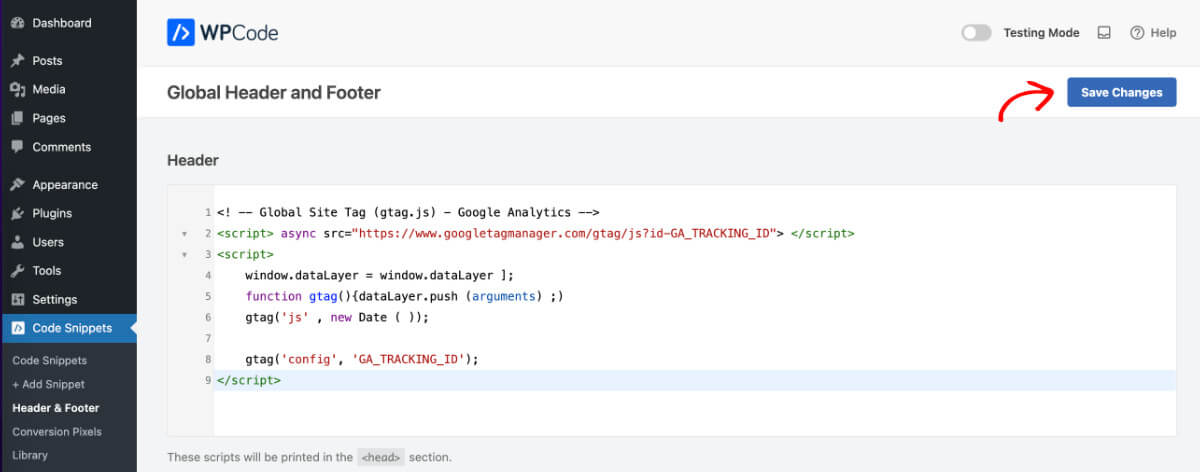
Websites often use header scripts to add tracking codes. These codes help in understanding visitor behavior. For example, Google Analytics can be added this way. This helps in seeing which pages get the most views. Advertisers use tracking for better ads. This can improve marketing efforts.
Custom styles make a site look unique. They change fonts, colors, or layouts. Scripts can add special features. For example, a moving image or a cool button. These scripts make a site more fun. They also keep visitors engaged.
Many sites use tools from other companies. These might be chat boxes or social media buttons. Adding them in the header makes them work well. They appear on every page. This helps users interact easily with the site.
Credit: wpcode.com
Implementation Methods
Adding a header script in WordPress allows customization of the website’s head section. This can include adding code for analytics, styling, or other functionalities. It’s a straightforward way to enhance your site’s capabilities without altering core files.
Using Theme Options
Many themes offer a simple way to add a header script. This option is usually found in the theme settings. You just paste your script in the provided box. It’s easy and quick. But not all themes have this option. So, check your theme settings first.
Adding Via Code Editor
Some users prefer to add scripts directly. This method involves editing the header.php file. You must be careful with this approach. A small mistake can break your site. Always back up your files before changing them. It’s a safe practice.
Utilizing Plugins
Plugins can make script adding easy. Many plugins are available for this purpose. They allow you to add scripts without coding. Plugins are user-friendly and safe. Just install, activate, and paste your script. It’s that simple.
Best Practices
Always check if your header script works on all browsers. Different browsers might show your site differently. Test your script on Chrome, Firefox, and Safari. Use a tool to see how your site looks on mobile devices. Responsive design is key.
Fast websites keep users happy. Optimize scripts to load quickly. Use small files and compress them. Avoid loading too many scripts at once. This helps your site run smoothly. Users will enjoy faster browsing.
Always keep your scripts secure. Check for updates regularly. Old scripts may have security risks. Use trusted sources for your scripts. Avoid scripts from unknown websites. This keeps your site safe from hackers.

Credit: wordpress.org
Troubleshooting Issues
Script conflicts can cause your site to break. One script may clash with another. This can lead to errors. Always check scripts for compatibility. Use updated versions to reduce problems.
Slow pages can frustrate users. Heavy scripts often slow down loading. Consider removing unnecessary scripts. Optimize them for better performance. Fast websites keep visitors happy.
Debugging helps find script issues. Turn on debug mode in WordPress. Check logs for errors. Use tools like Chrome DevTools. They help locate script problems. Fix these for a smoother site experience.
Future Trends
Header scripts in WordPress are essential for adding custom code. They help in tracking analytics and improving site functionality. These scripts are placed in the header section to execute before the page loads.
Emerging Technologies
New tools and tech come out each year. AI is one big trend. It helps make sites smarter. Voice search is growing too. More people talk to devices. So, websites need to adjust.
Evolving Standards
Web rules change often. Security rules get tighter. Websites must stay safe. Speed is also key. Fast sites keep users happy. Standards help make sites better.

Credit: basicwp.com
Frequently Asked Questions
What Is A Header Script In WordPress?
A header script in WordPress is code placed in the theme’s header section. It is used for adding functionalities like tracking scripts, meta tags, or custom JavaScript. This script ensures that the code is loaded on every page, enhancing site-wide features or integrations.
How Do I Add A Header Script?
To add a header script, use the WordPress admin panel. Navigate to “Appearance” > “Theme Editor” > “header.php”. Insert your script before the closing tag. Alternatively, use a plugin like “Insert Headers and Footers” for easier management without code edits.
Why Use Header Scripts In WordPress?
Header scripts enhance your website’s functionality and performance. They enable analytics tracking, SEO improvements, and custom features. Using header scripts ensures consistent loading across all pages, offering a cohesive user experience and better integration with external services.
Can Header Scripts Affect Website Speed?
Yes, header scripts can impact website speed if not optimized. Heavy scripts may slow down page loading times. It’s essential to use asynchronous loading and minimize unnecessary code. Efficient script management ensures your site remains fast and responsive for users.
Conclusion
Header scripts in WordPress enhance functionality. They allow customization and tracking. Easy to add, they require attention. Misuse can slow down your site. Always test changes thoroughly. Choose reliable plugins and code. Keep scripts organized for efficiency. Proper use improves user experience.
Header scripts are crucial for website performance. Understanding them helps in optimizing your site. Simple steps can make a big difference. Use header scripts wisely to maintain a smooth-running WordPress site. Your website’s success depends on effective header script management.