Are you looking to enhance the security of your WordPress website? You’ve probably come across the term “Enable SSL” and wondered what it means for your site.
Understanding SSL (Secure Sockets Layer) isn’t just for tech experts. It’s a crucial step in safeguarding your website and building trust with your visitors. SSL encrypts the data exchanged between your site and its users, ensuring their information stays private and secure.
Imagine the peace of mind knowing your website is protected against hackers and data breaches. We’ll demystify SSL in WordPress, show you why it’s essential, and guide you through the process of enabling it on your site. Stick around to unlock the secrets of SSL and elevate your website’s security to new heights.
Credit: www.pixelemu.com
Enable Ssl In WordPress
SSL certificates are very important for websites. They keep your data safe and secure. With SSL, your website shows a padlock icon in the address bar. This tells visitors that your site is trustworthy. Many search engines rank sites with SSL higher. This means more people can find your site. SSL also protects information like passwords and credit card numbers. Without SSL, hackers can steal this data easily. So, having SSL is important for everyone.
SSL works by using encryption. This means it scrambles data. Only the right person can read it. When you visit a site with SSL, your browser checks the SSL certificate. If it’s good, your browser and the site start a secure connection. This keeps your data safe while you browse. Each SSL certificate is like a digital ID for a website. It shows who owns the site. Always make sure a website has SSL before sharing personal info.
Benefits Of Ssl For WordPress Sites
SSL helps keep your site safe. It encrypts the data between users and the site. Hackers can’t easily read this data. This keeps passwords and personal information secure. Your site becomes a safe place for visitors.
Google loves secure sites. SSL can boost your site ranking. More users will find your site on search engines. This means more visitors. More visitors often lead to more success.
Users trust sites with SSL. They see the padlock icon in the browser. They feel safe sharing info. This trust can lead to more sales or sign-ups. Trust is vital for any online site.
Steps To Enable Ssl In WordPress
First, you need an SSL Certificate from a trusted provider. Some hosting providers offer free certificates. It’s important to check if your host provides one. If not, consider purchasing it. Ensure the certificate matches your domain name. This helps keep your site safe.
Once you have the certificate, install it on your server. Access your hosting dashboard for this step. Find the SSL section. Upload your certificate files there. Some providers offer auto-installation. Follow their instructions if available. Make sure the installation is successful.
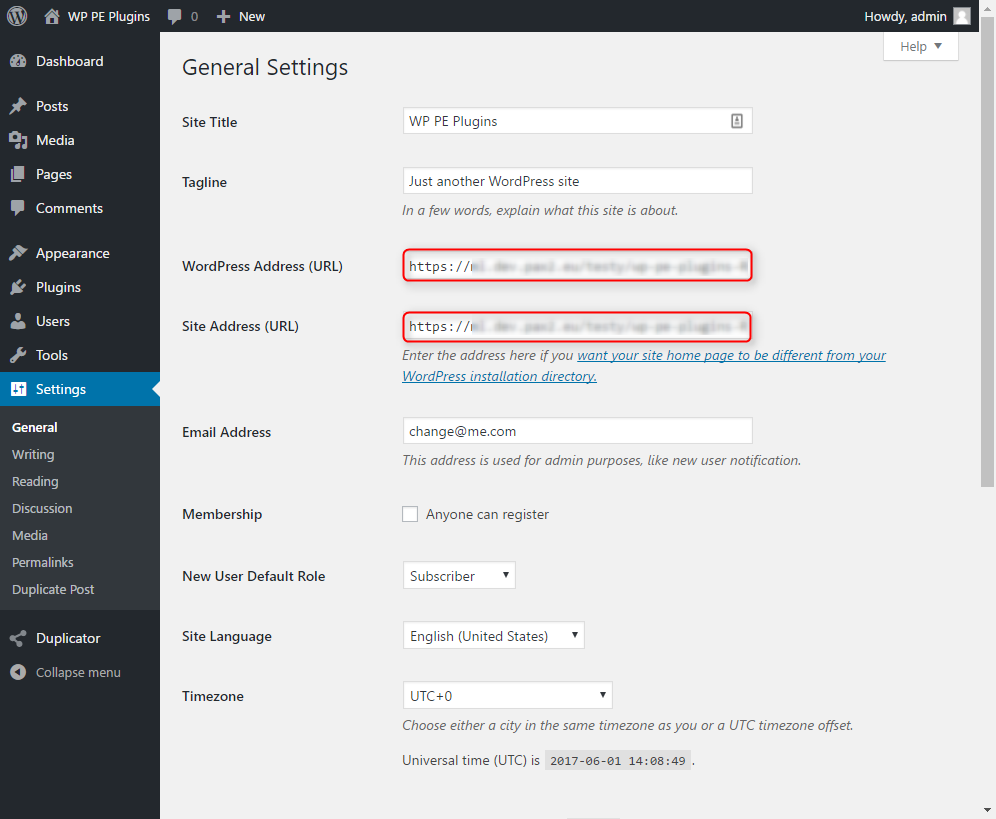
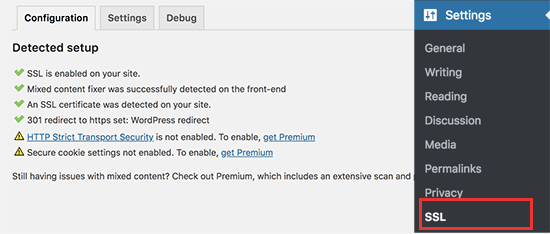
Now, configure WordPress to use SSL. Go to the Settings in your dashboard. Change the site URL to start with “https”. This ensures all links are secure. Check for any mixed content issues. Plugins like Really Simple SSL can help. Test your site to confirm SSL is working.
Credit: www.inmotionhosting.com
Troubleshooting Common Ssl Issues
Mixed content happens when secure and non-secure items load on a page. This can make your website look broken. Fix this by updating URLs to HTTPS in your content. Use plugins to help find these URLs. This keeps your site safe and tidy.
SSL errors happen if your certificate is expired or not set up right. Check the certificate’s date and make sure it is installed well. Contact your SSL provider if you need help. This will ensure that visitors feel safe on your site.
Redirect loops can confuse visitors. They occur when pages keep sending users back and forth. Check your redirects in the settings. Make sure there is no loop. Plugins can help you spot these errors. Fixing loops helps users reach the right page.
Best Practices For Ssl Management
SSL certificates expire. Regular renewal is crucial. Always check the expiry date. Renew before it lapses. An expired certificate can cause issues. It affects website security and trust. Visitors may see warning messages. This can hurt your site’s reputation. Set reminders for renewal dates. Use tools to automate the process. Automation reduces manual errors. Keep your certificates up to date. This ensures a secure connection for users.
SSL performance impacts user experience. Monitor regularly. Check for speed issues. Slow SSL can annoy users. Ensure your server is optimized. Use quality hosting services. They help improve speed. Keep an eye on SSL errors. Fix them promptly. Errors can break secure connections. They can lead to data breaches. Regular checks keep your site safe. Make SSL monitoring part of your routine.
Credit: www.wpbeginner.com
Frequently Asked Questions
How Do I Enable Ssl In WordPress?
To enable SSL in WordPress, first install an SSL certificate on your server. Then, update your WordPress site URL to use HTTPS in the settings. Use a plugin like Really Simple SSL to handle redirects and mixed content issues for a seamless transition to HTTPS.
Why Is Ssl Important For WordPress?
SSL encrypts data between your site and visitors, enhancing security. It helps protect sensitive information, builds trust, and improves SEO rankings. Google prioritizes sites using HTTPS, making SSL crucial for visibility and credibility in search results.
Can I Use Free Ssl Certificates In WordPress?
Yes, you can use free SSL certificates like Let’s Encrypt for WordPress. Many hosting providers offer easy integration. Free SSL certificates provide strong encryption, but may require manual renewal. They are a cost-effective option for enhancing your site’s security.
What Issues Might I Face After Enabling Ssl?
After enabling SSL, you might face mixed content warnings. These occur when some resources load over HTTP. Use a plugin to automatically update these URLs. Redirect issues can also arise, but plugins can help manage these effectively.
Conclusion
Enabling SSL in WordPress boosts security. It protects data between server and user. SSL builds trust with visitors, showing your site is safe. Search engines favor secure sites, improving your SEO ranking. Implementing SSL may seem technical, but it’s manageable.
Many hosting providers offer SSL certificates. Helpful tools and plugins exist to guide you. Keep your site secure and user-friendly. Prioritize SSL for peace of mind and better online presence. Your audience and website deserve the best security. Don’t delay; secure your WordPress site today.