Are you looking to streamline your website management across multiple platforms? Imagine having the power to control all your sites from one central dashboard.
This is exactly what WordPress Multisite offers. By the end of this article, you’ll discover how this powerful feature can simplify your digital presence, making it easier than ever to manage your online empire. Whether you’re a business owner, a blogger, or an educator, understanding WordPress Multisite could be a game changer for your web strategy.
Let’s dive in and explore how you can harness this tool to save time, reduce hassle, and enhance your site’s efficiency.
WordPress Multisite Basics
A WordPress Multisite is a feature in WordPress. It lets you create many sites from one place. Each site can have its own content. But all sites share the same WordPress installation. This saves time and resources. It is helpful for schools, companies, or blogs with many sections. You only need to update themes and plugins once. This keeps all sites safe and current.
WordPress Multisite started as a separate project. It was called WordPress MU. The MU stands for Multi-User. In 2010, WordPress 3.0 included Multisite in its core. This made it more popular and easier to use. Over time, features improved. Now, it is very stable and flexible. Many developers and users trust it for their networks. It continues to evolve with new updates.
Setting Up A Multisite Network
WordPress Multisite needs some things first. A hosting plan that supports it. PHP version 7.4 or higher. MySQL version 5.6 or above. Enough memory and disk space for your sites. A backup of your current site is also good. This keeps your data safe if things go wrong.
Start by editing the wp-config.php file. Add a line to enable multisite. Save and close the file. Go to your WordPress dashboard. Look for Tools and then Network Setup. Follow the steps shown. Install the network. Activate it using your email and password. Your multisite is ready now.
Subdomain or subdirectory? Choose one for your multisite. Plugins are shared across all sites. Themes can be shared too. Each site can have its own settings. Users can access different sites easily. Admins control site settings. Keep track of updates and backups for safety.
Managing A Multisite Network
Each user has specific roles on a WordPress Multisite. Roles decide what tasks a user can do. Basic roles include Administrator, Editor, and Subscriber. Administrators have the most power. They can add or delete users. Editors can make changes to pages and posts. Subscribers can only view content. It’s important to assign the right role. This keeps the site safe and organized.
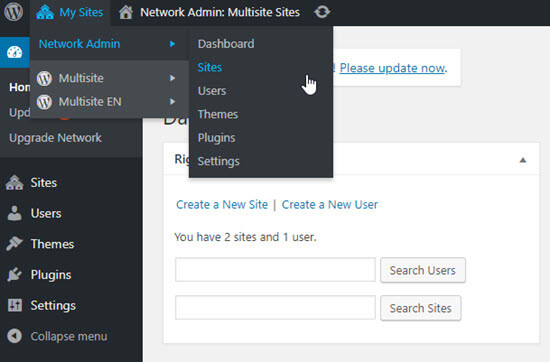
Managing a multisite requires careful administration. The Network Admin dashboard is key. Here, you can view all the sites. You can also add new sites. Changes made here affect the whole network. Regular checks help maintain site health. Always backup data. This prevents loss during updates.
Plugins add features to your site. Themes change its look. Both are managed in the Network Admin area. Only Super Admins can add new plugins or themes. This keeps the network stable. Remember, too many plugins can slow down the site. Always choose trusted plugins and themes. This helps in maintaining security.

Credit: www.solwininfotech.com
Benefits Of Using Multisite
Using a WordPress Multisite saves money. One server can handle many sites. This means fewer resources are needed. Less money spent on hosting. Also, updates are easier. Do it once for all sites. No need to update each site separately.
One dashboard controls all sites. Easy to manage users. Easy to manage themes and plugins. No need to log into each site. This saves time. Makes work simple and fast. All sites stay organized.
Add new sites easily. No need for extra setup. Grow your network without hassle. New sites inherit settings. This keeps all sites uniform. Perfect for businesses with many sites. Expand with ease.
Challenges And Limitations
Setting up a WordPress Multi Site can be tricky. You need to have a good knowledge of WordPress. There are many steps to follow. Each step needs to be done carefully. Mistakes can cause big problems. You have to manage multiple sites under one WordPress installation. It’s like handling a big puzzle.
A Multi Site can slow down your system. Each site shares the same resources. This can cause the system to lag. You must optimize each site properly. If not, your sites might load slowly. Slow sites can make visitors unhappy. They might leave your site quickly.
Security can be a big worry. If one site gets hacked, all can be at risk. You must keep each site safe. Regular updates are important. Strong passwords help protect your sites. Site backups are also crucial. Losing data can be very bad. You need to be extra careful with security.
Credit: www.wpbeginner.com
Use Cases For Multisite
Schools often use WordPress Multisite. Each department can have its own site. Teachers manage their own pages. Students find information easily. Multisite makes updates simple. Everyone stays informed.
Big companies need many websites. Each branch gets its own site. Multisite helps keep branding the same. Updates happen quickly across all sites. It saves time and keeps things organized.
Blogging platforms host many blogs. Each user can have their own blog. Multisite manages them all. It offers themes and plugins to all users. Bloggers can share ideas easily. It builds a blogging community.
Tips For Multisite Optimization
Keep your site fast. Use caching plugins. These plugins help speed up your site. Optimize images to load quickly. Large images slow down your site. Use a content delivery network (CDN). A CDN makes your site faster for users far away.
Secure your site with strong passwords. Avoid easy passwords like “123456”. Use security plugins to stop hackers. Always update your plugins and themes. Old versions can be risky. Check user roles. Give access only to trusted people.
Back up your site often. Use backup plugins for safety. Store backups in a safe place. You can use the cloud. Practice recovery steps. Know how to restore from a backup. This saves time during emergencies.

Credit: wishdesk.com
Future Of WordPress Multisite
WordPress Multisite is evolving fast. New features are added often. This helps users manage sites better. Developers are creating tools for easy site handling. More themes now support multisite. This gives users more choices. Plugins are also being updated. This improves multisite functions. Security is getting stronger. Updates protect sites from harm. Technology is making multisite faster. These changes will help many users.
The WordPress community is very helpful. Users share tips and tricks often. Many forums are available. They offer guidance to new users. Online tutorials help people learn quickly. Experts answer questions in groups. Support is easy to find. WordPress hosts events. People meet to talk about new ideas. This helps the community grow. Users can join groups. They learn more and help others.
Frequently Asked Questions
What Is WordPress Multisite Used For?
WordPress Multisite allows users to create multiple websites under a single WordPress installation. It is ideal for managing a network of sites from one dashboard. This feature is commonly used by businesses, educational institutions, and organizations to streamline website management and ensure consistent branding across various sites.
How To Enable WordPress Multisite?
To enable WordPress Multisite, you need to modify your wp-config. php file. Add the line `define(‘WP_ALLOW_MULTISITE’, true);` and save the changes. Then, you can access the Multisite Network Setup through the WordPress dashboard. Follow the instructions to complete the setup process.
What Are The Benefits Of WordPress Multisite?
WordPress Multisite offers centralized management, shared plugins, and themes across multiple sites. It reduces server resources by utilizing a single WordPress installation. Multisite is cost-effective and simplifies updates, security, and maintenance. It’s perfect for networks of related websites or businesses with multiple branches.
Can I Use Different Themes On WordPress Multisite?
Yes, you can use different themes for each site in a WordPress Multisite network. Network administrators can install themes, making them available to individual site owners. This allows for customized design while maintaining centralized control over theme options and updates.
Conclusion
Exploring WordPress Multisite can simplify managing multiple websites. A single dashboard controls everything. This saves time and reduces hassle. It enhances consistency across your sites. Ideal for businesses, schools, and organizations. Easy to set up and use. Allows shared themes and plugins.
Reduces hosting costs and simplifies updates. WordPress Multisite offers flexibility. It adapts to growing needs. A practical choice for web admins managing several sites. Consider Multisite for efficient site management. It suits diverse users and needs. A valuable tool for website networks.