Are you looking to expand your online store and offer more diverse product options? Then understanding what a variable product in WordPress is might be just what you need.
Imagine walking into a store where you can choose not only the color but also the size, material, and other features of a product—all tailored to your preferences. That’s exactly what variable products allow you to do on your WordPress site.
By mastering this concept, you can enhance your customers’ shopping experience, increase your sales, and build a more personalized brand. Ready to dive in and discover how you can leverage variable products to boost your online business? Keep reading to unlock the potential of your WordPress store!
Variable Product Basics
A variable product is a type of item in WordPress. It allows you to create different versions of a product. Each version can have its own price, stock, and image. For example, a t-shirt can have different sizes and colors. Each size or color is a different option. Shoppers can choose from these options. This makes shopping more flexible and fun. Each option is called a variation. Variations help businesses show more choices. They improve the shopping experience. Customers can find exactly what they need. Businesses can show the variety of their products easily. This keeps things organized and simple.
Setting Up Attributes
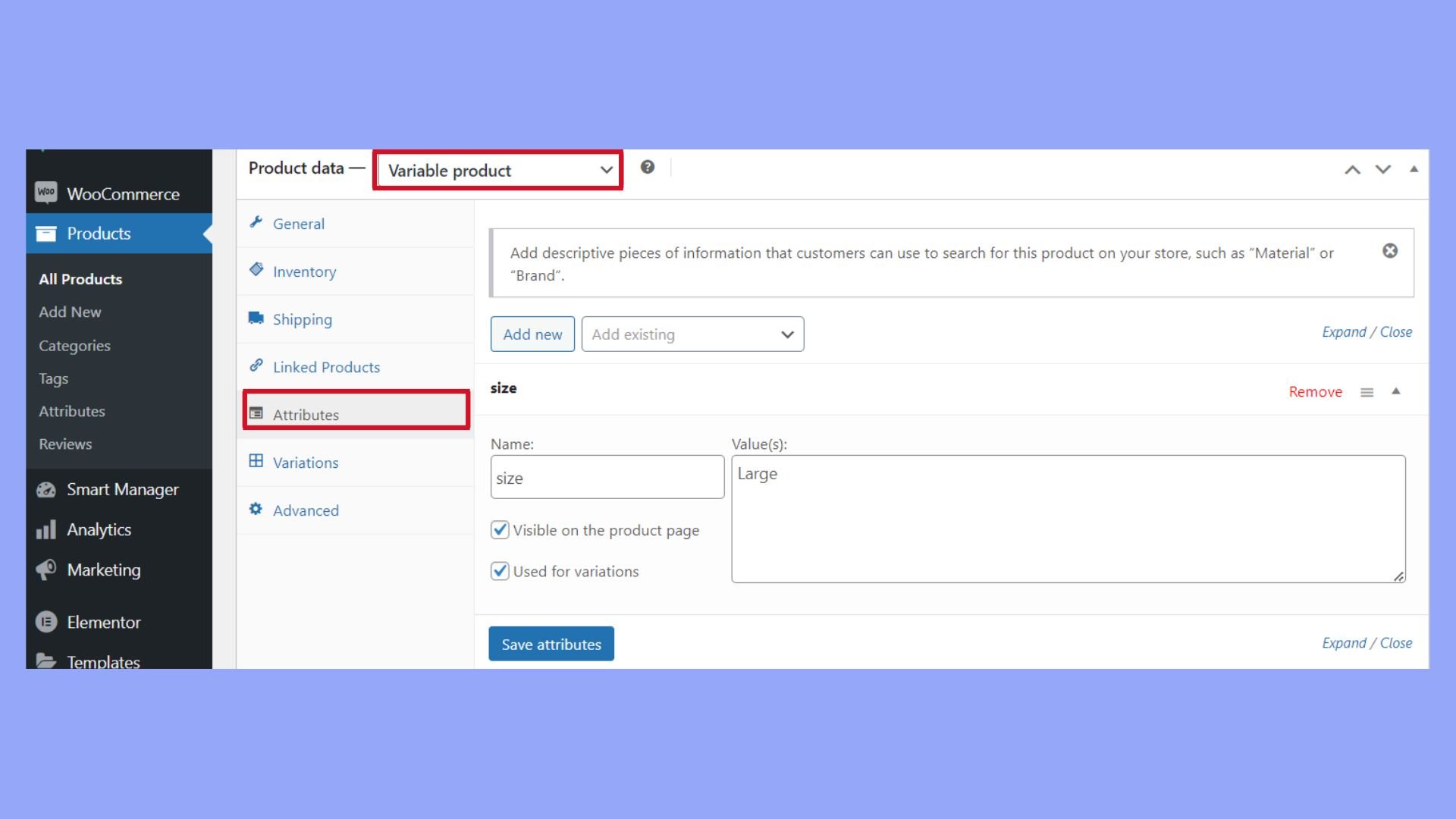
Attributes make products special. They tell details like color or size. First, go to the product page. Find the Attributes tab. This tab lets you choose types. Pick the right ones for your product. For example, if you sell shirts, choose color and size. This helps buyers see choices.
After choosing, add terms. Terms are the options for each type. For color, terms could be red, blue, or green. Save each term. This makes them show on the product page. Now, buyers can pick what they like. Attributes make shopping easier.
Remember, good attributes give clear options. They help people decide quickly. The right setup is key. It makes the product page neat and clear.
Creating Variations
To add variations, first, choose a product type. Select “Variable product” from the dropdown. This allows different options for a product. For example, size or color. Click on the “Attributes” tab. Enter the details for each option. After that, save the changes. Next, go to the “Variations” tab. Click “Add Variation”. Choose the combination you want. This step is easy. Repeat for more variations.
Managing stock is important. It helps to know what you have. Each variation needs its own stock number. Go to the “Inventory” section. Enter the stock amount. This helps in tracking. If a product runs out, it shows on the site. This avoids confusion. Customers know if an item is available.
Set different prices for each variation. Go to the “Variations” tab. Click on a variation. Enter the price in the price box. Some options might cost more. For example, a larger size may be more expensive. This helps in offering more choices. Always check your prices. Make sure they are correct. Wrong prices can confuse buyers.

Credit: iconicwp.com
Customizing Variations
Changing images for product variations is important. Each product can have different looks. Use high-quality images to show these differences. Customers understand better with clear images. Make sure all images are the same size. This keeps the product page neat. Too many different sizes can confuse the viewer.
Descriptions should match each product variation. If the color changes, mention it. If the size changes, describe it. Use simple words. Make sure all details are clear. Customers appreciate detailed descriptions. They help in making decisions. Be honest in your descriptions. It builds trust with customers.
Handling Inventory
Variable products have different options. Each option needs stock management. You can set the stock quantity for each option. This helps keep track of items. If an item is low, you can see it quickly. You can also set alerts for low stock.
Backorders allow items to be bought when out of stock. You can choose to allow or disallow backorders. If allowed, customers know the item will take longer. Backorder settings help manage customer expectations. Setting it right is important for customer trust.
Credit: 10web.io
Shipping And Tax Considerations
Variable products need special attention for shipping and tax. Each variation might have different shipping needs. Some items may weigh more. Others could need extra packaging. Always check the shipping settings for each variation. This helps avoid mistakes and unhappy customers.
Taxes can also vary with each product variation. Some items might have different tax rates. It’s important to set the correct tax rate for each one. Using the right tax rules helps with legal compliance. It also keeps customers satisfied and avoids confusion.
Understanding both shipping and taxes is crucial. It affects the final price and delivery. This ensures a smooth buying experience for everyone.
Best Practices For Variable Products
Customers like clear and simple choices. Use easy-to-read labels for product options. Make sure each option, like size or color, is obvious. An organized layout helps. Place the most popular options at the top. This makes shopping quick and fun.
Fast loading times are key. Slow pages can drive buyers away. Use optimized images to speed up the site. Smaller image sizes help. Good product photos are also important. Show different angles and details.
Clear pricing is a must. Show the price for each variation. No one likes surprises at checkout. A clear price tag builds trust.

Credit: woocommerce.com
Frequently Asked Questions
What Is A Variable Product In WordPress?
A variable product in WordPress is a type of product listing that allows variations. These variations can include different sizes, colors, or any other attribute. It’s commonly used in WooCommerce to offer customers multiple options for a single product. This enhances user experience and increases sales potential.
How Do I Create A Variable Product?
To create a variable product, first, add a new product in WooCommerce. Select ‘Variable product’ from the product data dropdown. Then, add attributes like size or color. Finally, define variations by setting prices and stock levels for each attribute combination.
This setup enhances product customization.
Why Use Variable Products In WordPress?
Using variable products allows you to offer multiple options for a single product. This flexibility improves customer satisfaction by providing choices. It also helps in inventory management. Variable products can lead to increased sales by catering to diverse customer preferences.
Can I Add Images To Each Variation?
Yes, you can add images to each product variation in WooCommerce. This feature allows customers to see specific images for each variation, such as different colors or styles. Adding images enhances the shopping experience by providing a visual representation of each product option.
Conclusion
Variable products in WordPress enhance your store’s flexibility. They allow you to offer different versions of a product. Sizes, colors, or materials. This feature caters to diverse customer preferences. It’s a useful tool for any e-commerce site. Users can easily select options that meet their needs.
Setting it up requires understanding attributes and variations. With practice, managing variable products becomes straightforward. It helps improve customer satisfaction. Businesses benefit from providing more choices. It’s a valuable feature for growing your online store efficiently. Keep exploring WordPress options.
Discover what suits your business best.