Have you ever found yourself staring at an empty space on your WordPress website, wondering what to put there? This is where a placeholder comes in handy.
It’s like a friendly guide, showing you where to place your content or helping you visualize the layout before your actual content is ready. Imagine having a tool that makes your website building process smoother and more efficient. By understanding placeholders, you’re not just improving your site’s design but also enhancing user experience.
Dive into this article to discover how placeholders can transform your WordPress journey and make your site more appealing to visitors. Your curiosity might just lead you to the secret behind a seamless and captivating web design!

Credit: ninjaforms.com
Placeholder WordPress Basics
A placeholder is a temporary design element. It fills space where content will go. Web designers use it to plan layout. It helps show where text or images will be. Using placeholders makes building websites easier. It gives a clear idea of the final design. Placeholders are useful for testing. They show how the site looks before adding real content.
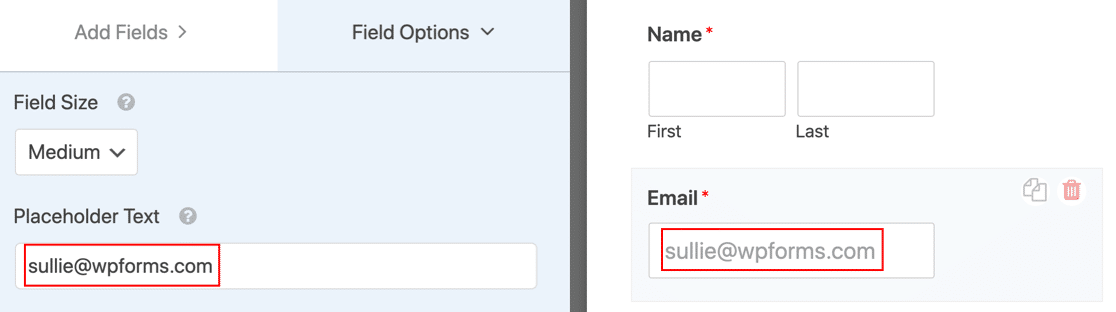
Placeholders are used in form fields to guide users. They show what kind of information to enter. In templates, placeholders mark spots for text. They help in creating uniform pages. Designers use them for mock-ups. They represent the layout and style. Placeholders can hold spots for images. This helps in visualizing the design. They make the site look organized even without content.
Benefits Of Using Placeholders
Placeholders help designers save time. They offer a quick way to fill spaces. This allows easy testing of layouts. Designers can see how the page looks. It helps in making fast changes. Placeholders can be swapped with real content later. This keeps the design moving forward.
Using placeholders makes pages look neat. It ensures uniformity across all sections. This avoids mismatched content sizes. Everything looks balanced. Consistent visuals improve user experience. Visitors can focus on content without distraction. Neat design keeps them engaged longer.
Placeholders help in organizing content. They show where text will go. Writers can plan their content efficiently. It makes it easier to visualize the final look. Teams can discuss ideas clearly. Placeholders act as a guide. Content planning becomes smoother and more effective.
Types Of Placeholders
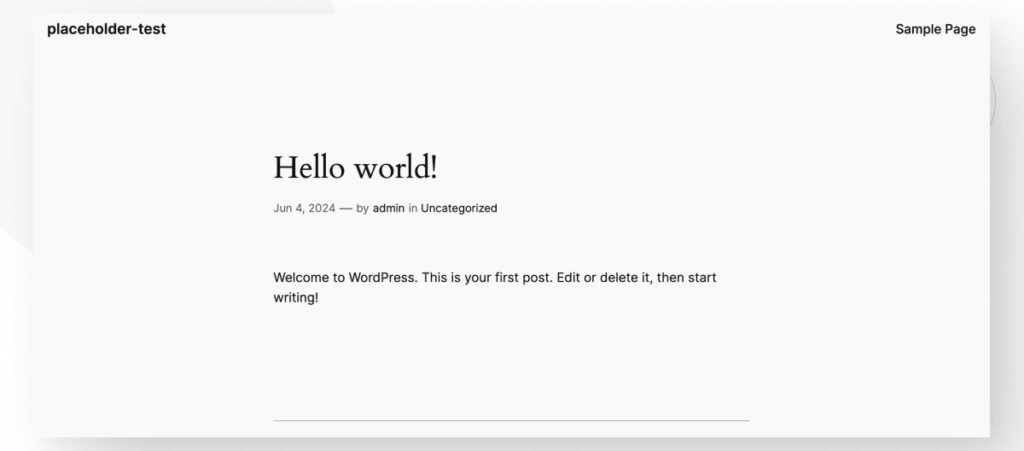
Text placeholders are used for words. They hold space in your design. This helps in keeping the layout clean. You can easily replace them with real text. This is useful for creating drafts and mockups. It gives you an idea of how the content will look.
Image placeholders keep space for pictures. They help in designing a page. You see the structure without needing real images. This makes it easier to focus on layout. Later, real images replace these placeholders. They help in visualizing the final look.
Video placeholders are for videos. They show where a video will go. This is useful for planning. It helps to see the flow of your content. You can replace these with the actual video later. They ensure that the design stays neat and organized.
Credit: wcanvas.com
How To Implement Placeholders
Placeholders in WordPress help display temporary content while the real data loads. They enhance user experience by keeping the layout stable. Implementing placeholders involves using shortcodes or plugins, making websites appear more professional and reducing bounce rates.
Using WordPress Plugins
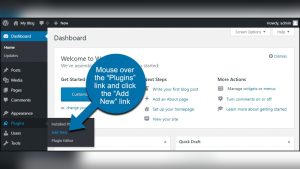
WordPress plugins make it easy to add placeholders. Many plugins are free. Search for “placeholder plugins” in the WordPress library. Install your chosen plugin. Activate it. Follow the plugin’s setup steps. Usually, plugins offer simple settings. Customize your placeholder to fit your needs. Plugins save time. No coding needed. Easy for beginners. Manage placeholders from your WordPress dashboard. Plugins keep sites user-friendly.
Custom Code Solutions
Custom code gives more control. Use HTML and CSS. Add code to your theme’s files. Use a child theme to keep changes safe. HTML defines the structure. CSS styles the placeholder. PHP can add dynamic placeholders. Code requires basic knowledge. Not ideal for beginners. Test code on a local server first. Always backup before adding code. Custom solutions offer flexibility. Tailor placeholders to your exact needs.
Design Best Practices
Picking the correct placeholders is important for your website. They help in guiding users. Choose images or text that fit well with your theme. They should not distract from the main content. Good placeholders make your site look tidy and neat. They also help in reducing confusion for visitors. Always ensure that they are of high quality.
Balance is key in design. Too many elements can confuse users. Keep your page clean and simple. Use placeholders to fill gaps smartly. They must match the overall look of your site. This keeps everything looking nice and organized. It is like making sure all pieces of a puzzle fit together.
Websites need to work on all devices. This is where responsive design comes in. Your placeholders must look good on phones and computers. They should resize automatically. This ensures a smooth user experience. Test your site on different screens. It helps catch any problems early.
Credit: wpforms.com
Common Mistakes To Avoid
Using too many placeholders can confuse users. They might not know where to focus. Keep it simple. Use placeholders only when needed. This keeps your site clean and clear.
Many people use phones to browse. If your placeholders do not work on phones, users will leave. Always check how they look on small screens. Make sure everything is easy to tap and read.
Some users rely on screen readers. Placeholders should be clear for them too. Ensure they can access all information. Check that all users can understand your site. This includes those with special needs.
Future Trends In Placeholders
AI is changing how we use placeholders. It can create smart content. Smart content fills spaces on websites. AI understands what users need. It can make web pages better. AI can even create images. These images fit the design. They look like real photos. AI makes everything faster. It saves time for designers. It helps create better websites.
Placeholders can now be interactive and fun. They engage users more. Users can click or swipe. This adds a playful touch. Interactive placeholders keep users interested. They don’t get bored. It also makes websites unique. Designers can show creativity. Users enjoy exploring these features. It makes the web experience better. Everyone likes a website that feels alive.
Frequently Asked Questions
What Is A Placeholder In WordPress?
A placeholder in WordPress is a temporary element used to reserve space for future content. It helps maintain design consistency during site development. Common placeholders include text, images, or widgets that indicate where actual content will be added later.
How Do Placeholders Improve Site Design?
Placeholders improve site design by maintaining structure and layout during development. They ensure consistency and visual appeal, helping designers visualize the final product. By reserving space for future content, placeholders guide the design process effectively.
Can Placeholders Be Customized In WordPress?
Yes, placeholders can be customized in WordPress to suit design needs. You can change text, images, or widget styles to fit your theme. Customization helps align placeholders with your brand, ensuring a cohesive look during development.
Are WordPress Placeholders Visible To Users?
WordPress placeholders are typically invisible to users once the site is live. They serve as temporary elements during development. Actual content replaces placeholders before the site launch, ensuring users see the intended design and information.
Conclusion
Understanding placeholders in WordPress enhances your website design process. They offer flexibility and ease of use. You can insert content seamlessly while maintaining structure. This leads to a more organized and visually appealing site. Remember, placeholders are just temporary. They help guide your content creation journey.
Perfect for testing layouts and designs. They ensure everything fits perfectly before finalizing. Use them wisely to save time and effort. A great tool for beginners and experts alike. Keep exploring WordPress features to enhance your site. Happy website building!