
Have you ever wanted your WordPress website to look exactly the way you envision it? You’re not alone.
Many website owners struggle to achieve that perfect design that truly reflects their brand. This is where custom CSS comes in. Custom CSS allows you to fine-tune your site’s appearance, ensuring every detail is tailored to your liking. Imagine having the power to change fonts, colors, or layout with just a few lines of code.
Sounds intriguing, right? Understanding custom CSS can open up a world of possibilities for your WordPress site, transforming it from ordinary to extraordinary. Stick around to learn how you can take full control of your site’s design and elevate it to new heights.
Custom Css Basics
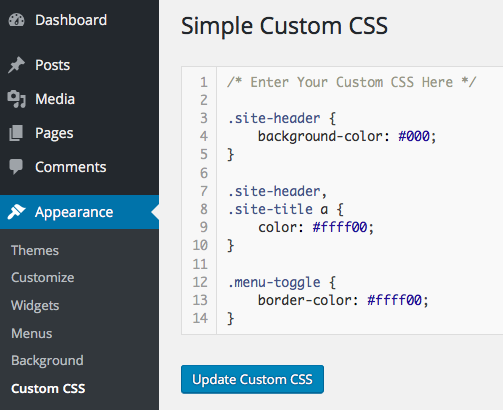
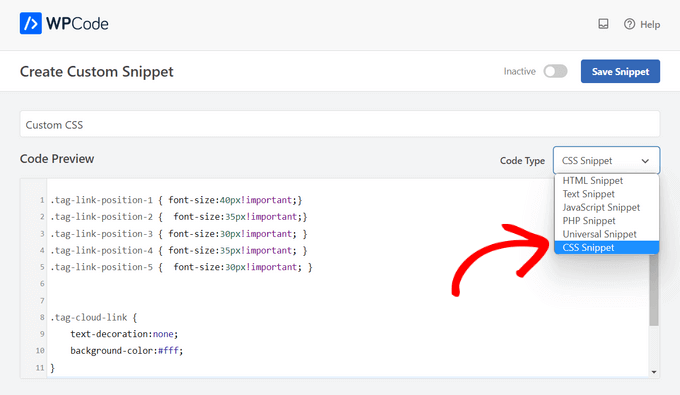
Custom CSS is a tool. It helps make websites look unique. You can change colors, fonts, and layout. CSS stands for Cascading Style Sheets. It is a language used for styling web pages. WordPress allows you to add Custom CSS. This makes your site look different. You can design your website how you want.
Custom CSS lets you change your site’s design. It is like painting your room. You use it to change the look of your site. This makes your site stand out. You can make your site match your brand. Custom CSS is easy to use. It is powerful and helpful.
Custom CSS makes your site personal. It gives you control over design. You can fix style issues fast. Your site can be more appealing. People like sites that look nice. Custom CSS helps with that. It can improve user experience. Better design can make visitors stay longer. It is a good tool for web design.
Credit: themetry.com
Applying Custom Css In WordPress
The Theme Customizer is easy to use. Open your WordPress dashboard. Find “Appearance” and click “Customize”. Look for the “Additional CSS” option. Click it. A box will appear. Type your custom CSS there. Click “Publish” when done. Your changes will appear right away.
A child theme helps keep changes safe. First, create a new folder. Name it like your main theme, but add “-child”. Inside, make a file called “style.css”. Add your custom CSS here. Then, upload the folder to your WordPress themes directory. Activate the child theme from the dashboard. Your custom styles are now active.
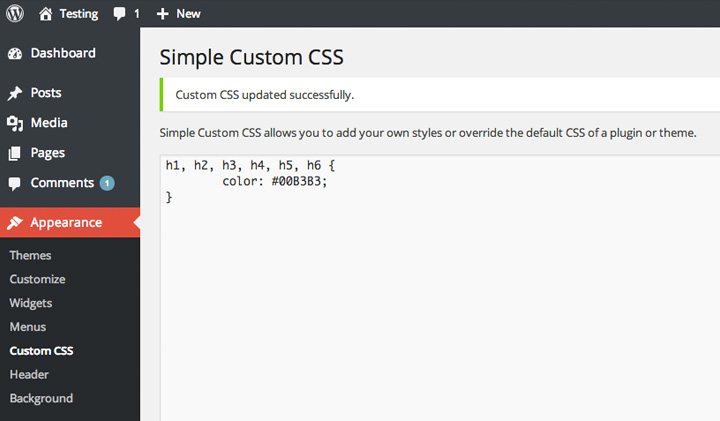
Plugins make adding CSS simple. Search for “Simple Custom CSS” in the plugin store. Install and activate it. Go to the plugin settings. You will see a box. Add your custom CSS there. Click “Save”. Your site will show the new styles. Plugins help keep your site organized.
Common Custom Css Uses
Custom CSS helps change font styles on a WordPress site. Make text bold or italic. Change the size or type of the font. You can make it look unique and special. This makes your website more personal and fun.
With Custom CSS, you can change the colors of your site. Change the background to any color you like. Make buttons and links stand out. This makes your website look vibrant and eye-catching.
Custom CSS allows you to adjust the layout of your site. Move items around to fit better. Add space between words and images. This helps your site look organized and neat.
Best Practices For Custom Css
Keep your CSS clean and tidy. Use comments to note important sections. This helps when making changes later. Group similar styles together. It makes the code easy to read. Use consistent naming for classes and IDs. This keeps everything organized.
Browsers can display styles differently. Test your site on all major browsers. This includes Chrome, Firefox, and Safari. Use tools like BrowserStack for testing. Fix any issues you find. This ensures a smooth user experience everywhere.
Large CSS files slow down sites. Minimize your code. Remove any unused styles. Use a CSS minifier tool to compress your code. This reduces file size. Improved performance means faster loading times. A fast site keeps visitors happy.
Troubleshooting Css Issues
Conflicting styles can make your website look strange. Check for any duplicate CSS rules. Two rules may want to style the same element. This can cause problems. Look at your theme’s CSS file. Also, check any CSS added by plugins. If styles clash, fix them by editing the CSS.
Browser developer tools help you find CSS problems. Right-click on a webpage and choose “Inspect”. This opens the tool. Here, you can see which CSS styles apply to each element. Change CSS live to test fixes. These tools are very helpful.
Changes in CSS can sometimes cause issues. It’s good to save a backup of your CSS files. If something breaks, you can easily go back. This saves time and reduces stress. It’s like a safety net for your website.
Credit: www.wpbeginner.com
Advanced Custom Css Techniques
Responsive design makes websites look good on all devices. Use media queries to change styles for different screen sizes. This ensures the site is user-friendly. It also helps improve the user experience. Try to keep design simple and clear.
CSS animations add life to web pages. They can make elements move or change. Use them to draw attention to important parts. Keep animations smooth and not too fast. This makes the site more engaging and fun. But use them sparingly to avoid distraction.
CSS variables store values to use in styles. They make it easy to change colors or sizes. Change one variable, and the whole site updates. This saves time and keeps styles consistent. They are like shortcuts for your CSS.
Credit: www.elmastudio.de
Frequently Asked Questions
What Is The Purpose Of Custom Css In WordPress?
Custom CSS allows you to personalize the appearance of your WordPress site. It lets you modify styles without altering the theme files. You can adjust fonts, colors, layouts, and more. This provides flexibility in design and helps maintain your site’s unique brand identity.
How Can I Add Custom Css In WordPress?
You can add Custom CSS through the WordPress Customizer or a plugin. In the Customizer, navigate to “Additional CSS” under “Appearance. ” For plugins, options like “Simple Custom CSS” provide user-friendly interfaces. Both methods enable easy CSS modifications without changing the theme’s core files.
Is Custom Css Safe For WordPress Sites?
Custom CSS is generally safe for WordPress sites when used correctly. It doesn’t affect site security directly. However, incorrect coding might cause design issues. Always ensure CSS is well-written and tested. Regular backups can help restore your site if issues arise from CSS changes.
Can Custom Css Affect Site Performance?
Custom CSS usually has minimal impact on site performance. Excessive or complex CSS might slow down rendering slightly. Optimizing CSS and using efficient coding practices can mitigate performance issues. Regularly review and clean up unused styles to ensure your site remains fast and responsive.
Conclusion
Custom CSS in WordPress helps personalize your website easily. It allows you to change styles without altering core files. This flexibility makes your site unique and visually appealing. Learning to apply custom CSS enhances your design skills. It’s a useful tool for anyone managing a WordPress site.
No need for deep technical knowledge. Just a willingness to experiment. With practice, you’ll see the impact on your site’s look. Start small and gradually make bigger changes. Custom CSS empowers you to craft a site that stands out. Keep exploring, and enjoy the creative process!



