Imagine you’ve spent hours perfecting your WordPress site, curating content, and building a community, only to find yourself facing the daunting task of deleting a user. You pause, wondering what really happens when you press that delete button.
Does it wipe away their contributions or impact your site’s performance? You’re not alone in your curiosity. Many WordPress users find themselves in the same position, unsure of the consequences and potential ripple effects. We’ll unravel the mystery behind deleting a WordPress user.
You’ll discover the impact it can have on your site’s content, security, and overall functionality. Understanding these changes is crucial for maintaining the integrity and smooth operation of your WordPress site. So, if you’ve ever hesitated before clicking delete, this guide will provide clarity and confidence, ensuring that your next move is informed and strategic. Stay tuned as we dive into the details of user deletion and what it means for your WordPress ecosystem.
Impact On Content
Deleting a WordPress user changes posts and pages. Their content remains, but authorship changes. The deleted user’s name disappears. A generic user takes their place. This affects attribution. Readers might not know the original writer. Comments and feedback also shift. They still show up, but under the new user name. This can confuse readers. Old links remain active. No broken paths, thankfully. Content stays visible. No risk of losing it.
Media files stay intact. Images, videos, and audio won’t vanish. They remain attached to posts. Ownership changes, but files are safe. This is crucial. Users don’t worry about losing media. The change is mainly about authorship. Files won’t be deleted. They remain accessible. Safe and sound. No need to re-upload or replace them.
User Role And Permissions
Administrators have the most power on a WordPress site. They can add, delete, or change anything. Deleting an administrator means losing all their settings and posts. Be careful! This action cannot be undone. Always back up important data first.
Contributors can write posts, but they need approval. Deleting a contributor removes their drafts and comments. Their published posts stay on the site. But those posts will show a different author. Check drafts before deleting. Some content might be valuable.
Subscribers can read and comment on posts. Deleting a subscriber is simple. It only removes their account and comments. Their email and name will disappear. But, your posts remain safe. This action is safe for cleaning up inactive users.
Reassignment Options
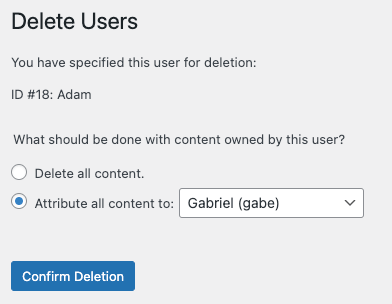
When you delete a WordPress user, their posts need a new owner. Assigning posts to another user keeps the content on your site. This process is simple and keeps your site organized. Choose the new user wisely. They will manage the posts now. Check that the new user has proper permissions. This ensures they can handle the content.
Deleting a WordPress user can also remove all their content. This means posts, pages, and comments will disappear. Consider this option carefully. It is permanent and cannot be undone. Make sure to back up important data. Losing content might affect your site’s information. Weigh the pros and cons before choosing this option. It is crucial for site management.

Credit: pressable.com
Effect On Comments
Deleting a WordPress user can affect comments they made. Their comments will remain, but appear under “Anonymous” or another name. This keeps the conversation intact while removing their association.
Comment Ownership
Deleting a user affects their comment ownership. Comments by the deleted user remain on the site. These comments will show “Deleted User” or “Guest” as the author. The original name is gone. This can confuse readers. They might not know who wrote the comment. It’s important to manage user deletion carefully.
Comment Visibility
Comments stay visible on the site. Deleting a user does not remove their comments. This ensures the conversation remains intact. Posts with many comments still appear the same. Readers can see all the interactions. Only the author’s name changes. This keeps the blog engaging and full of insights.
Backup And Recovery
Backing up your website is very important. It keeps your data safe. Regular backups prevent data loss. Use plugins for easy backups. Always store copies in different places. This ensures your data is safe. Automatic backups save time. They run without you having to do anything. Check your backup settings often. Make sure everything is working.
Did you delete a user by mistake? You can get them back. Restoring users is easy with backups. Use the backup file to restore. First, find the right backup. Open the backup and look for the user data. Import the user data back to your site. Now, the user is back. Always check if everything is correct. This keeps your site running smoothly.
Security Implications
Deleting a WordPress user changes the site’s security settings. The user will no longer have access to the admin panel. This means they can’t make changes or see protected content. It’s important to check other users’ permissions. Make sure everyone has the right access levels. This helps keep the website safe. Sometimes, user roles overlap. Double-check to ensure no gaps in security.
Deleting a user might not remove all their data. Old posts and comments may remain. It’s good to review what data stays. Some users might have shared sensitive info. Protecting this info is important. Always back up data before deleting a user. This helps if something goes wrong. Consider using plugins to manage data privacy.
Best Practices
Deleting a WordPress user affects website data and content ownership. Reassign content to another user to prevent data loss. Consider potential impacts on site functionality and collaboration.
Before Deleting A User
Backing up your data is important. Save all user details and posts. This keeps your site safe from losing content. Check their roles and permissions too. Understand what tasks they did on the site. You can give their tasks to another user. This helps in keeping the site running smoothly.
Managing User Accounts
Choose to reassign content if needed. This means moving posts to another user. This makes sure you don’t lose valuable information. Deleting content can be risky. Always ensure the new user can handle the tasks. Review the user’s contributions before deciding. This helps in making informed choices.
Credit: www.geckodesigns.com

Credit: pressable.com
Frequently Asked Questions
What Happens To User Content After Deletion?
When you delete a WordPress user, their content remains on your site. You can reassign it to another user or delete it. If reassigned, the content will continue to be accessible under the new user’s name. Always decide how to handle the user’s posts before deletion.
Can I Recover A Deleted WordPress User?
Once a WordPress user is deleted, recovery isn’t possible directly through WordPress. You’d need a backup to restore the user. Regular backups help in retrieving lost data, including users. Always ensure you have backups before making significant changes to your site.
Does Deleting A User Affect Site Performance?
Deleting a user typically doesn’t impact site performance. It merely removes their access and profile. However, managing large databases efficiently can improve site speed. Regularly removing inactive users is a good practice for maintaining a streamlined user database.
Will User Comments Disappear After Deletion?
User comments remain intact even after the user is deleted. Comments are associated with the user’s ID, not their active status. You can choose to delete comments separately if needed. Ensure you manage comments according to your site’s policy for user-generated content.
Conclusion
Deleting a WordPress user requires careful consideration. You risk losing valuable data. Backup essential information before proceeding. Maintain site integrity by assigning content to another user. This ensures no broken links or missing posts. Review your site regularly to identify unused accounts.
This practice enhances security and performance. Keep user roles organized and updated. It simplifies site management and reduces confusion. Remember, informed decisions lead to a well-maintained WordPress site. Happy blogging!