Are you setting up your WordPress website and wondering about the best directory folder to install it in? You’re not alone.
Navigating the technical aspects of WordPress can be confusing, especially when it comes to choosing the right directory for your site. This decision is crucial for your website’s performance and security. You want to make sure your WordPress installation is as streamlined and efficient as possible, don’t you?
Imagine having a website that’s not only fast but also easy to manage. You’ll discover where exactly WordPress should go, why it matters, and how this choice can impact your site’s success. Read on to uncover the secrets to optimizing your WordPress directory setup, and take control of your website’s future today!
Credit: www.hostgator.com
WordPress Installation Basics
Installing WordPress is simple. You need a web server first. This server hosts your site. A popular choice is Apache or Nginx. After setting up the server, download the WordPress package. It’s free from wordpress.org. Extract the files. Place them in the root directory.
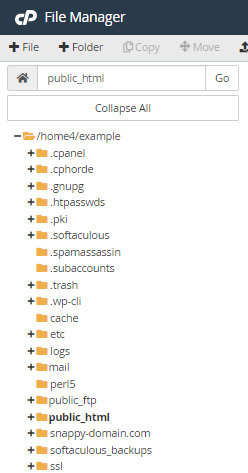
The root directory is usually named public_html. Some servers use www or htdocs. This folder makes your site accessible online. Upload the files there. Configuration comes next. Open the setup screen. Create a database. Link WordPress to this database. Input the database name, username, and password.
Finish the installation. Follow the screen prompts. Choose a site title. Select a username. Secure your site with a strong password. Now, your WordPress site is live!
Credit: wpml.org
Choosing The Right Directory
WordPress can live in the root directory or a subdirectory. The root is the main folder. It is like the entrance of a house. A subdirectory is like a room inside. Many people choose the root for their WordPress. It makes the site load directly. Visitors see it faster. Others use a subdirectory. It helps in keeping files organized. It is good for big sites. Both have their own benefits.
If WordPress is in the root, everything is visible. It is simple. But a subdirectory keeps things tidy. It is easy to manage. Think about your needs. Choose what suits best. Keep your files safe. Always backup your work.
Root Directory Vs Subdirectory
Putting WordPress in the root directory is easy. It makes your site address look clean. Like this: www.yoursite.com. Search engines may find your site faster. This can help your site rank better. It is also simple to manage. You have fewer folders to check. This can save time.
A subdirectory keeps things organized. Your site can have many sections. Like blog.yoursite.com or shop.yoursite.com. Each section has its own folder. This setup makes updates easier. You can work on one section without breaking others. It also helps if you plan to grow. Adding new parts to your site is simple.
Think about your site’s needs first. A simple site? The root directory might be best. Planning to expand? A subdirectory could be smarter. Consider how much time you can spend on management. Root is quicker. Subdirectory offers more control. Choose what fits your goals.
Steps To Install In The Root Directory
WordPress installation in the root directory involves placing files directly in the main folder of your site. This setup ensures your website loads when users enter your domain name. Simplifies URL structure, making it user-friendly.
Preparing Your Server
Make sure your server is ready. Check if it meets the WordPress requirements. It needs PHP and MySQL. Look at your hosting plan. See if it supports these. Also, enable FTP access. This helps in uploading files.
Uploading WordPress Files
Download WordPress from its website. Get the latest version. Extract the files on your computer. Use an FTP client to upload. Put the files in the root directory. This is usually named public_html or www. It makes WordPress accessible directly.
Configuring Wp-config.php
Open the wp-config-sample.php file. Rename it to wp-config.php. Edit this file. Add your database details. Include database name, user, and password. Save the file. Your WordPress site is almost ready.
Steps To Install In A Subdirectory
To install WordPress in a subdirectory, first create the desired folder, like “blog” or “site”. Upload WordPress files into this folder using an FTP client. Finally, configure the settings in your hosting dashboard to point to this new subdirectory.
Creating A Subdirectory
Create a new folder in your hosting panel. Name it anything you like. This is your subdirectory. It will hold all WordPress files. Ensure the folder is empty. An empty folder avoids errors. Now, move on to the next step.
Adjusting WordPress Settings
Go to WordPress dashboard. Find Settings and click on it. Look for General settings. Change the site address URL. Include the subdirectory name in the URL. Save changes. This tells WordPress where to find itself. It is easy and quick.
Seo Implications
Using a subdirectory can help in SEO. Search engines see it as part of your main site. This means better ranking potential. Keep content relevant and fresh. Good content keeps visitors coming back. This boosts your site’s reputation.
Common Installation Mistakes
Wrong file permissions can break your site. Files should have 644 permissions. Folders need 755 permissions. Avoid 777 permissions. They make your site unsafe. Hackers might exploit them. Check your settings often.
Wrong URL settings lead to broken links. Your WordPress Address and Site Address should match. URLs need to start with http or https. Don’t misspell URLs. It confuses visitors. It also affects search results.
Database errors stop the site from working. Wrong database name causes problems. Double-check the username and password. Ensure the database host is correct. Fix errors quickly. It keeps your site running smoothly.
Best Practices For Directory Structure
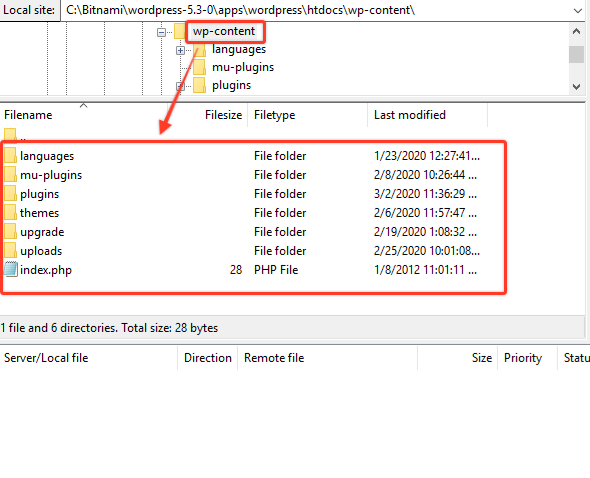
Always keep your WordPress files in a single folder. This makes it easy to find everything. Name the folder clear and simple. Use a name like “wordpress_site”. Inside the folder, sort files by type. Place images in an “images” folder. Keep plugins in their own folder. This keeps everything neat and helps you find things faster.
Keep your WordPress folder safe. Use strong passwords for all files. Hide important files from public view. This means people can’t see your secrets. Update your WordPress often. Updates fix weak spots. This keeps your site safe from bad people. Follow these tips to protect your site.
Always make backups of your site. Use a tool that saves copies of your files. Store backups in a safe place. This could be a cloud or an external drive. Check your backups often. Make sure they are working. If something breaks, you can restore your site quickly. Backups are like a safety net for your website.
Troubleshooting Installation Problems
Installing WordPress can show many error messages. Don’t worry. Each error has a solution. A common error is “Cannot Connect to Database.” Check your database name and password. Another error is “500 Internal Server Error.” Try resetting your .htaccess file. These steps often fix the problem.
WordPress needs certain server requirements to run. First, check the PHP version. It should be 7.4 or higher. MySQL version should be 5.6 or more. Ensure your server supports HTTPS. If any requirement is missing, update your server.
Sometimes problems are hard to fix alone. Ask a professional for help. Many experts are available online. They can solve WordPress issues quickly. They ensure your site runs smoothly. This saves you time and stress.
Credit: www.wpdownloadmanager.com
Frequently Asked Questions
Where Should I Install WordPress On My Server?
WordPress should ideally be installed in the root directory of your domain. This ensures that your website is accessible directly at your domain name. If you prefer a subdirectory, name it appropriately, like “blog” or “site”, to keep it organized and intuitive.
Can I Install WordPress In A Subfolder?
Yes, you can install WordPress in a subfolder. This is useful for organizing content or running multiple sites. Simply create a new folder within your root directory and install WordPress there. Ensure you configure the settings to point to this subdirectory correctly.
What Is The Best Directory For WordPress Files?
The best directory for WordPress files is typically the root directory. This makes your website directly accessible from your main domain. Organizing WordPress in a dedicated folder can also be beneficial for managing multiple installations or different site sections.
How Do I Move WordPress To A New Directory?
To move WordPress, first, copy all files to the new directory. Update the URLs in the WordPress settings and database. Adjust the. htaccess and wp-config. php files if necessary. Backup your site before making any changes to avoid data loss.
Conclusion
Choosing the right folder for WordPress is crucial. It impacts your website’s performance and security. Place WordPress in the root directory for simplicity. This makes URLs clean and easy to manage. Some prefer a subdirectory for organization. This can help separate WordPress from other files.
Remember, always back up before changes. This prevents data loss. Installing in a subdirectory? Adjust settings carefully. Make sure links work properly. Each choice has its pros and cons. Consider your needs. Make an informed decision. Your website’s success depends on it.