Are you curious about how your WordPress theme stores information? You’re not alone.
Understanding the database tables that WordPress themes interact with can give you a deeper insight into how your website functions. This knowledge not only enhances your ability to manage your site but also empowers you to make informed decisions when customizing or troubleshooting.
Imagine being able to optimize your site’s performance, improve security, and ensure seamless updates—all by understanding a simple table. We’ll unravel the mysteries behind the database table associated with your WordPress theme, making it easy for you to grasp and utilize this information effectively. Dive in and discover how this knowledge can transform your WordPress experience.
WordPress Database Structure
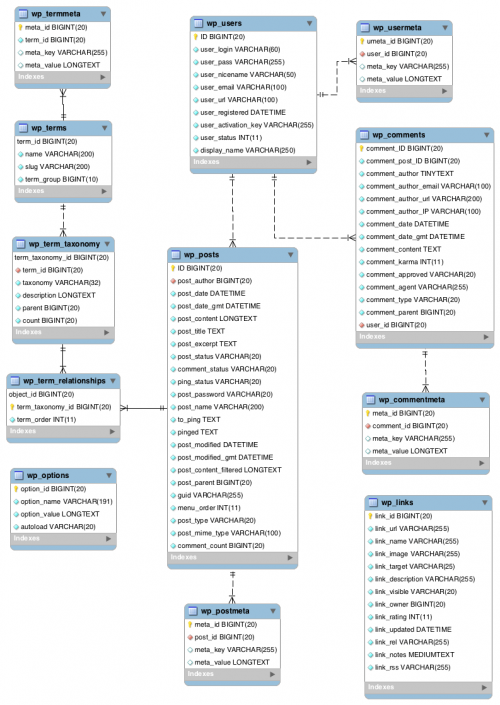
WordPress has many core tables. These tables store important data. Each table has a special job. The wp_posts table stores all posts. The wp_users table keeps user info. For comments, the wp_comments table is used. Options and settings are in the wp_options table. There is also the wp_terms table. This table helps with tags and categories. These tables work together. They make WordPress work smoothly.
Some themes use custom tables. These tables store theme data. They are not part of core tables. Custom tables help in storing theme settings. They can also manage unique content. Each theme can have its own tables. This makes themes flexible. But too many tables can slow WordPress. So, themes should use tables wisely.
Credit: www.templatemonster.com
Themes And Database Interactions
WordPress themes have special options stored in the database. These options help themes work well. They are often kept in the wp_options table. Each theme can have different settings. These settings include colors, fonts, and layout choices. The database saves these choices. This way, themes keep their unique styles.
Themes handle data in smart ways. They store and use specific information. This helps in keeping track of user preferences. The database makes it easy to remember settings. Themes can change how they look based on this data. This makes each website special and different.
Key Tables For Theme Functionality
The wp_options table holds important data for your theme. It stores settings and configuration details. Themes use this table for customization options. This includes theme settings, plugin settings, and other site-wide options. Each setting has a name and value pair. This table is crucial for theme management.
The wp_posts table is where all content lives. It stores posts, pages, and attachments. Each item has a unique ID. The wp_postmeta table stores extra information for each post. This includes custom fields and metadata. Themes use these tables to display and manage content efficiently.
The wp_terms table manages categories and tags. These help organize content. The wp_term_taxonomy table defines the relationships between terms. It explains if a term is a category or a tag. Themes use these tables to help users find related content easily. They ensure content is well structured and accessible.
Custom Tables By Themes
Some themes make their own database tables. This helps store special data. For example, a theme might use tables for custom settings. These tables can keep track of design changes. Themes that create tables can offer more flexibility.
There are benefits to this. One benefit is better data organization. This makes it easy to find and change data. But there are also drawbacks. One drawback is increased database size. This can make the website run slower. Another drawback is complexity. More tables can make it hard to manage the database.
Optimizing Database For Themes
Improving your database can make WordPress themes run better. First, clean up your database. Remove old posts, drafts, and spam comments. This helps the database work faster. Keep your plugins updated. Outdated plugins can slow down the database.
Use a good caching plugin. It stores data so the database doesn’t have to work every time. Optimize your database tables often. This keeps things tidy and efficient. It’s like cleaning your room, but for your database.
Theme updates can change database tables. New themes may add or remove tables. Always back up your database before changing themes. This keeps your data safe. Check for theme updates often. They can improve performance and fix bugs.
Some themes need more database space. Others use less. Choose themes that fit your database size. This helps your site run smoothly. Make sure your database and theme work well together.
Security Considerations
Theme data is important. It must be safe. Hackers often target weak themes. They try to steal data. This can cause big problems. Always update your theme. Updates fix holes. They keep the theme strong. Use strong passwords. Change them often. This adds another layer of safety. Use plugins wisely. Some plugins can be unsafe. They might have bugs. Bugs can open doors for hackers. Check plugin reviews. Only install trusted plugins. Backup your theme data. Backups help recover lost data. If something goes wrong, you can restore it. Keep your backups safe. Use secure storage. Cloud storage is a good option.
Common vulnerabilities include outdated themes. Old themes have known issues. Hackers know these issues. They use them to attack. Weak passwords are bad. Hackers guess weak passwords. Use strong passwords. SQL injection is a danger. Hackers use SQL to steal data. Secure your database. Limit access to it. Cross-site scripting is risky. Hackers use it to run bad scripts. These scripts steal info. Validate user inputs. This can stop bad scripts. Protect against brute force attacks. Hackers try many passwords quickly. Use plugins to limit login attempts. This makes brute force attacks harder.
Troubleshooting Database Issues
Discovering which database table your WordPress theme uses is crucial for troubleshooting. Often, theme settings are stored in the ‘wp_options’ table. Understanding this helps in resolving issues and optimizing performance.
Common Errors
WordPress database errors can be confusing. Connection errors happen often. They stop your website from loading. Syntax errors in SQL can cause issues. Your database may not respond. Missing table errors occur when tables are deleted. These errors break links on your site.
Debugging Techniques
Debugging helps find problems. Enable debugging in WordPress settings. It shows error messages. Check your database for missing tables. Use phpMyAdmin to explore your database. Look for error logs in your hosting panel. These logs show what went wrong. Fix errors by following the logs. Backup your database regularly. This helps restore it if something goes wrong.
Credit: codex.wordpress.org
Credit: help.one.com
Frequently Asked Questions
What Database Tables Do WordPress Themes Use?
WordPress themes primarily use the `wp_posts` table for storing page and post content. Additionally, the `wp_postmeta` table is used for storing custom fields and metadata associated with posts. Themes may also interact with the `wp_options` table to manage theme settings and configurations.
How Do WordPress Themes Access Database Tables?
WordPress themes access database tables using built-in WordPress functions. Functions like `get_post()` and `get_option()` are commonly used. These functions facilitate retrieving data from tables such as `wp_posts`, `wp_postmeta`, and `wp_options`, ensuring seamless integration with the database.
Can WordPress Themes Modify Database Tables?
WordPress themes can indirectly modify database tables by updating content and settings. They use functions like `update_post_meta()` and `update_option()` to change values in tables such as `wp_postmeta` and `wp_options`. Direct modifications are typically handled by plugins or through custom code.
Are Custom Tables Used In WordPress Themes?
Custom tables are not typically used directly by WordPress themes. Themes rely on standard WordPress tables like `wp_posts` and `wp_postmeta`. However, developers can create custom tables for specific functionality, often managed through plugins, rather than directly through themes.
Conclusion
Understanding the database table of WordPress themes can simplify your site management. With this knowledge, you can tweak your site design efficiently. Navigating WordPress tables becomes less daunting with practice. This empowers better control over your site’s appearance and functionality.
It also helps in troubleshooting theme-related issues quickly. Knowing where theme data resides aids in making informed decisions. Keep learning to enhance your WordPress skills. A little exploration can lead to smoother site operations. Dive into your theme’s database with confidence.
The more you know, the easier it gets!