
Have you ever wondered how websites actually exist on the internet? Whether you’re launching a new blog, starting an online store, or simply curious about how things work behind the scenes, understanding web hosting is essential.
Imagine your favorite website as a house. Web hosting is the land it’s built on. Without it, your website has no place to live on the internet. You might be thinking, “Why do I need to know about web hosting?
” Well, choosing the right web hosting service can be the difference between a successful website and a digital ghost town. It’s not just about putting your website online; it’s about ensuring it’s fast, secure, and reliable. If you’re ready to unlock the secrets of web hosting and discover how it can boost your online presence, this article is for you. Dive in, and let’s unravel the mystery of web hosting together.
Types Of Web Hosting
Shared hosting is where many websites share one server. It’s like living in an apartment. Costs are low, but you share resources. If one site gets busy, others slow down. Great for small sites or beginners.
VPS stands for Virtual Private Server. It’s like having your own house. You get more control and resources. More expensive than shared hosting. Ideal for growing websites.
Dedicated hosting is a server just for you. It’s like owning a mansion. You have full control and power. Best for big sites with lots of visitors. Costs the most, but worth it for large projects.
Cloud hosting uses many servers. If one server fails, others help out. It’s like having many backup homes. Scalable and flexible. Good for sites with changing traffic. You pay only for what you use.

Credit: www.geeksforgeeks.org
Key Features
Bandwidth means the amount of data you can send. It affects how fast your site loads. More bandwidth can make your site faster. Fast sites keep people happy. It helps users to stay longer.
Storage is where your site files live. Every picture and page needs space. More storage lets you save more stuff. If you run out, your site won’t work well. Enough storage keeps your site smooth.
Uptime is the time your site is online. A good host has high uptime. This means your site is always there. No one likes a site that is down. Choose a host with 99% uptime or more. It keeps your site active.
Security keeps your site safe from bad people. A secure host stops hackers. It protects your data and files. Look for hosts with strong security tools. This keeps your site and users safe.
Choosing The Right Provider
Identify what your website will need. Storage space is crucial. Traffic levels matter too. Security features are essential. Speed can affect user experience. Ease of use is important. Scalability for future growth is vital. Understand these needs first.
Budget is important. Affordable options can be found. Compare prices across different providers. Hidden fees can surprise you. Look for discounts or promotions. Quality of service matters, not just price. Keep value in mind.
Reliable support is necessary. 24/7 help is ideal. Check response times for queries. Read reviews from other users. Uptime should be high. Downtime can harm your site. Stability is key for success. Choose a provider wisely.
Setting Up Your Website
Choose a unique name for your website. This is your domain name. Check if it’s available. You can use websites like Namecheap or GoDaddy. After choosing, register it. This makes it yours. No one else can use it. You have to pay a small fee yearly. Now, your website has an address. People can find it using this address.
A Content Management System (CMS) helps you manage your site. Popular options include WordPress and Joomla. First, download the CMS. Then, upload it to your server. Follow the steps on the screen. Create a username and password. This lets you log in. After setup, you can add pages and posts easily. A CMS makes website building simple.
After CMS installation, adjust your site settings. Set a title and tagline for your site. Choose a design theme. Many are free. Customize colors and fonts. Set up a menu for navigation. Add important pages like “About” and “Contact.” Adjust privacy settings to protect your site. Save changes. Your site is now ready for visitors.
Common Challenges
Downtime can be a big problem. Websites may go offline. Users get frustrated. Businesses lose money. Downtime affects trust. Reliable hosts reduce downtime. Choose wisely!
Security is vital online. Websites face threats. Hackers try to steal data. Protect your site. Use strong passwords. Keep software updated. Choose hosts that offer security features.
Scalability means growth. Websites start small. They get bigger. Traffic increases. Servers must handle more visitors. Hosts should offer scalable plans. Upgrade easily as needs grow.
Credit: www.hostinger.com
Future Trends
Green hosting uses clean energy. It reduces pollution. Many companies now choose eco-friendly options. They want to help the planet. Using solar and wind power is common. This saves energy. It is good for nature. Green hosting is popular. It is good for business. It makes people happy. They like green choices.
AI is now in web hosting. It makes tasks easier. AI can predict problems. It keeps sites safe. AI helps in managing traffic. It makes sites faster. Many hosts use AI tools. They want to give a better experience. AI is like a smart helper. It makes work simple.
Edge computing is a new trend. It puts data closer to users. This makes sites quick. Edge computing reduces delays. It helps in busy times. Many companies like edge technology. It makes things run smoothly. People get content faster. This is important. Edge computing is a smart choice.

Credit: www.godaddy.com
Frequently Asked Questions
What Is Meant By Web Hosting?
Web hosting provides the technology and services needed for a website to be viewed on the internet. It stores website files on servers, making them accessible online. Users can choose from different hosting types like shared, VPS, or dedicated, depending on their needs.
What Are The 3 Types Of Web Hosting?
The three types of web hosting are shared hosting, VPS hosting, and dedicated hosting. Shared hosting is cost-effective for beginners. VPS hosting offers more resources and control. Dedicated hosting provides exclusive server access for high-traffic websites. Each type caters to different needs and budgets.
Can I Run My Website Without Hosting?
No, hosting is essential for your website to be accessible online. Hosting services store your website data on servers, making it available to users. Without hosting, your website cannot be viewed or accessed by others on the internet. Choose reliable hosting for optimal performance and security.
What Is An Example Of A Web Host?
An example of a web host is Bluehost. It offers reliable hosting services and supports WordPress websites efficiently. Bluehost provides features like 24/7 support, domain registration, and easy-to-use control panels. It is popular among bloggers and small businesses for its affordability and performance.
Conclusion
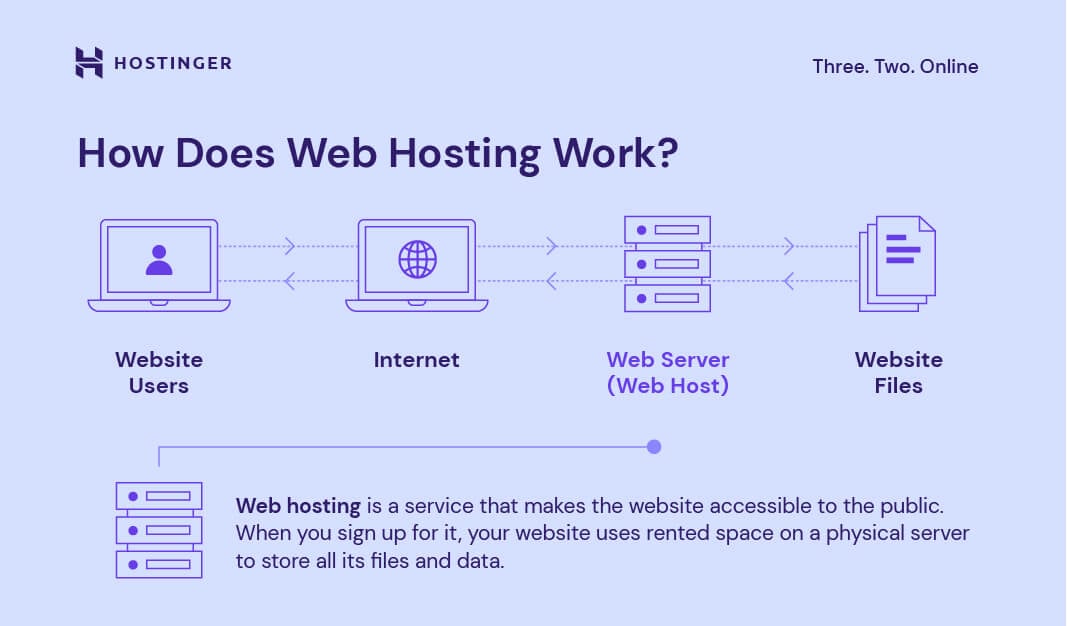
Web hosting serves as the backbone of your website. It stores your website files and makes them accessible online. Choosing the right web hosting is essential. It impacts your site’s speed, security, and reliability. Consider your needs carefully. Research different hosting providers.
Look for features like uptime, support, and scalability. Remember, a reliable host supports your online presence. As your website grows, your hosting needs might change. Stay informed and make smart choices. Ensure your website runs smoothly and efficiently. With the right web hosting, your site can thrive.



