
Are you struggling with finding the perfect size for your WordPress blog elements? You’re not alone.
Whether you’re a seasoned blogger or just starting out, understanding the ideal dimensions for images, videos, and layout can make or break your site’s appeal. You want your blog to look professional, load quickly, and engage your readers, right? Getting the sizes right is a crucial step in achieving that.
By the end of this article, you’ll have a clear grasp of what works best for your WordPress blog, ensuring it stands out and captures your audience’s attention. Curious to know more? Read on to unlock the secrets of creating a visually stunning and highly functional blog.
Optimal Image Dimensions
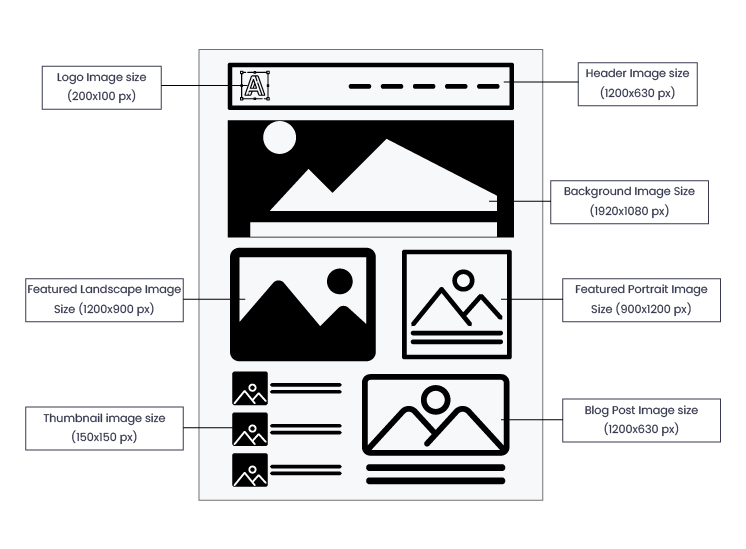
Thumbnails are small images. Their typical size is 150 x 150 pixels. They load quickly and help in easy navigation. Thumbnails are useful for previews. They give a snapshot of the content. They are often square-shaped.
Medium images offer more detail. Common size is 300 x 300 pixels. These are ideal for blog posts. Medium images balance quality and speed. They help readers see more detail without slowing down the page.
Large images show high detail. Often sized 1024 x 1024 pixels. Perfect for showcasing products or detailed photos. Large images can be slower to load. They are great for visual impact. Use sparingly to keep pages fast.
Full-size images are the original size. They can be very large. Not resized or compressed. Full-size images show every detail. Best for downloadable images. They may slow down page loading.
Credit: enginescout.com.au
Recommended Video Sizes
Videos make blogs more engaging. YouTube is a good option for embedding. The best size for embedded YouTube videos is 1280×720 pixels. It looks great on most screens. For Vimeo, use 640×360 pixels. This size loads faster. Your blog will run smoothly.
Videos must fit all devices. A responsive size is 1920×1080 pixels. It works well for desktops. For tablets, 1024×576 pixels is better. On phones, choose 640×360 pixels. These sizes ensure videos look good everywhere.
Blog Content Width
WordPress has default width settings for blogs. The usual width is around 600 to 800 pixels. This width helps readers focus on the content. It also keeps the blog clean and organized. Many themes use this width. This is because it fits well on most screens.
Users can change the content width. Some prefer wider layouts, like 1000 pixels or more. Others like narrower ones, under 600 pixels. Custom widths need careful planning. Wide layouts can make reading hard. Narrow ones might hide content. Choose a width that suits your audience. Test different widths for best results.
Header And Banner Dimensions
The standard header size for a WordPress blog is usually 1048 pixels wide by 250 pixels tall. This size ensures your blog header looks good on most screens. A header is like a title for your blog. It should be clear and easy to read. Some bloggers prefer smaller headers to save space. Others use larger headers for more design. Always consider your blog style.
Banners can vary in size. A common banner size is 728 pixels by 90 pixels. This is known as a leaderboard banner. It works well for ads or promotions. For sidebar banners, 300 pixels by 250 pixels is popular. This size fits nicely on the side of your page. Choose banner sizes based on your blog layout. Make sure they do not distract from your content.
Sidebar Width Considerations
A single column layout is simple. It makes reading easy. The content fills the entire space. There is no sidebar. Full-width designs are common. They look clean and modern. This style is often used for blogs. It focuses on the text. Images are large and clear. Readers see everything at once. It’s great for storytelling. The design feels spacious. Minimal distractions help readers. They focus on the content.
Multi-column layouts have sidebars. Sidebars hold extra content. They often include menus or ads. This layout is flexible. Two columns are common. One for the main content. One for the sidebar. Three columns can work too. They add more space for extras. Widgets fit well in sidebars. The design feels balanced. Readers see more options at a glance. Navigation becomes easier.
Mobile Responsiveness
Mobile screens are small. WordPress blogs must fit well on them. Text and images should adjust automatically. This helps readers see everything clearly. Buttons should be big enough to tap easily. No one wants to zoom in and out. Navigation should be simple. This means easy to find and use.
It’s important to test WordPress blogs on different devices. Use phones, tablets, and computers. Each device has a unique screen size. Check the layout and design on each one. Make sure nothing looks strange or broken. This ensures a good user experience for everyone. Always keep testing as new devices come out.
Plugins For Size Management
Image optimization is important for a WordPress blog. It makes pages load faster. Faster pages are loved by readers. They keep readers happy. Tools like Smush and Imagify help with this. They make images smaller without losing quality. Smaller images save storage space. Blogs with large images load slowly. This can make readers leave. So, always use image tools. It makes your blog work better.
Videos need special plugins to fit well. Video Resizer and FitVids are good choices. They help videos look right on all devices. Big videos can slow down your site. This makes users unhappy. Plugins make sure videos load fast. Fast videos keep users on your site. Always check if videos fit the page. Use plugins to help with this task.
Credit: wpexperts.io

Credit: snappa.com
Frequently Asked Questions
What Is The Ideal Image Size For WordPress?
The ideal image size for WordPress is 1200 x 628 pixels. This dimension is perfect for featured images. It ensures compatibility with social media sharing. Always optimize images for faster loading and better SEO.
How Do I Change WordPress Blog Size?
You can change WordPress blog size via the theme settings. Most themes offer customization options for width and layout. Check your theme documentation for guidance. Alternatively, you might need custom CSS for advanced changes.
What Is The Standard WordPress Header Size?
The standard WordPress header size is 1048 x 250 pixels. This size fits most themes and maintains visual clarity. Ensure your header image is high-quality for best results. Always preview changes to ensure proper display.
Why Is WordPress Image Size Important?
WordPress image size is crucial for faster site loading. Properly sized images improve user experience and SEO. Large images can slow down your website. Resize and compress images for optimal performance.
Conclusion
Choosing the right size for your WordPress blog is essential. Proper dimensions enhance user experience and site aesthetics. Consider your audience and content type. Experiment with different sizes to find what works best. A well-sized blog can boost engagement and readability.
Remember to keep your images optimized for faster loading. Regularly update your sizes as your blog evolves. This ensures your content stays fresh and appealing. Use these tips to maintain a professional look. Your readers will appreciate the effort. Happy blogging!


