
Are you eager to create your own WordPress theme but not sure where to begin? You’re in the right place.
Crafting a WordPress theme might seem like a daunting task, but it’s more attainable than you might think. Imagine having a unique design that perfectly represents your brand and style, all built by you. This guide will walk you through the essentials of WordPress theme development, breaking down complex processes into simple, actionable steps.
By the end of this article, you’ll feel empowered to bring your creative vision to life. Ready to unlock your theme-building potential? Let’s dive in and start creating something amazing.
Getting Started
Begin by installing a local server. XAMPP or WAMP are good options. They help create a local environment on your computer. This way, you can test and build your theme safely.
Download and install one of these servers. Open the control panel. Start Apache and MySQL services. This makes your computer act like a real server.
Download the WordPress package from the official site. Extract the files to the htdocs folder in your server setup. This folder is inside the server installation directory.
Open your web browser. Type localhost in the address bar. Follow the instructions to install WordPress. You will create a database, username, and password. Once done, you can start building your theme!
Theme Basics
WordPress themes are collections of template files. These files control the look of your site. They include HTML, CSS, and PHP files. Each file has a special role. The style.css file sets the design. The index.php file is the main template file. The functions.php file adds features to your theme. Themes also have JavaScript files. These files make your site interactive.
Themes need key parts. They must have a header, footer, and sidebar. The header is the top part of your site. It shows the site name and menu. The footer is at the bottom. It shows links and info about your site. The sidebar is a column beside your content. It holds widgets and ads. Each part uses template files. These files help structure your site.
Creating Theme Structure
Start with folders. Keep files organized. Use simple names. Place style.css in the main folder. Add functions.php next. Keep template files together. Use header.php for the top part. Use footer.php for the bottom. Organize JavaScript files in one place. Make a folder for images. It’s important for keeping things tidy.
WordPress uses a special order for files. This is template hierarchy. It decides which file to show. index.php is the base file. single.php shows posts. page.php shows pages. archive.php shows lists. Each file has a purpose. Hierarchy helps WordPress choose the right file. It makes themes work smoothly.
Design And Layout
CSS makes your theme look nice. It controls the colors, fonts, and spacing. Good styling helps users enjoy your site more. Use clear and simple CSS rules. Keep the code clean and easy to read. Small changes can have a big impact.
Use classes and IDs to style different parts of your theme. This keeps your styles organized. Avoid too many styles. It can make the site slow. Test your theme on different devices. Make sure it looks good everywhere.
Responsive design means your theme works on all devices. Phones, tablets, and computers all need different layouts. Use flexible grids and layouts. They adjust to the screen size. Add media queries in your CSS. This changes styles for different screens.
Check your theme on different devices. Ensure it looks good and functions well. Users like sites that work everywhere. A responsive theme keeps them happy and engaged.
Adding Functionality
Creating custom functions can make your theme special. Functions are like little helpers. They do specific tasks. You can use them to display special messages. Or to change how a page looks. Custom functions help in making your theme unique. They can also improve site speed. Faster sites keep visitors happy. Happy visitors come back often.
Widgets add extra features to your site. They are easy to use. You just drag and drop them. This makes designing fun. Sidebars hold widgets. They are like containers. You can place them on the side of your page. Or at the bottom. Sidebars keep your site organized. They help users find things quickly.
Credit: www.wpzoom.com
Customizing With Php
Crafting a WordPress theme with PHP allows for unique design and functionality. PHP enables dynamic content and interactive features, enhancing user experience. By customizing with PHP, developers create themes tailored to specific needs, making websites stand out.
Theme Functions File
The Theme Functions File is where magic happens. This file, known as functions.php, holds special codes. These codes help change how your theme works. You can add new features or adjust existing ones. For example, you can register menus or add widget areas. The file lets you control WordPress behavior. Use it wisely!
Custom Hooks And Filters
Custom Hooks and Filters offer powerful tools. Hooks let you insert your code at specific points. Filters modify data before it is used. You can create your own hooks. This means your theme can react to different events. Filters allow you to change content without altering core files. Together, they make your theme flexible and unique.
Working With Javascript
JavaScript adds life to your theme. It’s important for dynamic features. Start by adding scripts in your theme folder. Use the wp_enqueue_script() function. This helps load your JavaScript files.
Place the function in the functions.php file. This ensures the script loads properly. Make sure to add file paths correctly. Check for any errors in your code. Scripts should run without problems.
JavaScript makes your theme interactive. It can change content without refreshing. Users like fast and smooth websites. Use JavaScript to add slideshows, pop-ups, and more. Make your theme exciting. Keep your scripts clean and simple.
Credit: blog.templatetoaster.com
Testing And Debugging
Crafting a WordPress theme demands thorough testing and debugging. Testing ensures compatibility across devices and browsers, while debugging identifies and fixes errors. This process enhances user experience and ensures a smooth, functional theme.
Common Issues
WordPress themes can have problems. These include styling errors and plugin conflicts. Broken links and missing images are common too. Themes may not work with new WordPress versions. Bugs can make the site look wrong. Slow loading times can frustrate users. Fixing these issues is crucial. Regular updates help solve problems. Testing themes on different devices is important. Check for responsive design errors. Ensuring compatibility with browsers is key. Validating code reduces bugs. These steps keep themes running smoothly.
Debugging Tools
Debugging tools help find errors in WordPress themes. The WordPress Debugging Mode shows errors. It helps developers fix problems quickly. Firebug is a browser tool. It inspects HTML and CSS. Chrome Developer Tools offer similar features. These tools help understand code issues. WP_DEBUG is another useful tool. It shows PHP errors on the site. Query Monitor checks database queries. This helps optimize theme performance. Using these tools makes debugging easier. They improve the quality of WordPress themes.
Deploying Your Theme
Testing your theme is important. Make sure everything works well. Check all pages and features. Fix any errors you find. Use a simple checklist. It helps you not miss anything important.
Create a backup of your work. This keeps your files safe. Choose a good name for your theme. It should be easy to remember. Write a clear description. Tell users what your theme does.
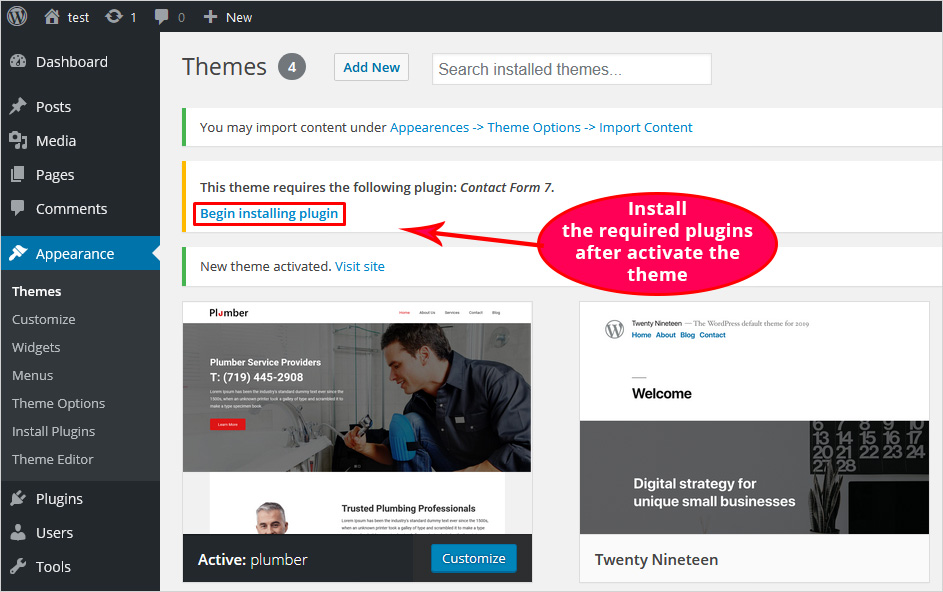
Go to the WordPress site. Find the theme submission page. Fill out the form. Follow all the rules given. Double-check your theme files. Make sure they are clean and neat. Use a zip file for your theme.
Add a readme.txt file. This file tells about your theme. Include installation instructions. Make them simple and clear. Wait for approval from WordPress. They will review your theme. Once approved, users can download it.
Credit: blog.templatetoaster.com
Frequently Asked Questions
How Do I Create My Own Theme In WordPress?
Start by setting up a local development environment. Create a new theme folder in WordPress’s “wp-content/themes”. Develop essential files like style. css, index. php, and functions. php. Customize code using HTML, CSS, and PHP. Test the theme thoroughly. Upload the theme to your live WordPress site.
How To Write A Theme In WordPress?
To create a theme in WordPress, use HTML, CSS, PHP, and JavaScript. Start with a basic structure. Include essential files like style. css, index. php, and functions. php. Customize templates and styles. Test for responsiveness and functionality. Follow WordPress coding standards for best results.
Is It Hard To Make A WordPress Theme?
Creating a WordPress theme requires knowledge of HTML, CSS, PHP, and WordPress functions. Beginners may find it challenging initially. With practice, it becomes easier, especially using starter themes or frameworks. Online tutorials and resources help simplify the process, making it accessible to those eager to learn.
Are WordPress Themes Profitable?
Yes, WordPress themes can be profitable. They offer opportunities for developers to sell customizable designs. High demand exists due to millions of WordPress users. Quality themes attract purchases, generating revenue. Successful themes often include unique features and regular updates, enhancing their market value and profitability.
Conclusion
Creating a WordPress theme can seem complex at first. But with patience and practice, it becomes easier. Start with a clear plan. Organize your files and follow WordPress guidelines. Always test your theme thoroughly. Seek feedback and make improvements. Learning never stops in web development.
Keep exploring new design trends. Stay updated with WordPress changes. Remember, every expert was once a beginner. Your efforts will pay off with a unique theme. Happy coding!



