Imagine you’ve built a website that’s buzzing with activity, and now it’s time to pass the torch to someone else. Whether you’re selling your website or simply handing it over to a friend, transferring web hosting can seem like a daunting task.
But don’t worry, you’re not alone. Many people find themselves in this exact situation, unsure of where to start or what steps to take. Luckily, transferring web hosting to another person doesn’t have to be complicated. By following the right steps, you can ensure a smooth transition that protects your hard work and keeps everything running seamlessly.
In this guide, you’ll discover simple, clear instructions that will make the transfer process feel like a breeze. You want to make sure everything goes off without a hitch, right? Let’s dive in and ensure you handle this transition like a pro.
Preparing For Transfer
Check the terms and conditions of your hosting plan. Some providers have strict rules. These rules can affect the transfer process. Look for any fees or penalties. Sometimes, transfers cost extra money. Know what is allowed and what is not. This will help you avoid problems later. Understanding the terms is crucial to a smooth transfer.
Always make a backup of your website data. This includes all files and databases. Backups protect against data loss. Use a reliable tool for this task. Many hosting services offer one-click backup options. It is easy and saves time. Store the backup in a safe place. You may need it later if something goes wrong. A backup is like a safety net for your website.
Gathering Necessary Information
Check the domain name first. Ensure it is spelled correctly. Find the registrar where it is registered. Note the expiration date. This is vital. You need to renew it on time.
Gather all login details. This includes the username and password. Make sure they are correct. You need them to access the hosting account. Without this, transferring becomes hard. Always keep them safe. Never share them with strangers.
Communicating With Hosting Provider
Reach out to your hosting provider’s customer support. They can guide you through the transfer. Be ready with your account details. Always verify your identity with them. This keeps your account secure.
Ask about the transfer requirements. Each provider might have different rules. Some need special forms filled out. Others may ask for additional details. Make sure you have everything ready. This avoids delays and problems later.

Credit: ravenousravendesign.com
Initiating The Transfer Process
Fill out the transfer forms provided by your hosting company. These forms are important. They collect necessary details. Make sure all information is correct. Incorrect details can delay the process. Check every field carefully. Sign the forms where needed. A signed form is often required.
Provide authorization to the hosting company. This step shows you agree to the transfer. It is like saying “Yes, I want this transfer.” You may need to write a letter. Or send an email. Include your name and account details. Double-check for errors. Mistakes can cause problems. Once done, send it to the hosting company.
Transferring Ownership
To transfer web hosting, you need to update account details. Start by logging into your hosting account. Find the section where you can change the owner’s name. Enter the new person’s name and contact details. Save changes to ensure the new owner gets notified. It’s crucial for the new person to have correct information. This makes communication easier.
Payment details must be updated too. Go to the billing section in your hosting account. Remove your credit card information. Add the new owner’s payment method. Make sure billing cycles remain uninterrupted. This prevents service issues. Always confirm with the new person. They should check if the payment method is updated correctly. If errors occur, contact support immediately.
Credit: www.milesweb.com
Post-transfer Checklist
Ensure all files have been sent to the new owner. Check if the domain records are updated. Confirm the transfer with both parties. Make sure the new owner has access to the control panel. Verify that the billing information is correct. This prevents future issues.
Visit the website to see if it works well. Test all links and pages. Ensure images display correctly. Check if the website is loading fast. Look for any error messages or broken links. Ask the new owner if everything is fine. This ensures a smooth transition.
Common Challenges And Solutions
Transferring web hosting to another person can be tricky. Common challenges include handling account access and ensuring data security. Solutions often involve updating permissions, backing up files, and communicating with both parties to ensure a smooth transition.
Troubleshooting Dns Issues
DNS problems can cause website delays. Incorrect DNS settings are common. Check the DNS records first. Verify that the nameservers are correct. They must match the hosting provider. Use a DNS checker tool. It helps find errors. If the site is not loading, it may be a DNS issue. Update the DNS records promptly. This ensures your site runs smoothly.
Resolving Email Problems
Email issues can be frustrating. Incorrect server settings may cause this. Check the SMTP and IMAP settings. Ensure they are correct. Also, verify the email account details. Passwords must be accurate. Sometimes emails go to spam. Check the spam filters. Adjust them if needed. Keep your email settings updated. This helps avoid future problems.

Credit: www.seoclerk.com
Frequently Asked Questions
Can You Transfer Web Hosting?
Yes, you can transfer web hosting. Choose a new host, backup your website, and update DNS settings. Follow the new host’s transfer instructions for a smooth transition.
How Do I Transfer My Website To Another Person?
Transfer ownership by changing account details on your hosting platform. Update domain registration information. Provide necessary login credentials. Ensure the new owner has access to all relevant files and databases. Confirm the transfer with your hosting provider for a smooth transition.
How Do I Transfer Ownership Of A Website Domain?
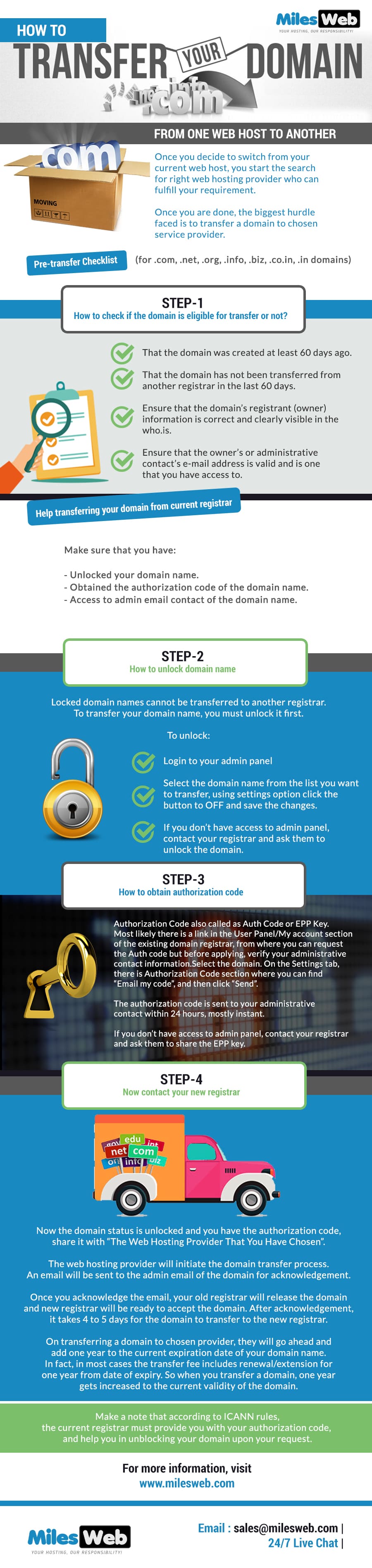
To transfer a domain, unlock it and obtain the transfer code from your current registrar. Initiate the transfer with the new registrar using the code. Ensure the domain is eligible for transfer and confirm via email. Check the status with both registrars until completion.
How Do I Change Who Hosts My Website?
To change your website host, choose a new provider, back up your site, and migrate files. Update your domain’s DNS settings to point to the new host. Ensure all functions work correctly before canceling the old hosting plan.
Conclusion
Transferring web hosting is straightforward with clear steps. First, ensure the new owner has all necessary credentials. Then, update account details and permissions. This prevents access issues later. Remember to inform your hosting provider about the ownership change. They can assist with any technical hurdles.
Regular backups are vital during the process. They safeguard important data. Double-check everything before finalizing the transfer. This avoids errors and ensures smooth transition. With patience and attention, anyone can transfer hosting successfully. By following these tips, you will ensure a seamless experience for both parties involved.