
Have you ever wondered about the magic that happens behind the scenes when your favorite apps fetch data from a server? Hosting a Web API on a server is a crucial step in making that magic happen.
Whether you’re a budding developer or a seasoned pro, mastering the art of hosting can elevate your projects to new heights. Imagine being able to seamlessly connect your applications with a robust backend, ensuring smooth data flow and enhanced user experience.
In this guide, you’ll uncover the secrets to hosting your Web API on a server with ease and precision. Ready to transform your skills and bring your web applications to life? Let’s dive in and discover the steps to make your Web API accessible to the world.

Credit: stackoverflow.com
Choosing The Right Server
Dedicated hosting gives you full control of the server. It’s like having your own house. Shared hosting means you share the server with others. It’s like living in an apartment. Dedicated hosting is more expensive. Shared hosting is cheaper. Choose based on your budget and needs.
Cloud servers are flexible. You can easily scale them up or down. They are great for growing businesses. You only pay for what you use. Popular options include AWS, Google Cloud, and Azure. They offer reliable and secure services.
Choose between Windows and Linux servers. Linux is free and open-source. Windows is user-friendly but may cost more. Linux is good for developers. Windows is good for those who prefer ease of use. Consider your technical skills and requirements.
Preparing Your Environment
First, install a web server. Popular ones are Apache and Nginx. Next, make sure you have Node.js or .NET installed. These are needed for hosting. Use a package manager like npm for Node.js.
Check if your database software is ready. MySQL and PostgreSQL are good choices. Keep all software updated. This ensures you have the latest features.
Pick an IDE or text editor. Visual Studio Code is popular. Create a new project for your API. Organize your files neatly. Test your API locally. Make sure it runs without errors.
Firewalls keep your server safe. Configure them properly. Allow only necessary ports. Common ports for APIs are 80 and 443. Use SSL for security. It encrypts data between server and client.
Set up authentication for your API. Use tokens or keys. Regularly check security updates. They help protect your server.
Deploying The Web Api
Begin by gathering all your API files. This includes the main code and any additional resources. Use an FTP client to transfer these files to your server. Make sure to place them in the correct directory. Check that all files are uploaded correctly. Double-check your connections and file paths.
Access your web server settings. Find the section for configuring applications. Point it to your uploaded API files. Ensure that the correct runtime environment is selected. This might be Node.js, .NET, or another platform. Apply the settings and restart the server if necessary. Test the server to see if it runs your API.
Obtain a domain name from a registrar. Go to your DNS settings and add a new record. Point it to your server’s IP address. This links your domain to your API server. Ensure that the DNS changes propagate. This may take some time. Once done, your API will be accessible via the domain.
Managing Api Endpoints
A route is like a path. It tells where to go. Routes help you find the right place. Methods tell what to do there. GET is for reading. POST is for adding. PUT is for updating. DELETE is for removing. Each route needs a method. Together, they make a plan.
Requests ask for something. Responses give something back. A request can ask for data. The server then sends a response. Responses can be data or messages. Errors can happen too. A good server should handle errors well. Keep requests and responses simple. This helps everyone understand.
Updates change things. Version control helps manage changes. Each version has a number. Numbers keep track of updates. Old versions can still work. New versions add new things. Users choose which version to use. This makes updates easy to follow.
Monitoring And Maintenance
Hosting a Web API on a server demands careful monitoring and maintenance. Regular checks ensure seamless performance and security. Keep software updated to prevent vulnerabilities and optimize server settings for efficiency.
Performance Monitoring Tools
Tools help you check how well your Web API works. Check speed and load using these tools. Fix slow response issues quickly. Ensure your API is healthy. Use charts to see data clearly. Monitor traffic to prevent overload. Alerts help you act fast. Pick tools that suit your needs.
Error Logging And Debugging
Errors happen in Web APIs. Log errors to find out why they occur. Keep logs organized. Debugging helps solve problems faster. Use simple methods for debugging. Fix errors before they impact users. Look for error patterns. Improve your API’s reliability.
Regular Backups And Updates
Data safety is crucial. Back up data regularly to avoid loss. Store backups securely. Update software to keep it safe. Updates fix bugs and add features. Schedule updates to minimize downtime. Keep track of changes. Protect your data from threats.
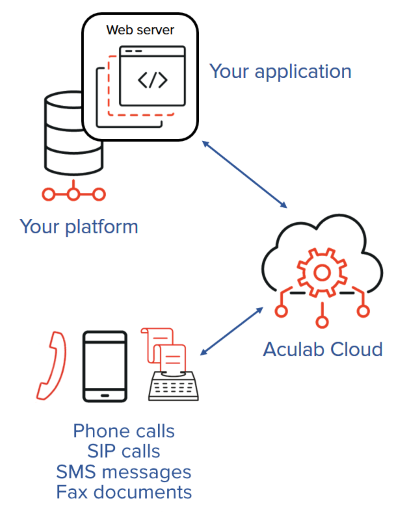
Credit: www.aculab.com
Ensuring Security
Implementing SSL/TLS is key for secure data. These encrypt data between the server and the client. It prevents bad people from seeing the data. Use a trusted certificate for this. It makes sure the connection is safe.
Authentication and Authorization help control who can use the API. Authentication checks if the user is real. Authorization decides what the user can do. Use strong passwords and tokens to make this better.
APIs face many dangers. Protecting Against Common Threats is a must. Use firewalls to block bad traffic. Check for strange activities often. Keep the server software updated. This keeps away hackers and viruses.

Credit: www.dotnetcurry.com
Frequently Asked Questions
How Do I Host An Api On My Server?
To host an API on your server, install a server environment like Node. js. Upload your API files. Configure your server to handle API requests. Set up appropriate security measures. Finally, test the API to ensure it’s running correctly.
How Is The Web Api Hosted?
Web APIs are hosted on servers, often using cloud platforms like AWS, Azure, or Google Cloud. These platforms ensure scalability, security, and accessibility. Hosting involves configuring server settings and deploying API code, making it accessible via HTTP. Proper hosting guarantees optimal performance and user satisfaction.
Can Web Api Be Self Hosted?
Yes, Web API can be self-hosted using frameworks like ASP. NET Core. You control server environment and deployment.
How To Deploy Web Api In Iis Server?
Deploy Web API in IIS by publishing it from Visual Studio. Configure the application pool and site settings. Copy published files to the IIS site folder. Ensure the correct. NET version is set. Bind the site to a port and domain.
Test the deployment by accessing the API URL.
Conclusion
Hosting your Web API on a server is straightforward. Follow the steps outlined, and you’ll succeed. First, choose a reliable server. Next, ensure your API is secure. Then, upload your files carefully. Always test your API after deployment. This ensures everything runs smoothly.
Troubleshoot any issues promptly. Regular maintenance is vital for performance. With practice, hosting becomes easier. You’ll gain confidence with each project. Remember, patience and attention to detail are key. Your Web API will benefit users efficiently. Keep learning and adapting to new technologies.
This helps in staying relevant in the tech world.


