Have you ever wondered who is actually hosting your website? Knowing your domain host is more important than you might think.
It helps you manage your site, solve technical issues faster, and keeps your online presence secure. If you’re not sure where to find this information, don’t worry—you’re not alone. You’ll discover simple and effective ways to figure out who your domain host is, so you can take control of your website with confidence.
Keep reading, because the answers you need are just a few steps away.
Check Your Domain Registrar
Checking your domain registrar is an important step to find out who hosts your domain. The registrar is the company where you registered your domain name. This company keeps your domain information and controls your domain settings. Knowing your registrar helps you manage your domain and hosting better.
Locate Your Domain Account
Start by locating your domain account with the registrar. Check your email for registration confirmation. This email usually contains your account details. If you do not remember the registrar, use a WHOIS lookup tool. It shows the registrar name and contact information. Write down the registrar name to access your account.
Access Domain Settings
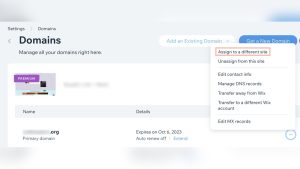
Next, log in to your registrar account. Use your username and password to sign in. Once logged in, find the domain management section. Here, you will see a list of your domains. Select the domain you want to check. This section shows your domain’s DNS and hosting details. You can update your nameservers or view hosting information here.

Credit: support.intermedia.com
Use Whois Lookup Tools
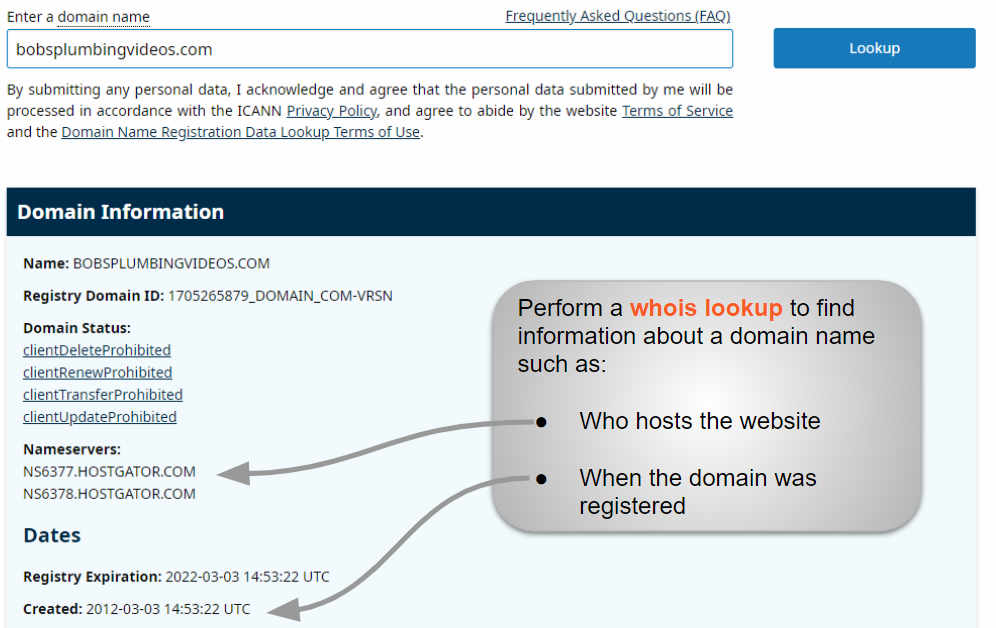
WHOIS lookup tools help find details about a domain name. They show who registered the domain and where it is hosted. Anyone can use these tools online for free. Just enter the domain name, and the tool searches the public database.
This method is quick and easy. It reveals important information about the domain owner and hosting provider. It is a good start for figuring out who your domain host is.
Find Registrar Information
WHOIS tools display the registrar of the domain. The registrar is the company that manages the domain name registration. This company may or may not be the same as the hosting provider.
You will see the registrar’s name, website, and contact details. This information helps you contact the company handling your domain. It also confirms where the domain was purchased.
Identify Hosting Provider Details
Some WHOIS records include the hosting provider’s details. Look for the nameservers listed in the record. Nameservers often reveal the hosting company’s identity.
If nameservers show a hosting company, you can contact them for support. If not, use the IP address shown in the WHOIS data. Use an IP lookup tool to find the hosting provider linked to that address.
Review Dns Records
Reviewing DNS records helps identify your domain host quickly. DNS records hold important details about where your domain points. These details include the servers that manage your domain and how your website connects to the internet. Understanding these records guides you to your domain host.
Check Nameservers
Nameservers show which company controls your domain’s DNS settings. These servers direct traffic to your website. To find nameservers, use a DNS lookup tool online. The nameservers often include the host’s name or brand. For example, names like ns1.bluehost.com hint at Bluehost as the host. This is a clear sign of your domain host.
Analyze A And Cname Records
A records link your domain to an IP address. This tells browsers where to load your website. CNAME records point your domain to another domain name. These records may reveal your hosting provider or CDN service. Check these records to confirm which servers handle your site. They provide clues about your domain host’s identity.

Credit: support.intermedia.com
Inspect Website Source
Inspecting the website source can reveal who hosts a domain. This method looks inside the website’s code and data. It uncovers useful clues about the hosting provider. Anyone can do this with a few simple steps. This approach works well for beginners and tech-savvy users alike.
Look For Hosting Clues
Open the website in your browser. Right-click anywhere on the page and select “View Page Source.”
Scan the source code for mentions of hosting services or company names. Sometimes, hosting providers add tags or comments here. Look for URLs or IP addresses linked to hosts.
Check the HTML meta tags and scripts. Hosting details might appear in these parts. Some websites include the hosting company in footer code or script URLs.
Use Online Hosting Checker Tools
Several free tools reveal hosting information quickly. Enter the domain name in tools like Whois Lookup or Hosting Checker.
These tools analyze domain registration and hosting details. They display the hosting company’s name and server location. This method is faster than manual inspection.
Use multiple tools to confirm the hosting provider. Results may vary between services. Cross-checking helps ensure accuracy.
Contact Support For Help
Contacting support can be a quick way to find your domain host. Support teams have access to important account details. They can guide you step-by-step to identify your host. This approach saves time and avoids confusion.
Reach Out To Registrar Support
Your domain registrar keeps records of your hosting provider. Contact the registrar’s support team by email or phone. Provide your domain name and ask for hosting information. They can tell you where your domain points and who hosts it.
Keep your account details ready for identity verification. This ensures faster service and helps protect your data. Registrar support is often the first place to check.
Ask Your Website Developer
Your website developer usually knows your hosting details. They set up or manage your site’s hosting account. Reach out to them for clear information about your host.
They can explain the hosting plan and provide login information. Developers can also help with any hosting-related questions. This direct approach avoids guesswork and saves time.
Credit: www.boldgrid.com
Tips To Avoid Hosting Confusion
Hosting confusion causes delays and errors. Clear steps help keep control of your domain and hosting. Simple habits prevent mix-ups and save time. Follow easy tips for smooth management.
Keep Hosting Details Documented
Write down all hosting information. Include usernames, passwords, and service provider names. Keep records in a safe, easy-to-find place. Update the details after any changes. This helps avoid forgetting important info.
Separate Domain And Hosting Accounts
Use different accounts for domain and hosting services. This separation makes it easier to manage each service. It prevents confusion about who controls what. Keep login details for both accounts clearly labeled. This way, you can quickly identify your domain host.
Frequently Asked Questions
How Can I Check My Domain Hosting Provider?
You can check your domain hosting provider by using a WHOIS lookup tool. It shows the registrar and hosting details linked to your domain name quickly.
What Is Whois And How Does It Help Identify Hosts?
WHOIS is a public database showing domain registration info. It helps identify your domain host by revealing the registrar and hosting company details.
Can I Find My Domain Host Via Dns Records?
Yes, DNS records often reveal your domain host. Checking the domain’s nameservers or A records can indicate the hosting provider’s identity.
Why Is It Important To Know My Domain Host?
Knowing your domain host helps manage your website effectively. It ensures you can update DNS, renew services, or troubleshoot hosting issues promptly.
Conclusion
Knowing your domain host helps you manage your website better. You can find this information using simple online tools. It takes just a few minutes to check your domain host. This knowledge saves time when updating or fixing your site.
Always keep your domain host details safe and easy to find. Understanding this step makes running a website less confusing. Start by using a trusted domain lookup tool today. You will feel more confident handling your website needs.