Are you looking to boost your website’s visibility and drive more traffic? Adding backlinks in WordPress is one of the easiest and most effective ways to do just that.
But if you’re unsure where to start or worried it might be too complicated, don’t worry—you’re in the right place. This guide will walk you through simple steps to add backlinks quickly, helping your site rank higher and attract more visitors.
Keep reading, and you’ll learn exactly how to make backlinks work for your WordPress site.
Why Backlinks Matter
Backlinks are links from other websites to your WordPress site. They are important for many reasons. They help search engines trust your site. They also bring visitors from other sites. Understanding why backlinks matter helps you grow your website better.
Role In Seo Ranking
Search engines use backlinks to measure a site’s popularity. The more quality backlinks, the higher your site ranks. Backlinks act like votes of confidence. They show your content is useful and reliable. Sites with many backlinks often appear on the first page of results.
Driving Referral Traffic
Backlinks also bring visitors from other websites. When users click a backlink, they come directly to your site. This traffic is called referral traffic. It can increase your site’s audience and potential customers. Quality backlinks from related sites bring more interested visitors.
Types Of Backlinks
Backlinks are links from one website to another. They help search engines know which pages are important. Not all backlinks are the same. Different types of backlinks have different effects on your site’s ranking and traffic.
Understanding the types of backlinks helps you build better links in WordPress. Choose the right type to improve your site’s authority and visibility.
Dofollow Vs Nofollow Links
DoFollow links pass SEO value from one site to another. They tell search engines to count the link as a vote of confidence. These links help improve your site’s ranking.
NoFollow links have a special tag that stops search engines from passing SEO value. They still bring visitors but do not boost your ranking. Use NoFollow links for paid or untrusted content.
Internal Vs External Links
Internal links connect pages within the same website. They help users find related content and keep them longer on your site. Internal links improve your site’s structure and SEO.
External links point to pages on other websites. They show search engines that your content is connected to others. Good external links build trust and add value for readers.
Preparing Your WordPress Site
Preparing your WordPress site is essential before adding backlinks. A well-prepared site improves your link management and SEO results. This step ensures you avoid common mistakes and keep your site organized. Follow the right setup process for better outcomes.
Choosing The Right Seo Plugin
Select an SEO plugin that fits your needs. Popular options include Yoast SEO and Rank Math. These plugins help manage links and improve site SEO. They offer tools to add backlinks easily and track their performance. Choose a plugin with good reviews and regular updates.
Setting Up Link Management
Organize your backlinks for better control and tracking. Use your SEO plugin’s link management features. Create a system to monitor inbound and outbound links. Avoid broken links by regularly checking them. Proper link management enhances your site’s SEO health and user experience.

Credit: wpmudev.com
Adding Backlinks Manually
Adding backlinks manually in WordPress helps improve your site’s SEO and user experience. You control which pages link to others. This method is simple and effective for growing your website’s authority.
Inserting Links In Posts And Pages
Open the post or page where you want to add a backlink. Highlight the text you want to turn into a link. Click the link icon in the editor toolbar. Paste the URL of the target page into the box. Press Enter or click the Apply button. The text now links to another website or page. This method helps direct visitors to useful content.
Using Widgets And Menus For Links
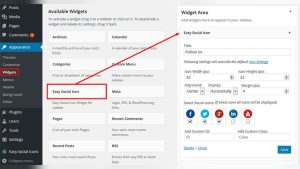
Go to the WordPress dashboard and select Appearance. Click on Widgets or Menus to manage links outside posts. For widgets, drag a Text or Custom HTML widget to your sidebar or footer. Add the backlink using HTML anchor tags. For menus, choose Links or Custom Links. Enter the URL and link text. Save changes to display links on your site. These options help place backlinks in visible areas.
Using Plugins To Add Backlinks
Using plugins to add backlinks in WordPress makes the process simple and fast. Plugins help manage links without needing coding skills. They also save time by automating link insertion. This way, you keep your website organized and SEO-friendly.
Top Plugins For Link Management
Several plugins help you add and manage backlinks easily. “Pretty Links” creates clean, short URLs for your links. “ThirstyAffiliates” helps manage affiliate links with ease. “Broken Link Checker” finds and fixes broken links on your site. These tools keep your backlinks healthy and effective.
Automating Backlink Insertion
Automation plugins insert backlinks automatically in your content. “Auto Affiliate Links” adds links based on keywords you choose. “WP Link Status” monitors links and updates them when needed. These plugins reduce manual work and ensure backlinks stay active. Automation keeps your site updated without extra effort.

Credit: www.youtube.com
Best Practices For Backlink Placement
Placing backlinks correctly in WordPress boosts your website’s SEO power. Proper placement helps search engines understand your content better. It also improves user experience by guiding visitors to relevant pages. Following best practices ensures backlinks add value without looking spammy or forced.
Anchor Text Optimization
Use clear and descriptive anchor text for your backlinks. Avoid generic words like “click here” or “read more.” Instead, use phrases related to the linked page’s topic. This helps search engines connect the link to relevant keywords. Keep anchor text natural and short. Overusing exact keywords can look unnatural and harm SEO.
Link Relevance And Placement
Place backlinks where they fit the content naturally. Links should relate directly to the topic on the page. Avoid placing links in unrelated sections or footers. Links inside the main content get more SEO value. Also, position links close to relevant text. This makes it easier for readers and search engines to understand the link’s purpose.
Avoiding Common Backlink Mistakes
Adding backlinks in WordPress helps boost your site’s visibility. Yet, mistakes can harm your ranking and user experience. Avoiding common backlink errors keeps your site safe and effective. Focus on quality and relevance to build strong backlinks.
Overstuffing Links
Too many links on one page confuse readers and search engines. It looks spammy and lowers trust. Use links only where they add real value. Keep your content clear and easy to read.
Linking To Low-quality Sites
Links to poor or irrelevant sites can hurt your SEO. Google sees these links as risky. Always check the site’s reputation before linking. Choose trustworthy and related sites to improve your credibility.

Credit: www.youtube.com
Monitoring Backlink Performance
Monitoring backlink performance helps understand how links affect your website. It shows which backlinks bring visitors and improve rankings. Tracking backlinks lets you fix bad links fast. It also helps keep a healthy link profile for SEO success.
Using Google Search Console
Google Search Console is a free tool to track backlinks. It shows links pointing to your website and their quality. You can see which pages get the most links. It also alerts you about harmful or spammy links. Regular checks help maintain a strong backlink profile.
Tracking With Seo Tools
SEO tools like Ahrefs and SEMrush provide detailed backlink data. They show link sources, anchor texts, and link growth over time. These tools help find lost or broken backlinks quickly. They also compare your backlinks with competitors. Using SEO tools improves your link strategy efficiently.
Building Backlinks Outside WordPress
Building backlinks outside WordPress boosts your site’s authority. These links come from other websites and point to your content. Search engines see these links as votes of trust. More quality backlinks often lead to better rankings. Focus on genuine and relevant sources for backlinks. Avoid spammy or unrelated sites to keep your site safe.
Guest Posting Strategies
Guest posting means writing articles for other websites. Choose sites related to your niche or topic. Write helpful and original content that readers enjoy. Include a link back to your WordPress site in your bio or article. This drives traffic and improves your site’s SEO. Contact site owners politely and offer your best content. Keep your posts clear, useful, and short.
Social Media And Forums
Social media platforms help share your content widely. Post your blog links on Facebook, Twitter, and LinkedIn. Engage with your audience to build trust and interest. Forums related to your field also offer backlink chances. Join discussions and offer valuable answers. Add your WordPress link naturally in your profile or posts. Stay active and helpful to gain respect and clicks.
Frequently Asked Questions
What Are Backlinks In WordPress?
Backlinks are links from other websites pointing to your WordPress site. They boost SEO by increasing your site’s authority and traffic. Adding quality backlinks improves your search engine rankings and helps build credibility for your content.
How Can I Add Backlinks In WordPress Posts?
To add backlinks in WordPress posts, highlight the text you want linked. Click the link icon, then enter the target URL. Make sure to use relevant and trustworthy sources to enhance your SEO and user experience.
Why Are Backlinks Important For WordPress Seo?
Backlinks signal search engines that your content is valuable and trustworthy. They improve your WordPress site’s search rankings and increase organic traffic. Quality backlinks also help build relationships with other websites in your niche.
Can I Add Backlinks Using WordPress Plugins?
Yes, several plugins like Yoast SEO and Rank Math help manage backlinks. These plugins assist in adding internal and external links easily and optimizing anchor text. They simplify backlink management and improve your site’s SEO performance.
Conclusion
Adding backlinks in WordPress helps improve your site’s visibility. It drives more visitors and builds trust with search engines. Use clear anchor text and relevant links for best results. Keep your links natural and avoid spammy sites. Regularly update your backlinks to maintain website health.
Simple steps can make a big difference over time. Start adding backlinks today and watch your site grow steadily.