Have you ever wondered what instance type you should choose for hosting WordPress on AWS? You’re not alone.
Selecting the right AWS instance is crucial for the performance, cost-efficiency, and scalability of your WordPress site. With so many options available, it can be overwhelming to decide which one is the perfect fit for your needs. This guide will walk you through the key factors you need to consider, ensuring you make an informed decision.
Discover how the right choice can enhance your site’s speed, reliability, and user experience, while also keeping costs under control. Let’s dive in and explore the best AWS instance types for your WordPress site, ensuring your online presence thrives like never before.
Choosing The Right Aws Instance For WordPress
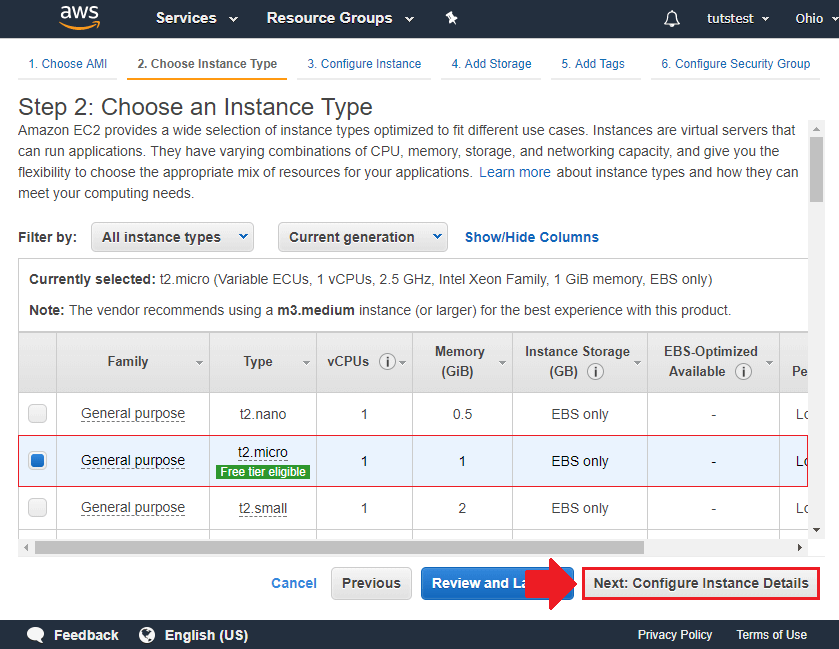
AWS offers many instance types for WordPress. Picking the right one is key. Start small with the t2.micro or t3.micro. These are good for new sites. They are cheap and easy to use. For more traffic, consider the m5.large. This type provides more power and memory. It suits growing sites well.
Heavy traffic sites need the c5.xlarge. This instance handles loads easily. It is more costly but worth it for busy sites. Always monitor your site’s needs. Choose an instance that matches your site’s traffic and performance. Switching instances is easy on AWS.
Credit: onepagezen.com
Factors Influencing Instance Selection
The number of visitors affects the server choice. High traffic needs powerful instances. More users mean more load. Lower traffic can use smaller instances. Match instance with website needs.
Complex sites use more resources. Heavy plugins and themes need strong servers. Simple sites need fewer resources. Choose instance based on your site’s demands. Ensure your site runs smoothly.
Budget impacts your instance choice. Expensive instances give more power. Cheaper instances might save money. Balance cost and performance. Allocate funds wisely for best results.
Popular Instance Types For WordPress
General Purpose Instances are like all-rounders. They handle different tasks well. These are great for WordPress sites. They balance between CPU, memory, and storage. T2 and T3 instances are common choices. They are cost-effective. You pay less but get good speed. Ideal for small to medium websites.
Compute Optimized Instances focus on processing power. They are perfect for sites with heavy tasks. These instances have high-speed CPUs. Good for complex WordPress plugins. They handle multiple users easily. C5 instances are a popular pick. They offer high performance.
Memory Optimized Instances are for data-heavy tasks. They have large memory. Perfect for WordPress sites with big databases. These instances ensure fast data access. R5 instances are commonly used. They help with smooth site performance. Ideal for large websites.
Credit: engr-syedusmanahmad.medium.com
Benefits Of Using Ec2 For WordPress
EC2 lets your website grow with ease. You can add resources when needed. Traffic spikes are no worry. It’s easy to handle more visitors. Websites stay fast and ready. No long waits for users.
EC2 offers many choices. You can pick the right instance type. Choose memory, CPU, and storage. Tailor it to your needs. Control everything with ease. This means better performance for your site.
EC2 works well with other AWS tools. Use S3 for storage. Set up databases with RDS. Monitor performance with CloudWatch. Everything works together smoothly. Your website benefits from these tools.
Configuring Instances For Optimal Performance
Choosing the right instance size is very important. Small instances can save money. But, they may not handle heavy traffic. Large instances provide more power. They can manage more users. It is crucial to balance cost and need. Think about your website’s requirements. Consider both current and future growth.
Load balancing distributes traffic evenly. It prevents servers from overload. This ensures smooth performance. Websites stay fast and responsive. It also increases uptime. Multiple servers share the work. This helps during peak times. Users get a better experience. Load balancing keeps sites reliable.
Caching speeds up website loading. It stores data temporarily. Users access pages quickly. This reduces server load. Cached pages are served faster. It is an essential part of performance. Less waiting means happy visitors. Implementing caching can improve site speed. It enhances user satisfaction significantly.
Cost Management Tips
Save money with Reserved Instances. Pay less than on-demand rates. Choose a plan for one or three years. This helps manage your budget. It’s good for predictable workloads. Plan ahead and save more.
Spot Instances are cheaper than regular ones. They are good for short tasks. You can save up to 90% on costs. But they can stop anytime. Plan for this risk. Use them for flexible work.
Keep an eye on your usage. Use AWS CloudWatch for this. It helps track your resource use. Know what you spend on. Adjust resources if you use too much. This helps keep costs low.
Security Best Practices
Keep your login information safe. Do not share it with others. Use a strong password. Combine letters, numbers, and symbols. Enable two-factor authentication. This adds an extra layer of safety. Regularly check who has access. Remove any users not needed.
Always back up your data. Use cloud storage or external drives. Schedule backups weekly. This ensures you don’t lose important data. Check backups regularly. Make sure they are complete and working. This helps in quick recovery if needed.
Keep your system updated. Install updates as soon as they come. Updates fix security holes. They keep your site safe from threats. Check for updates every week. This includes plugins and themes. Updated systems run smoothly and securely.

Credit: docs.aws.amazon.com
Frequently Asked Questions
What Is The Best Aws Instance For WordPress?
The best AWS instance for WordPress depends on your needs. For small websites, t2. micro is cost-effective. For high traffic, consider m5. large or c5. large. These instances offer better performance and scalability. Always analyze your website’s traffic and resource requirements before choosing an instance type.
How Do I Choose Aws Instance Type For WordPress?
Choose based on your website’s traffic and performance needs. Small sites can use t2. micro for cost-efficiency. For growing traffic, consider m5. large or c5. large. These instances provide better CPU and memory resources. Regularly monitor your website to adjust the instance type as needed.
Is Aws Free Tier Enough For WordPress?
AWS free tier can host WordPress for small websites. It offers a t2. micro instance with limited resources. For larger sites, you may need to upgrade to a paid instance. Always monitor performance and adjust your plan to prevent downtime and ensure smooth operation.
Can I Scale Aws Instances For WordPress?
Yes, AWS allows you to scale instances for WordPress. Use AWS Auto Scaling to automatically adjust capacity. This feature helps handle traffic spikes efficiently. Choose the right instance type and scaling strategy to maintain website performance. Regularly monitor resources to ensure optimal scaling.
Conclusion
Choosing the right AWS instance type boosts WordPress performance. Consider your website needs first. Think about traffic and storage requirements. Balance cost and efficiency for optimal results. AWS offers flexibility for various site sizes. Always monitor usage and adjust as needed.
This ensures your WordPress site runs smoothly. Avoid overspending by selecting appropriate resources. Test different instances to find the best fit. Your choice impacts speed and user experience. Make informed decisions to enhance your site. Keep researching and learning about AWS options.
This leads to better management and growth.