
Are you frustrated with how your WordPress site appears on Google search results? You’re not alone.
Many website owners wish they could have more control over their site’s search appearance, ensuring it’s both attractive and informative. The good news is, you can shape how your site shows up on Google, and it’s simpler than you might think.
Imagine having the power to attract more clicks just by tweaking a few settings. In this guide, you’ll discover practical steps to enhance your site’s presence on Google, making it not only stand out but also draw in the right audience. Ready to transform your search visibility and boost your website traffic? Let’s dive in and unlock the secrets to optimizing your WordPress site for Google.
Optimizing Title Tags
Title tags are the name of your page. They show in search results. Using clear and simple words is important. Keep it short. 60 characters or less is best. Include keywords that describe your page. This helps Google understand what your page is about. Make it unique. Do not use the same title for different pages. This confuses people and search engines.
Your title should be interesting. It should make people want to click. Ask questions or use numbers. For example: “5 Ways to Improve Your Blog.” Keep it relevant. Match the title with the content. This builds trust with readers.
Crafting Meta Descriptions
Meta descriptions help your page show on Google. They are short summaries. Good meta descriptions attract clicks. They should be clear and simple. Keep them under 160 characters. Always include important keywords. These words tell users and search engines about your page. Avoid using too many words. Focus on the main idea. Make each word count. Ensure descriptions are unique for each page. Duplicate descriptions confuse search engines. They might not show your page. Use action words. They make people curious. Invite readers to learn more. Help them click on your page.
Utilizing Seo Plugins
SEO plugins can help improve your website’s rank. They are easy to use. Yoast SEO is a popular choice. It helps you with keywords. It also checks your content for readability. All in One SEO Pack is another option. This plugin offers basic tools for beginners. It helps with title tags and meta descriptions.
Choose a plugin that fits your needs. Check reviews before installing. Plugins often have updates. Keep them updated for best results. Some plugins offer premium options. These might have extra features. But free versions work for many users.
Avoid using too many plugins. This can slow down your site. Focus on quality, not quantity. A good plugin can make SEO easier. Your site will show up better on Google.
Updating Permalinks
Permalinks are the permanent URLs for your posts and pages. Changing these can improve how your site shows up on Google. They give structure to your website links. Click on Settings in the WordPress dashboard. Then, choose Permalinks. A new page will open with options. Choose the format that best fits your content. Post name is often a good choice. This makes URLs easier to read. After changing, click Save Changes. This updates your site’s URL structure.
Managing Schema Markup
Schema markup helps Google understand your site’s content. It tells search engines what your page is about. Use plugins to easily manage schema. Yoast SEO and All in One SEO are popular choices. These plugins offer user-friendly tools. They guide you to set up schema. Follow their step-by-step process. Ensure your schema is accurate and relevant. This improves your site’s visibility on Google. People will find your site easily. Your information becomes clear to search engines. Schema can include ratings, events, and products. Correct schema makes your site stand out. It attracts more visitors. Keep your schema updated. Regular updates are important. This keeps your site fresh and relevant.
Improving Content Quality
Google loves quality content. Write clear and simple sentences. Avoid long and confusing words. Use short paragraphs to keep readers interested. Add relevant information to your text. Make sure it is useful for your audience.
Check for spelling and grammar errors. These can harm your content’s quality. Use tools to find and fix mistakes. Improve your text regularly. Update old content with new facts. This helps your site stay fresh.
Structure your content well. Use headings and subheadings. They help readers find information quickly. Break down complex ideas into simple parts. This makes your content easy to read.
Submitting Xml Sitemaps
Search engines love XML sitemaps. They help to find your pages. Google needs this file to index your site well. The XML sitemap lists all site pages. It shows the structure of your site. This helps Google understand your content better.
To submit a sitemap, go to Google Search Console. Add the sitemap link. Usually, it is yourwebsite.com/sitemap.xml. Check if Google accepts it. This step is quick. It helps your site show up in search results. Make sure your sitemap is up to date. Add new pages when you create them. Keep your sitemap clean and tidy. Google will thank you.
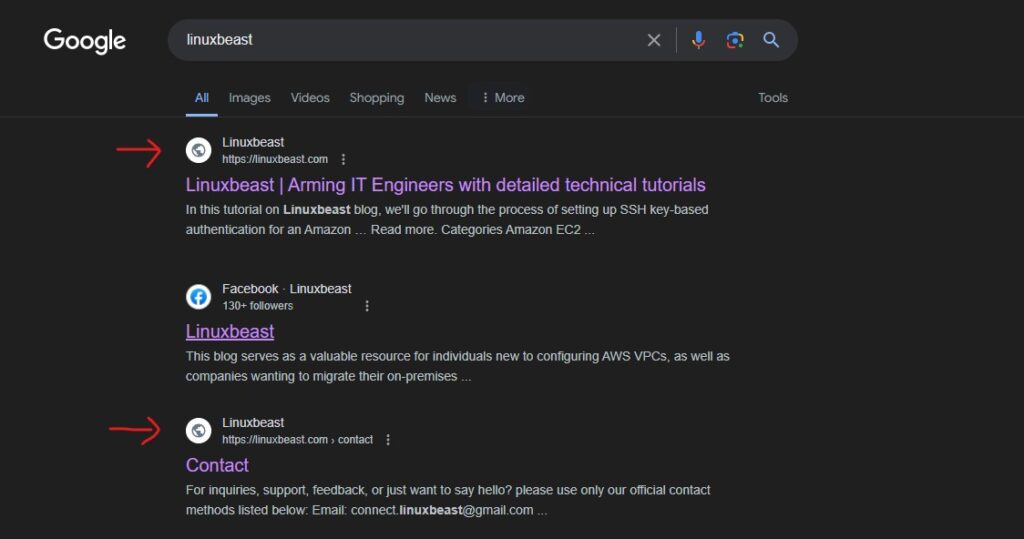
Credit: linuxbeast.com
Using Robots.txt Effectively
Robots.txt helps manage what Google sees. It’s a small file on your website. This file tells search engines which pages to skip. Important pages should not be hidden. Only hide pages not needed in search results. Examples are admin pages or login pages.
Write clear instructions in robots.txt. Use simple words that search engines understand. Do not block important pages by mistake. To make changes, edit the robots.txt file. Always check it after changes. Testing is key to avoid errors.
A well-organized robots.txt file keeps your website clean. It helps Google show the right pages. This means better search results. A simple step for great results.
Leveraging Google Search Console
Google Search Console helps you control what appears on search results. First, log in to your Google Search Console account. Check the URL inspection tool for any web page issues. Fix broken links and errors quickly. Use the coverage report to see which pages Google indexes. Submit important pages for indexing.
The performance report shows your site’s search results. Learn which keywords bring traffic. Optimize content for these keywords. Use the Google Search Console’s removal tool to hide unwanted pages. This helps keep your site neat.
Regularly update and check your site. Follow these steps to improve visibility on Google. It is simple with the right tools. Keep your site fresh and user-friendly. Be mindful of your site’s content. Make sure it is relevant and correct.

Credit: www.reddit.com
Monitoring Search Performance
Google Search Console helps track your website’s search performance. It shows how your site appears on Google. Focus on important metrics like clicks, impressions, and CTR. These metrics tell how well your site is doing. Check keywords bringing traffic to your site. This helps in understanding user search behavior. It is important to analyze which pages get the most views. This will help you to know what content works best. Make changes to improve your site’s visibility. Regular checks ensure your site stays relevant. Update content often to keep it fresh. A good SEO strategy involves constant monitoring. This helps in making informed decisions.

Credit: support.google.com
Frequently Asked Questions
How To Customize WordPress Seo Settings?
To customize WordPress SEO settings, use an SEO plugin like Yoast SEO or All in One SEO. These tools allow you to edit meta titles, descriptions, and keywords for each page. Ensure you optimize images and use clean URLs for better visibility.
Regularly update your content to improve SEO performance.
Why Doesn’t My WordPress Site Show On Google?
If your WordPress site isn’t on Google, check your site’s indexing status. Ensure your site isn’t set to “Discourage search engines” in settings. Submit your sitemap to Google Search Console. Optimize your site’s content and improve loading speed for better search visibility.
How To Change WordPress Site Title For Google?
To change your WordPress site title, go to Settings > General in your dashboard. Edit the “Site Title” field to your desired title. Use an SEO plugin to adjust the meta title for search engines. Ensure the title is relevant and includes important keywords for better SEO.
What Are Meta Tags In WordPress?
Meta tags in WordPress are snippets of text that describe a page’s content. They’re crucial for SEO and appear in search results. Use an SEO plugin to edit meta titles and descriptions for each page. Properly optimized meta tags can improve your website’s visibility on search engines.
Conclusion
Changing what shows on Google Search in WordPress is simple. Follow the steps to improve your site’s appearance in search results. Optimize titles and descriptions for better visibility. Use keywords wisely, ensuring they match your content. Regularly update your site with fresh and relevant information.
This helps Google recognize your efforts. Monitor your changes to see their impact. Stay consistent with your optimization efforts. Effective changes lead to better search rankings. Your website deserves the best chance to shine online. Keep learning and improving your WordPress skills.
You’ll see positive results over time.


