Are you trying to figure out the right platform for your website? You might have come across terms like CMS and WordPress, but what do they really mean, and how are they different?
Understanding these can be the game-changer in making the best choice for your online presence. Imagine having a clear roadmap that guides you in creating a website that not only looks great but functions seamlessly. That’s exactly what this article offers.
Dive in, and you’ll discover the essential differences between a Content Management System (CMS) and WordPress, helping you make informed decisions without the technical jargon. By the end of this read, you’ll have the confidence to choose the platform that aligns perfectly with your needs and goals. Ready to unravel the mystery? Let’s get started!
Cms Basics
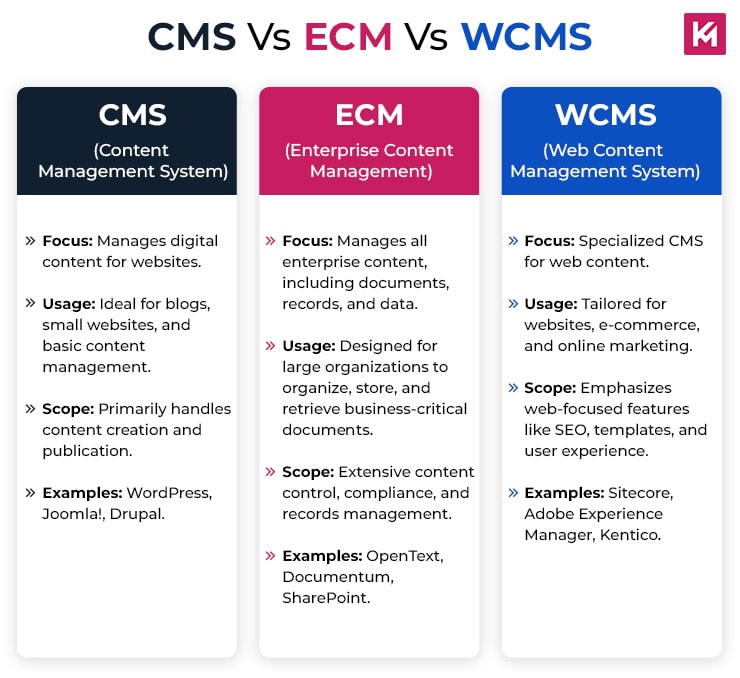
A Content Management System (CMS) is software. It helps you create and manage websites. You don’t need to know coding. WordPress is a popular CMS. It powers many websites. Its main purpose is to make website building easy. CMS tools let you add, edit, and delete content. They offer templates and plugins. These tools make websites look good.
CMS platforms have many features. Templates give your site a design. Plugins add extra functions. You can use a CMS to write blogs or sell products. Some CMS platforms offer SEO tools. These tools help your site get found online. User management is another feature. It lets you control who can edit your site. You can also track changes. This helps keep your site organized.
Credit: www.kinexmedia.com
WordPress Overview
WordPress began in 2003. It started as a simple blogging tool. Over time, it grew. It became a powerful content management system. Many people use it today. Millions of websites rely on WordPress. It’s open-source. Anyone can use or change it. The community is large. Developers share ideas and updates. WordPress keeps improving. It adapts to new needs.
WordPress offers many features. It is easy to use. Even beginners can create websites. Themes help change the site’s look. There are thousands of themes. Plugins add extra functions. You can find plugins for almost anything. WordPress is SEO-friendly. It helps sites rank better. Security is important too. Regular updates keep sites safe.
Cms Vs WordPress
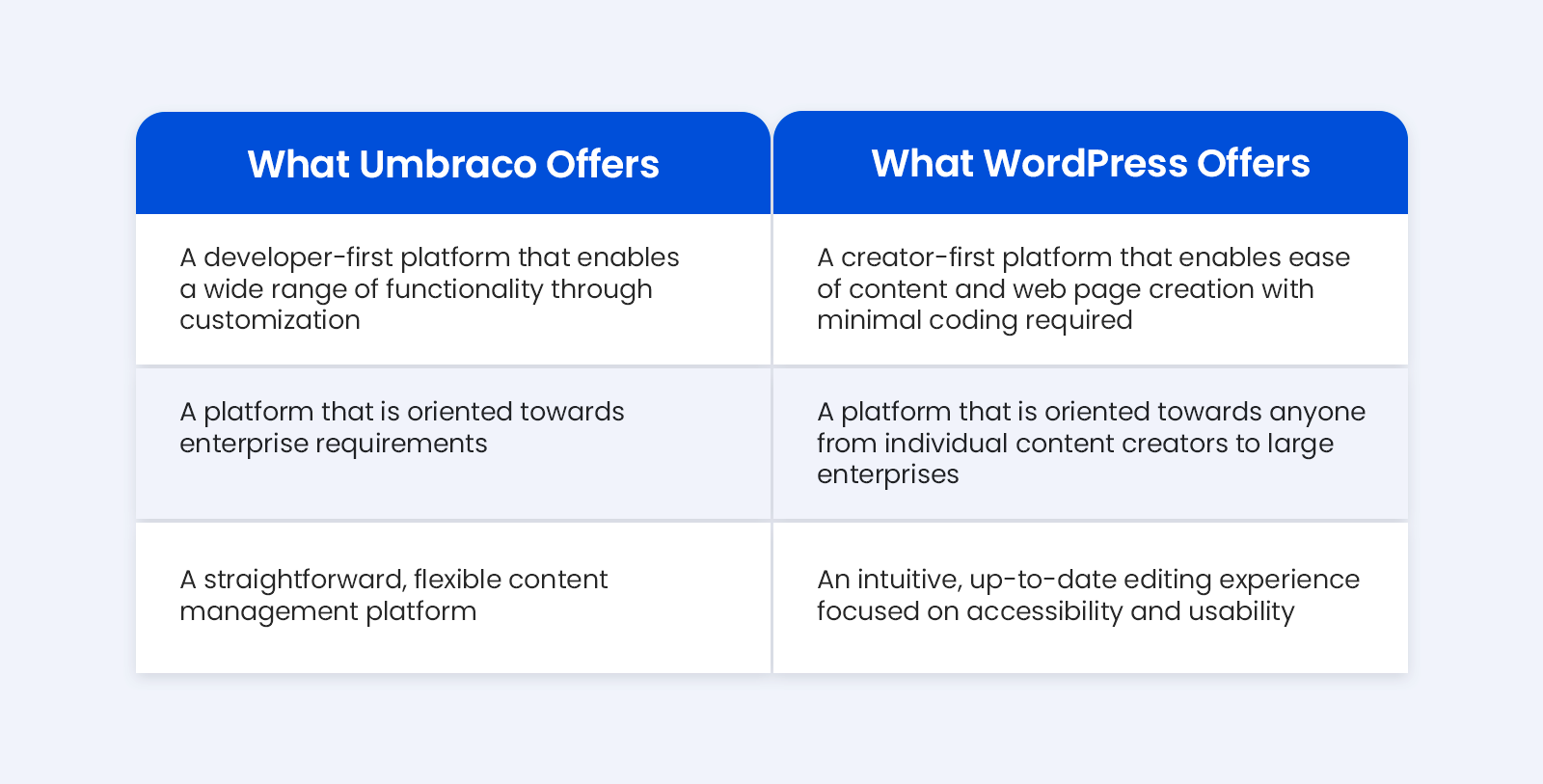
CMS stands for Content Management System. It helps make websites. You can create, edit, and publish content easily. WordPress is a popular CMS. Many people use it. But, there are other CMS options like Joomla and Drupal. Each CMS has its own features. Some are easy, others need skills. WordPress is known for its user-friendly interface. It is great for beginners.
WordPress is used for blogs and small business sites. It is also used for portfolios and e-commerce sites. Other CMS options are used for bigger projects. They are often used by large companies. These systems offer more control. They can handle complex tasks. WordPress is simple and flexible. It works for many types of websites.
Credit: successive.tech
Benefits Of Using Cms
A CMS offers great flexibility. You can change how your website looks. You can make it unique. Many tools help with this. You do not need to know coding. Pick a template. Add your own pictures and words. Your website will look different from others.
Customization is easy. Add features like a shop or a blog. Choose from many options. Make your site what you want it to be. It’s simple and fun.
A CMS can grow with you. It is scalable. Start small. As you grow, add more pages. Add more features. Your website can handle it. You do not need to start over. Just expand what you have.
This saves time. It saves money too. Your website can become big. It will still work well. This is a big advantage of using a CMS.
Benefits Of Using WordPress
WordPress is easy to use. Kids can learn it fast. You don’t need to be a tech expert. With a simple dashboard, you can manage your website. This makes it perfect for beginners. You can add posts, images, and videos with ease. Even changing themes is simple. No coding needed. Its interface is intuitive and clear.
WordPress has a big community. Many people use it. You can find help easily. There are forums and groups for support. People share tips and solutions online. You can ask questions and get answers quickly. This makes solving problems easier. Community members often create plugins. These plugins add more features to your site.

Credit: www.facebook.com
Choosing The Right Platform
Businesses need a platform that is flexible and scalable. CMS offers customization with plugins and themes. WordPress is a popular choice for blogs and websites. It is easy to use and has many plugins. Security is important for business websites. Both platforms offer security features. Businesses might need technical support. CMS often has better support options.
Personal projects may not need many features. WordPress is good for small projects. It is simple and quick to set up. CMS can be complex for beginners. WordPress has a large community for help. Themes and plugins make it easy to customize. Choose based on your project needs.
Future Trends
Exploring the future of content management, CMS and WordPress offer distinct features. CMS serves as a broad platform for managing digital content. WordPress, a specific type of CMS, focuses mainly on blogging. Both provide diverse tools, but WordPress is user-friendly, while CMS can be more complex.
Technological Advancements
Technology is always changing. CMS platforms will get smarter. AI will help with better tools. Users will enjoy easier use. Developers will find creating faster. Security will improve too. WordPress will add new features. It will focus on user experience. New plugins will be developed. Websites will load faster. Designs will be more creative.
Market Predictions
More people will use CMS platforms. Businesses will need better online presence. WordPress will remain popular. E-commerce will grow quickly. More small businesses will go online. Mobile-friendly sites will be in demand. SEO tools will become important. Websites will need to be fast. People will want easy-to-use sites. Security will be a top priority.
Frequently Asked Questions
What Is A Cms?
A CMS, or Content Management System, is software that allows users to create, manage, and modify website content without needing specialized technical skills. It serves as a backend interface, streamlining the process of building and maintaining websites.
Is WordPress A Cms?
Yes, WordPress is a popular CMS. It powers millions of websites globally. Known for its user-friendly interface, WordPress offers flexibility and customization. It supports plugins and themes, enhancing website functionality and design.
How Does Cms Differ From WordPress?
CMS is a broad category, while WordPress is a specific example. CMS includes various platforms like Joomla and Drupal. WordPress is renowned for its ease of use and vast community support, making it unique among CMS options.
Why Choose WordPress Over Other Cms?
WordPress is preferred for its simplicity and extensive plugin library. It offers customization and SEO-friendly features. The large community provides support and regular updates, ensuring website security and performance.
Conclusion
Choosing between CMS and WordPress depends on your needs. CMS offers diverse features. WordPress excels in simplicity and ease. Both have pros and cons. CMS suits complex sites. WordPress works well for blogs and small businesses. Consider your technical skills and project scope.
Compare customization options. Decide based on your budget. Evaluate hosting requirements. Both platforms support SEO. Each has a vibrant community. Beginners find WordPress easier. Advanced users may prefer CMS flexibility. Ultimately, your choice impacts your site’s success. Make an informed decision.
Start your journey today.