Have you ever wondered how to make your WordPress text look clean and professional? If you’re striving for that polished look, understanding the “Justify” feature on WordPress might be your golden ticket.
This tool can transform your text, giving it a neat, aligned appearance that appeals to the reader’s eye. Imagine your words, perfectly aligned, creating a sense of balance and harmony on the page. In a world where first impressions are everything, making your content visually appealing can captivate your audience and keep them engaged.
By the end of this post, you’ll not only understand what “Justify” does but also how it can enhance your website’s readability and aesthetic appeal. Ready to elevate your content game? Let’s dive into the world of text justification on WordPress.

Credit: mycodelesswebsite.com
Justify Text In WordPress
Justifying text makes it look neat and tidy. All lines line up on both sides. This style is common in books and newspapers. WordPress used to have a justify button. Now, it’s missing in the latest versions. But don’t worry. Plugins can help! They add justify options back.
You can also use CSS for this. It needs a little coding. Add a simple line: text-align: justify; in the style settings. Using the block editor, you can apply custom CSS. Some themes might already support this. Explore your theme settings.
Justified text looks professional. It is also easy to read. Try it out on your WordPress site today!
Credit: bdthemes.com
Importance Of Text Alignment
Text alignment is how text lines up on a page. It makes text look neat. Words can be set to the left, right, or center. Some people like to justify text. Justifying makes each line the same width. It fills the whole space from left to right.
Justified text gives a clean look. It can be found in books and newspapers. Some people think it is easy to read. Others say it makes words too spaced out. Choosing the right alignment can make a big difference. It helps readers follow the text. Your choice depends on what looks best for your content.
How To Use The Justify Option
First, open your WordPress dashboard. Click on “Posts” or “Pages.” This will take you to the list. Find the post you want to edit. Click “Edit” to open the editor. Now, you are ready to make changes. Ensure you are in the “Visual” tab. This view lets you see your changes. It is easy to use.
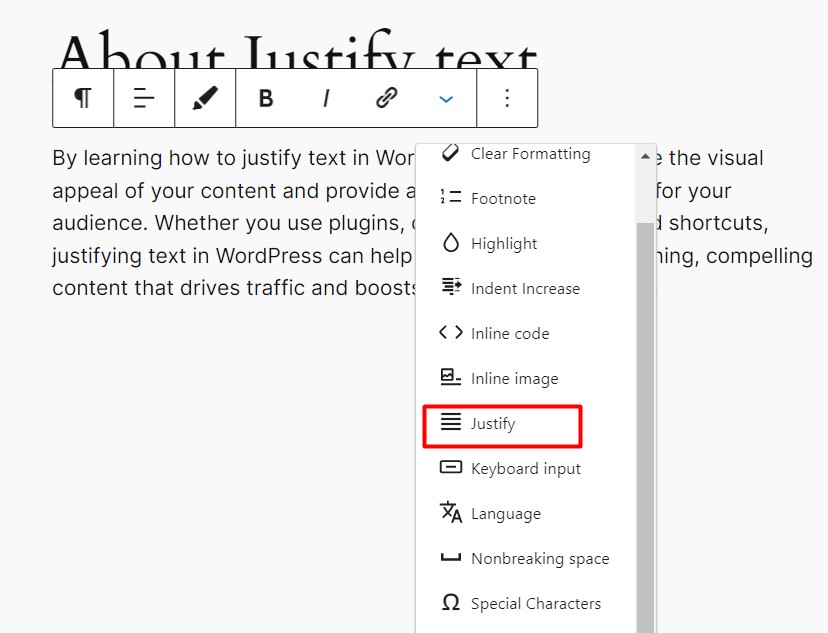
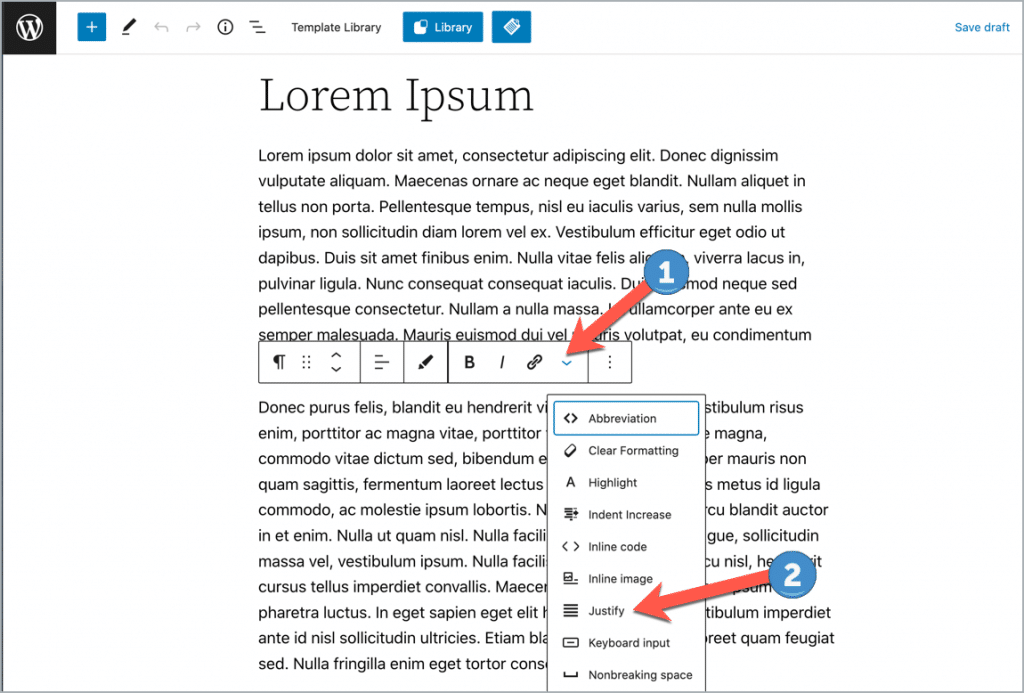
Look at the toolbar above your text. It has many buttons. Search for the “Justify” button. It looks like four lines in a block. Sometimes, you may need to click on the “Toolbar Toggle” to see it. Not all themes show it by default. Make sure you find it before you start.
Select the text you want to justify. Click the “Justify” button in the toolbar. Your text will align evenly on both sides. This makes your text look neat. If you change your mind, click again to undo.
Using Plugins For Justification
Justify on WordPress aligns text evenly across both margins, creating a clean and professional look. Plugins offer enhanced control, allowing users to customize text justification effortlessly. These tools simplify formatting, ensuring consistent style across your site.
Popular Justification Plugins
WordPress has many plugins for text justification. Some plugins are very popular. One such plugin is Justified Gallery. It helps align images and text. Another is WP Typography. This plugin makes text look nice. Advanced Editor Tools is also popular. It adds more formatting options. These plugins are easy to use.
Installation And Activation
Installing a plugin is simple. Go to the WordPress dashboard. Click on Plugins, then Add New. Search for the plugin name. Click Install and then Activate. The plugin will be ready for use.
Configuring Plugin Settings
After activation, configure the plugin. Go to the settings page. Adjust the options as needed. Each plugin has different settings. Some have sliders. Others have checkboxes. Save the changes. The text will justify as desired.
Custom Css For Text Justification
Custom CSS can help justify text on WordPress. Add CSS to change how text looks. Use CSS to make text line up well. This gives neat and tidy paragraphs.
Adding Custom Css
First, go to the WordPress dashboard. Find the customizer under “Appearance.” Click “Additional CSS.” Write code to justify text. Make sure it’s clear and simple.
Targeting Specific Elements
Use CSS to target elements like paragraphs and headings. Apply styles to specific parts of the text. This helps make certain areas look nice. Choose elements wisely for best results.
Ensuring Compatibility
Check if CSS works on all browsers. Some may not support text justification well. Test changes on different browsers. Keep compatibility in mind. This ensures a good user experience.
Pros And Cons Of Justifying Text
Justifying text in WordPress aligns paragraphs neatly, creating a clean look. This style can enhance readability and visual appeal. Yet, it may cause uneven word spacing, making text harder to read on some screens. Balancing design and readability is key to using justified text effectively.
Enhanced Readability
Justifying text makes the edges straight. This can help eyes follow lines better. It feels organized. Some people find it easier to read big paragraphs this way. Words line up neatly. No uneven spaces between words.
Aesthetic Appeal
Justified text looks neat and tidy. It gives a polished look to pages. People like when text is aligned like a block. It can make your page look more professional. Many books and newspapers use it.
Potential Drawbacks
Sometimes, words get too spaced out. This can make reading hard. Not all screens show justified text well. Small screens can break lines oddly. Readers might get confused. Ragged edges can be better on small devices.
Best Practices For Text Justification
Use justify for large blocks of text. It makes reading easier. Short texts are better left aligned. This keeps words neat and tidy. Always think about your audience. Will they find it easy to read?
Keep the text format the same. This is important for uniformity. Changes in style can confuse readers. Stick to one format throughout your page. Readers love consistency.
Too much justified text can be hard to read. It can create awkward spaces. Avoid using it for every paragraph. Let the text breathe. Use it wisely and sparingly for better results.
Troubleshooting Justification Issues
Justify on WordPress aligns text evenly on both sides of a page. This creates a clean, professional look. Troubleshooting justification issues involves adjusting settings to ensure text appears correctly formatted. Proper justification enhances readability and aesthetic appeal on your WordPress site.
Common Problems
Text not aligning can be a big issue. Often, the text looks different on mobile. Fonts might not show correctly. Some plugins may cause conflicts. Too many custom codes can break the layout.
Quick Fixes
Try removing extra plugins first. Use default themes to check the problem. Clear your browser’s cache. This often solves many issues. Ensure your WordPress is updated.
Seeking Support
Visit WordPress forums for help. Experts there can guide you. Many have faced similar issues before. You can also check the plugin’s support page. Developers provide solutions there.
Credit: wordpress.org
Frequently Asked Questions
How To Justify Text In WordPress?
To justify text in WordPress, you can use the built-in text editor options. In the Classic Editor, simply select the text and click the justify button. For the Block Editor, you may need a plugin as it doesn’t have a native justify option.
Is Justifying Text Good For Seo?
Justifying text itself does not impact SEO directly. SEO focuses more on content relevance, keyword usage, and user experience. However, justified text can enhance readability and presentation, indirectly benefiting user engagement, which is a factor in SEO performance.
Can I Justify Text Using A Plugin?
Yes, you can justify text using WordPress plugins. Some plugins offer text styling options including justification. Popular plugins include TinyMCE Advanced, which adds more formatting features to your WordPress editor, allowing easier text alignment control.
Why Is Justify Option Missing In Block Editor?
The justify option is missing in WordPress’s Block Editor due to design choice. WordPress developers prioritize readability and usability. Justified text can sometimes affect readability, so the option is not included by default to encourage better text alignment practices.
Conclusion
Justify on WordPress makes text alignment easy. It provides a clean look. Readers find justified text pleasing. It helps in creating neat paragraphs. This tool is useful for bloggers. Easy to apply. Keeps content organized. Enhances readability for visitors. Users enjoy a balanced layout.
No more uneven text edges. Simple to use for everyone. Justify is a handy feature. Ideal for clear and tidy posts. Understanding this tool improves writing skills. Discover the benefits of aligned text. Explore WordPress features further. Make your blog more attractive.
Happy blogging!