
Have you ever wondered how some websites have that extra pop and depth, making images and text stand out effortlessly? The secret often lies in a simple yet powerful design tool: the drop shadow.
If you’re using WordPress and aiming to enhance the visual appeal of your site, understanding drop shadows is a game-changer. This subtle effect can transform flat and ordinary elements into eye-catching highlights that captivate your audience’s attention. You’ll discover how easy it is to apply this technique to your WordPress website, adding an extra layer of professionalism and style that keeps visitors engaged.
Ready to delve into the world of drop shadows and make your website shine? Let’s explore how you can elevate your site’s design with just a few clicks.
Drop Shadow Basics
Drop shadow in WordPress adds depth to elements, making them stand out visually. This effect simulates a shadow behind text or images. It’s a simple way to enhance design aesthetics and create a layered look on websites.
Definition And Purpose
Drop shadow is a visual effect. It creates an illusion of depth. This effect makes text or images pop out. It adds a shadow behind elements. The shadow looks like it’s cast by a light.
The purpose is to enhance the design of a webpage. It provides a 3D-like appearance. This effect can make a site more attractive. Users find it easier to see content. Drop shadow can also highlight key parts of a page.
Visual Impact On Websites
Drop shadow can change how a site looks. It can make a design look more modern. Shadows create contrast. This helps important details stand out.
Many designers use shadows for better user experience. Shadows guide visitors’ eyes to important parts. They can improve the overall feel of a site.

Credit: developer.wordpress.org
Applications In WordPress
Drop shadows can make text stand out. They add a soft, dark edge. This makes words easy to read. Especially on bright backgrounds. Shadows help letters pop. Readers will not miss important details.
Images can look flat. Adding a drop shadow gives depth. It makes them seem more real. Your website looks lively. Visitors may find images more appealing. Depth adds a touch of professionalism.
Buttons are important. Drop shadows make them easy to find. They look like they are raised. Users will click them more often. This can help with navigation. A small change can make a big difference.
Adding Drop Shadow In WordPress
WordPress has many themes with built-in drop shadow options. These features are easy to use. Find them in the theme customizer. Just click and choose your shadow style. You can make text or images stand out. Try different shadows. See which looks best. This makes your site unique and eye-catching. No coding needed.
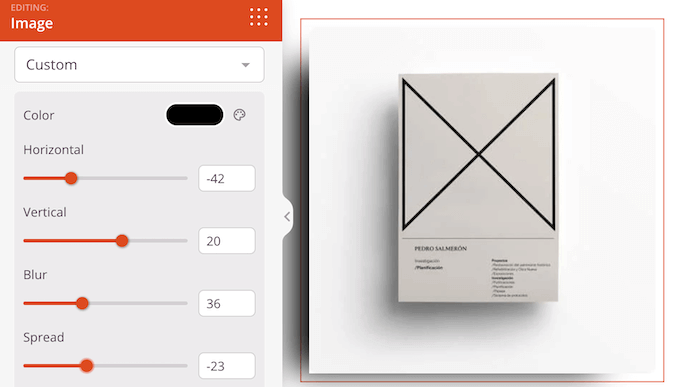
Custom CSS allows more control over shadows. You can write your own code. Add it in the Additional CSS section. Use code like box-shadow or text-shadow. This creates different effects. Adjust color, blur, and angle. Makes your site look professional. Practice and experiment. This helps you learn more about CSS.
Credit: www.wpbeginner.com
Plugins For Drop Shadows
Drop shadows in WordPress add depth and emphasis to website elements. These subtle effects create a sense of layering and dimension, enhancing visual appeal. Plugins offer easy ways to apply and customize drop shadows without coding skills. They help make your site more engaging and visually dynamic.
Top Plugins To Consider
Many plugins help add drop shadows in WordPress. Box Shadow is a popular choice. It offers easy controls. Shadow Effects gives more options. It’s perfect for beginners. CSS Hero is another tool. It helps with CSS styling. Many use it for drop shadows too.
Installation And Setup Guide
First, go to the WordPress dashboard. Then, click on Plugins. Next, select Add New. Type the plugin name in the search box. Hit Install. Once installed, click Activate. Now, the plugin is ready to use. You can find its settings under Appearance or Settings. Here, you can adjust shadow settings.
Design Tips And Best Practices
The shadow color should match your design. Bright colors can look odd. Neutral colors often work best. They blend well with most designs. Dark shadows add depth. Light shadows are subtle. Choose wisely for the best effect.
Shadow blur makes edges soft. Sharper shadows are bold. Adjust the spread to change size. A large spread is wide. A small spread is narrow. Blending blur and spread creates balance. This makes shadows look natural.
Shadows should not overpower your design. They must complement it. Balance is key. Too much shadow can be distracting. Too little may seem flat. Finding the right balance enhances your design. It makes it appealing.

Credit: developer.wordpress.org
Common Challenges
Drop shadow in WordPress often poses difficulties like inconsistent styling and browser compatibility issues. Users may struggle with customization and achieving desired visual effects. Additionally, integrating drop shadows with various themes or plugins can result in unexpected design challenges.
Browser Compatibility Issues
Drop shadows can look different in each browser. Some browsers may not show the shadow at all. This can make your website look odd. It’s important to test on all major browsers. This includes Chrome, Firefox, and Safari. Ensure the shadow effect is consistent.
Performance Considerations
Adding too many shadows can slow down your site. This can make visitors leave. Fewer shadows can help your site load faster. This is important for a good user experience. Keep your design simple. Ensure your website runs smoothly on all devices.
Future Trends
Explore drop shadow in WordPress for a simple, effective way to enhance visuals. It adds depth and dimension to web elements. Users can easily apply this feature to text, images, or buttons, enhancing the overall aesthetic.
Evolving Design Aesthetics
Designs change over time. Drop shadows are now more than simple effects. They give depth to images and text. This makes them look real and interesting. New tools offer more choices for shadows. Designers can now create soft, blurred, or colorful shadows. These trends help websites look modern and fresh. Shadows can highlight important parts of a page. They make visitors focus on key details. Designing with shadows is fun and creative. It adds life to flat designs. Shadows are a big part of today’s design world.
Advanced Shadow Techniques
Advanced techniques make shadows even more special. Layered shadows can create a 3D effect. This makes objects pop out from the screen. Gradient shadows add color changes to shadows. This makes them look magical and dynamic. Interactive shadows change when you move the mouse. It surprises and delights visitors. Custom shadows let designers have complete control. They can shape shadows to fit any design. These techniques are exciting. They push the boundaries of regular designs. Shadows are not just simple now. They are smart and creative.
Frequently Asked Questions
How To Add Drop Shadow In WordPress?
Adding drop shadow in WordPress can enhance visual appeal. Use CSS to apply shadows to elements. Simply add a box-shadow property to your stylesheet. Alternatively, WordPress plugins like Shadow Effects can help add shadows without coding. This improves depth and focus on your content.
Can Drop Shadow Improve Website Design?
Yes, drop shadows can greatly enhance website design. They create a sense of depth, making elements stand out. This visual effect can draw attention to key areas, improving user experience. Properly applied shadows can guide visitor focus, making navigation intuitive and engaging.
Are Drop Shadows Mobile-friendly?
Drop shadows are generally mobile-friendly when applied correctly. Ensure shadows are subtle and do not overwhelm small screens. Test your design on various devices to maintain usability. Responsive design techniques can help ensure that shadows enhance rather than hinder mobile experience.
What Are Best Practices For Using Drop Shadow?
Use drop shadows sparingly to maintain clean design. Ensure shadows are subtle and complement your theme. Consider the direction and intensity of light to create realistic effects. Experiment with colors and blur to achieve desired results without overwhelming your content.
Conclusion
Drop shadow in WordPress adds depth and style to your site. It enhances visual appeal, making elements stand out. Easy to apply, it requires minimal coding skills. Many plugins offer simple drop shadow options. Experiment with different shadow settings for unique effects.
Keep user experience in mind; too much shadow can distract. Balance is crucial for professional results. Use shadows to guide attention subtly. This small design tweak can improve your website’s aesthetics. Explore its potential to create an engaging and visually appealing website.
Embrace creativity while maintaining clarity and readability.


