
Imagine scrolling through a stunning website, where every image seems to tell its own story. Now, picture those stories becoming even more vivid and engaging with just a few words.
That’s the magic of captions in WordPress. Captions can transform a simple image into an impactful message, enhancing your content and drawing your visitors deeper into your narrative. As a WordPress user, understanding how to effectively use captions not only enriches your site visually but also boosts your SEO performance.
Curious about how captions can elevate your website? You’re in the right place. You’ll uncover the secrets to crafting captivating captions that not only captivate your audience but also improve your site’s visibility. Ready to unlock the potential of captions in WordPress? Let’s dive in!
Credit: www.greengeeks.com
Caption Basics
Captions help explain pictures. They give extra details. WordPress lets you add captions easily. Captions appear under images. They tell what the picture shows. Sometimes they give credits. Captions help readers understand better. They make content more engaging. A good caption is short. It is clear. It gives the right information. Readers appreciate helpful captions. Captions can enhance the user experience.
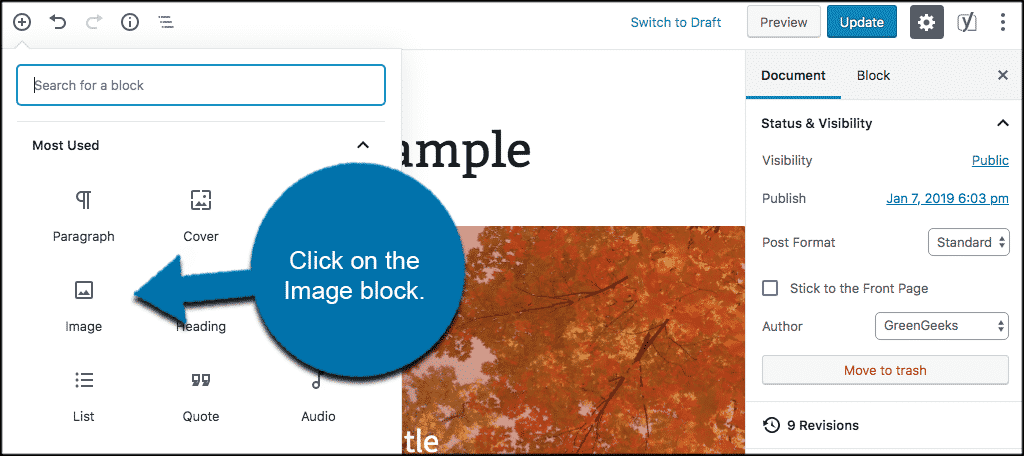
Add captions in WordPress by clicking the image. Find the caption box. Type your text there. Save changes to see the caption. Captions are simple to add. They are useful for all types of content. Always check your captions. Make sure they fit the image. Clear captions are important. They help readers connect with your message.
Role Of Captions
Captions help readers understand images better. They give extra details about what’s in the picture. This makes it easier for everyone to know the image’s purpose. Captions are important for people who can’t see the images well. They use screen readers to hear what’s in the picture. This makes the website more user-friendly for everyone.
Search engines like Google also look at captions. Good captions can help your site appear in search results. This means more people can find your site. Writing clear and short captions is best. Use simple words to describe the image. This helps people and search engines understand better.
Adding Captions To Images
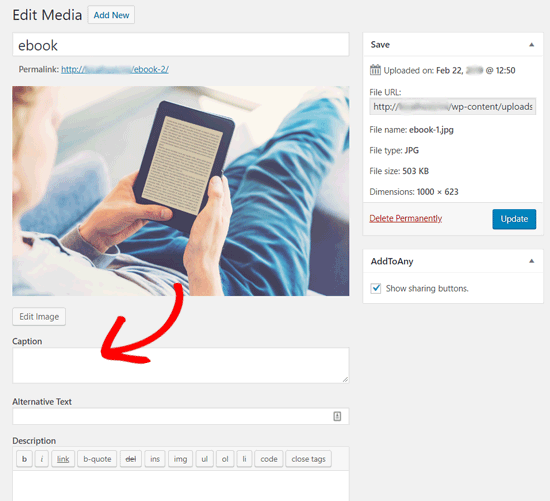
Use the Media Library to add captions. First, open your WordPress dashboard. Click on Media and then Library. Find the image you want. Click on it. A box will pop up.
In this box, you will see a field named Caption. Type your caption here. Keep it short and clear. Click Save when done. This will update your image with a caption.
Captions help explain images. They are useful for readers. Always add a caption when needed. This makes your site better.
You can add captions during upload. Click on Add New under Media. Select your image to upload.
Before you click Upload, you will see options. One of them is Caption. Type your caption in this box. Keep it simple.
Once done, click Upload. Your image will now have a caption. This helps users understand the image better. It also makes your site look good.
Caption Editing Tips
Choose words that are easy to read. Short words are best. Avoid tricky words. Keep it simple. This helps everyone understand. Your caption will be clear.
Share the most important details. Highlight the main point. Bold key facts. This makes them stand out. Readers will notice. They will remember better.
Write sentences with few words. Short sentences are easier. They are quick to read. This keeps readers interested. They stay on your page longer.
Stick to one style. Be consistent. This looks neat and tidy. It helps the reader. They can follow along easily. Consistency is key.
Always check your work. Preview the caption. Look for mistakes. Fix them before posting. A clean caption is professional. It builds trust with readers.
Caption Styles
Captions make images more interesting. Font and color choices are important. Kids like bright colors. Bold fonts are easy to read. You can pick any color you like. Choose a font that matches your theme. Color contrast helps words stand out. A good caption catches the eye. It should be clear and fun.
Alignment options help place captions. You can align left, right, or center. Left alignment is neat. Center looks balanced. Right alignment feels different. Each style gives a unique look. Try different alignments. See what fits best with your design. Play with styles to make your site cool.
Credit: www.joomunited.com
Seo Benefits Of Captions
Captions can boost your website’s SEO. They help search engines understand images. This increases your site’s visibility. Captions provide context to images. Users find content more engaging. This can lead to longer site visits. Longer visits can improve your site’s ranking. Captions also enhance accessibility. They help people with disabilities. More people can enjoy your content. This improves user experience. A better experience means more repeat visits. This is good for SEO.
Properly written captions can include keywords. This can further boost SEO. Keywords help search engines find your site. This can lead to more traffic. More traffic means more potential customers. Captions are a simple way to enhance your site. They offer multiple benefits. Use them wisely to improve your site.
Common Caption Mistakes
Many people forget to use relevant keywords in captions. This makes it hard for search engines to find your images. Another mistake is using very long captions. Long captions can confuse readers. Keep them short and clear.
Sometimes, captions miss important information. Tell what the picture is about. This helps readers understand. Using poor grammar is another common mistake. Double-check your sentences. Make sure they are correct.
Some people do not update their captions. When you change an image, update its caption too. This keeps your content fresh. Also, avoid using irrelevant jokes or comments. Stay focused on the image topic.
Best Practices For Captions
Captions help explain images in WordPress. They make images more engaging. Using clear and short sentences is important. Readers should understand them easily. Place the caption near the image. This helps readers connect the words with the picture.
Avoid using too many words in captions. Focus on the main idea. Highlight the most important points. Using keywords in captions can also help with SEO. It makes your content easier to find online. Ensure the caption is relevant to the image.
Always check grammar and spelling. Mistakes can confuse readers. If you follow these steps, captions can improve your blog. They will make your content more interesting.
Credit: www.wpbeginner.com
Frequently Asked Questions
What Is A Caption In WordPress?
A caption in WordPress is a short text description. It accompanies images to provide context or credit. Captions enhance user engagement and accessibility. They can be added directly when inserting images into posts or pages. Proper use of captions can improve SEO by adding relevant keywords.
How To Add A Caption To WordPress Images?
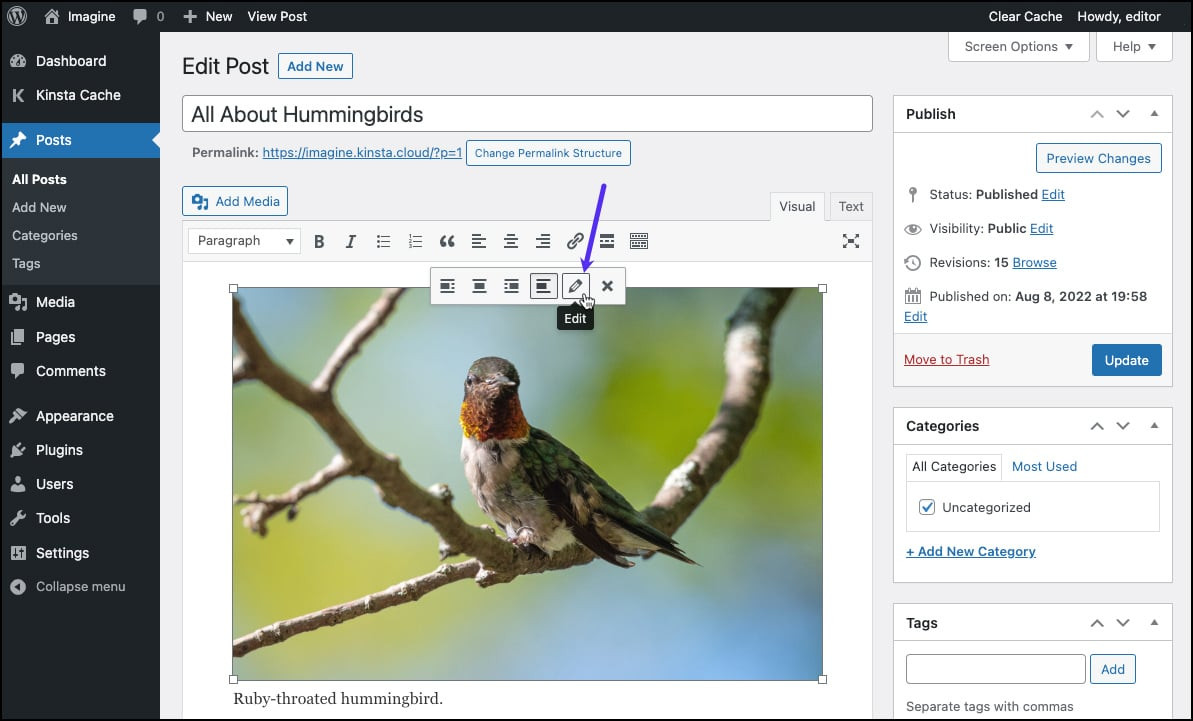
To add a caption, select the image in your post editor. Click the “Edit” button to access image settings. Enter your caption text in the designated field. Save changes to apply the caption. This helps in providing context and can improve image SEO.
Can Captions Improve WordPress Seo?
Yes, captions can improve WordPress SEO. They provide additional text content for search engines to index. Including relevant keywords in captions can enhance visibility. Captions also improve user experience by offering context. This can lead to better engagement and increased traffic.
Are Captions Necessary For WordPress Images?
Captions are not strictly necessary but highly recommended. They provide valuable context and credit information. Captions can improve accessibility for visually impaired users. They enhance user understanding and engagement. Additionally, they contribute to SEO by including relevant keywords.
Conclusion
Captions in WordPress improve content clarity and engagement. They provide context for images, making your posts more informative. Readers enjoy better understanding, which keeps them on your site longer. Captions also enhance accessibility, helping visually impaired users. Adding captions is easy in WordPress, boosting your SEO efforts.
Search engines appreciate this extra layer of information. This simple feature can elevate your blog’s effectiveness. Experiment with different styles to find what suits your content best. Remember, captions are a small detail with a big impact. Embrace them to make your WordPress blog more engaging and accessible.


