
Have you ever wondered how a simple web address can transform into a powerful tool for customizing your WordPress site? If you’re curious about the magic behind URLs and how they can be tailored to fit your needs, you’re in the right place.
The concept of a query string might sound technical, but understanding it can unlock new levels of control and personalization for your website. Imagine being able to tweak settings and retrieve specific data with just a few characters added to your URL.
You’ll discover what a query string is in WordPress and how it can become your secret weapon in optimizing your site’s functionality and performance. Dive in, and you’ll find that mastering query strings is easier than you think—and can be incredibly rewarding!
Basics Of Query Strings
A query string is a part of a URL. It helps in transferring data. You see it after a question mark in a URL. Query strings are useful for filtering or sorting data on a website. They can hold key-value pairs. These pairs help in passing information between pages. For example, it can show products based on a category. Query strings make WordPress websites more dynamic.
Query strings are simple to use. They start with a question mark, followed by key-value pairs. Each pair is separated by an equals sign. Multiple pairs are joined by an ampersand. For example: `?key1=value1&key2=value2`. This structure tells the server what data is needed. The server then shows the right content. Query strings allow websites to be interactive and tailored to user needs.

Credit: wp-staging.com
Components Of A Query String
A query string in WordPress includes key components such as parameters, keys, and values. These components help in passing data between web pages and servers. Parameters are identified by keys, which are assigned specific values to modify or retrieve information from a URL.
Key-value Pairs
A query string in WordPress uses key-value pairs. The key is like a name tag. It tells what the data is about. The value is the actual data. For example, in ?name=John, name is the key, and John is the value.
Separator Symbols
Separator symbols are used to separate parts of a query string. The question mark (?) starts the query string. The ampersand (&) separates different key-value pairs. For instance, in ?name=John&age=30, the ampersand separates name=John and age=30. These symbols help organize the data. They make it easy to read.
Using Query Strings In WordPress
Query strings help in many ways on a website. They can filter search results. Sort products by price or popularity. Track user actions with UTM parameters. Marketers use them to understand visitor behavior. Developers use them to customize page content. They make websites more interactive.
Query strings bring several benefits to WordPress sites. They enhance SEO by creating dynamic URLs. Help in tracking marketing campaigns effectively. Improve user experience with personalized content. They are easy to implement. Require no advanced coding skills. They are crucial for e-commerce sites. Use them to sort and filter products. It makes shopping easier.

Credit: gracethemes.com
Customizing Query Strings
Query strings in URLs are like secret codes. They tell the website what to do. You can add them to your links. This changes how your page looks or works. It’s like giving your webpage new instructions. You can make a page show different things to different people. This is very helpful for personalizing content. It’s a simple yet powerful tool.
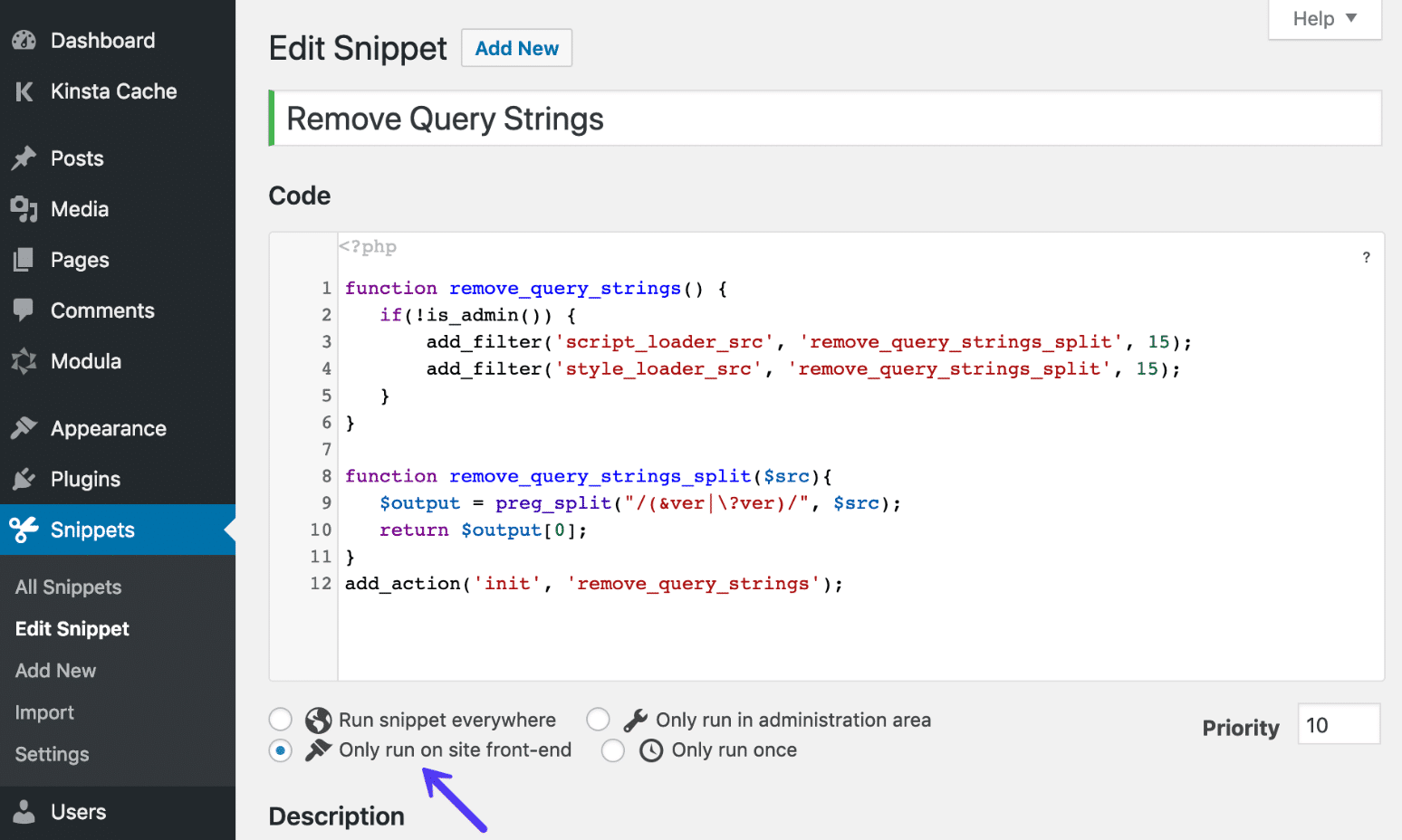
Plugins can help with query strings. They make things easier. You don’t need to know coding. Just install the right plugin. It does the hard work for you. Plugins can change query strings without breaking your site. They are like magic helpers. Many plugins are free. Some plugins have extra features. These are paid versions. Choose the one that fits your needs.
Seo Considerations
Query strings in URLs can affect search rankings. Long and confusing URLs can confuse search engines. Short and clear URLs are better. They help search engines understand your content. Query strings can make URLs long. This may lower page rank. Use query strings wisely to avoid this issue.
Keep URLs clean and simple. Avoid unnecessary query strings. This helps with better indexing. Use readable words instead of random letters. Ensure keywords are in the URL. This improves search visibility. Remember, a clean URL is user-friendly. It also helps search engines.
Credit: kinsta.com
Troubleshooting Query Strings
Query strings can sometimes cause problems. One common error is a 404 page. This means the page cannot be found. Another problem might be a broken link. This happens if the query string is wrong. These errors can confuse users.
First, check the URL carefully. Make sure there are no typos. Next, look at the query parameters. They must be correct and in order. Use a browser tool to inspect the query string. This helps find errors quickly.
Frequently Asked Questions
What Is A Query String In WordPress?
A query string in WordPress is a part of a URL that contains parameters. It helps to pass information between pages or retrieve specific data. Commonly used in search functions, it includes key-value pairs separated by `&`. Understanding query strings can aid in customizing and optimizing your site’s functionality.
How Do Query Strings Affect Seo?
Query strings can affect SEO by creating duplicate content issues. Search engines may index multiple versions of a page due to different query strings. This can dilute page authority and affect rankings. Using canonical tags or URL parameters in Google Search Console can help manage these effects.
Can Query Strings Improve Website Functionality?
Yes, query strings can enhance website functionality by enabling dynamic content delivery. They allow users to filter, search, and interact with data more efficiently. Developers can use query strings to customize user experiences and streamline data processing, improving overall site engagement and user satisfaction.
How To Modify Query Strings In WordPress?
To modify query strings in WordPress, you can use the `add_query_arg()` function. This function helps add, modify, or remove query string parameters. It’s useful for customizing URLs dynamically. Developers often use this function in themes and plugins to enhance site functionality.
Conclusion
Query strings in WordPress play a vital role. They help filter and sort data. Understanding them can improve website performance. They can also enhance user experience. Use query strings wisely for better SEO results. Keep them clear and concise. This ensures faster page loading.
Query strings can seem complex, but practice makes them easier. Experiment with them in a safe environment. Over time, you’ll get more comfortable. Always remember, simplicity is key. This keeps your website user-friendly and efficient. Happy exploring!


