
Have you ever noticed a mysterious link back to your blog post and wondered what it means? If you’re using WordPress, you’ve probably encountered the term “pingback.”
But what exactly is a WordPress post pingback, and why should you care about it? Imagine a world where your content effortlessly connects with other bloggers, enhancing your site’s visibility and fostering community engagement. That’s the power of pingbacks. Understanding pingbacks can unlock new opportunities for your blog.
It’s not just about getting more eyes on your content but also about building a network of interconnected posts. You’ll learn how this simple mechanism can help boost your SEO, improve your site’s authority, and create meaningful connections across the blogging universe. Stick around as we dive into the world of WordPress post pingbacks and uncover how this feature can elevate your blogging game. Whether you’re a seasoned blogger or just starting out, knowing the ins and outs of pingbacks could be the key to amplifying your online presence. Ready to transform your blog? Let’s get started!
Credit: 10web.io
Understanding Pingbacks
A pingback is a special link notification. It tells a blog owner when their post is linked. This link comes from another blog. Pingbacks help bloggers connect. They share ideas and create networks. It’s like a virtual handshake between websites.
Pingbacks started with early blogging platforms. They evolved to improve website communication. At first, only text links were used. Now, they include comments and trackbacks. This evolution helped blogs grow. It made sharing content easier and faster.
How Pingbacks Work
A pingback is like a digital handshake between blogs. When you link to another blog, your blog sends a signal. This signal is a pingback. The linked blog receives this and checks the link. If the link is valid, it shows a short message on the linked blog. This process helps bloggers connect and share ideas.
In WordPress, pingbacks help track who links to your posts. They appear as comments under your post. This feature helps bloggers know who is talking about their work. It also helps bring more readers to your blog. Pingbacks create a network of shared content. This makes content discovery easier for readers.
Benefits Of Using Pingbacks
Pingbacks help your website by creating backlinks. Backlinks are important for SEO. They make your site more visible to search engines. This can lead to higher rankings. Higher rankings bring more visitors. More visitors can mean more success.
Pingbacks make your site more interactive. They show connections between different blogs. Visitors can click on pingbacks and explore related content. This keeps them on your site longer. Longer visits can lead to more engagement. Engagement is good for your blog.
-3.jpeg?width=650&name=What%20Is%20a%20WordPress%20Pingback%3F%20%5B+%20How%20to%20Disable%20Them%5D%20(freelancer%20-%20Colin)-3.jpeg)
Credit: blog.hubspot.com
Differences Between Pingbacks And Trackbacks
A WordPress post pingback is an automatic comment created when another blog links to your content. Unlike trackbacks, which require manual approval, pingbacks are generated directly by WordPress. This makes them more convenient but less customizable compared to trackbacks.
Technical Distinctions
Pingbacks and trackbacks are ways for blogs to talk. They tell a blog that another blog wrote about it. Pingbacks use XML-RPC technology. They work automatically. No human action needed. Trackbacks need a person to send them. They use a different method. Pingbacks show only a link. Trackbacks show a short text. This helps readers know what it is about.
Use Cases And Preferences
Pingbacks are often used for linking posts. They are easy to set up. Bloggers who like simple tools choose them. Trackbacks are used for sharing more details. They let bloggers add personal notes. Some prefer trackbacks for this reason. Each has its own use. It depends on what a blogger needs.
Enabling And Disabling Pingbacks
A WordPress post pingback is a notification alerting you when another blog links to your content. Enabling or disabling pingbacks allows you to manage these alerts on your website, enhancing control over your content’s interaction with other blogs.
WordPress Settings
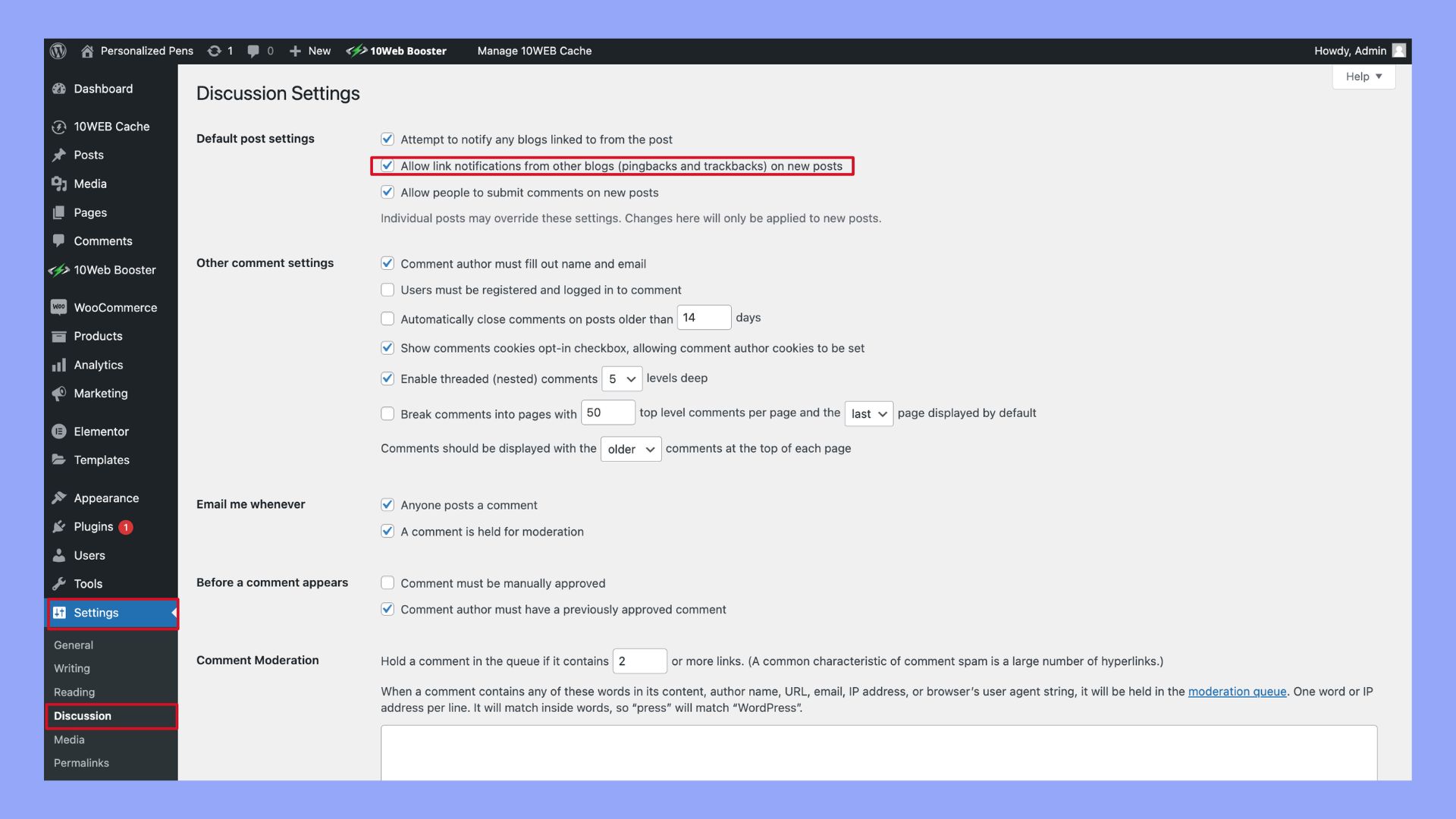
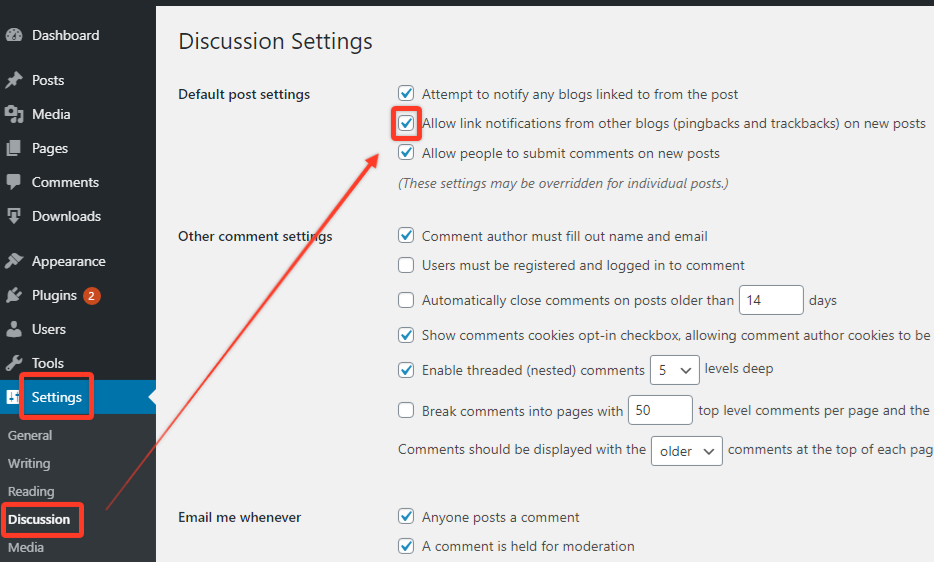
Pingbacks are notifications from other blogs. They tell you someone linked to your post. To manage pingbacks, visit your WordPress settings. Find the “Discussion” section. Here, you can enable or disable pingbacks. Tick the box to allow or remove the tick to stop them. This setting is simple to change anytime.
Pros And Cons
Pingbacks have benefits and drawbacks. They help you know who links to your content. This can increase engagement and traffic. But, they can also lead to spam links. Spam links might harm your blog’s reputation. It’s crucial to weigh the positives and negatives. Some bloggers love pingbacks. Others prefer to turn them off. Make the right choice for your blog.
Credit: www.wpdownloadmanager.com
Managing Pingback Spam
Pingbacks can be a problem. Spam is everywhere. Many bad websites send fake pingbacks. These are not real. They clog up your site. They make your website slow. They harm your reputation. Nobody likes spam. It is bad for everyone.
Strong spam filters are essential. They block unwanted pingbacks. Use plugins to help. Akismet is a popular choice. It’s reliable. Another method is to moderate. Review each pingback manually. Approve only the genuine ones. Disable pingbacks if needed. This stops spam completely. Always keep your software updated. New updates fix security holes. A safe site is a happy site.
Improving Blog Engagement
Building connections with readers is important for your blog. A pingback helps in linking blogs together. It shows that someone mentioned your post. This builds a network of related content. Readers find more posts on the same topic. This keeps them engaged longer. They explore other blogs linked to yours. It feels like a conversation between blogs.
Encouraging reader interaction is another benefit. Pingbacks show that someone values your content. Readers may leave comments. This creates a lively discussion. It invites more people to join. Readers feel part of a community. This makes your blog more interesting. Interaction boosts the visibility of your blog. It attracts new readers. Your blog grows with each pingback.
Frequently Asked Questions
What Is A WordPress Pingback?
A WordPress pingback is a type of comment. It’s automatically created when you link to another blog post. It notifies the linked blog owner. This helps in building connections and increasing site engagement. Pingbacks can be managed in your WordPress dashboard.
How Do Pingbacks Work In WordPress?
Pingbacks work by sending an automatic notification. This happens when you link to another WordPress blog. The receiving blog can approve or reject the pingback. Once approved, it appears as a comment with a link back to your post.
Why Are Pingbacks Important For Seo?
Pingbacks help build backlinks, which are crucial for SEO. They indicate that other sites find your content valuable. This can improve your site’s authority and ranking. Additionally, they increase traffic and engagement by directing readers to relevant content.
How Can I Enable Pingbacks In WordPress?
To enable pingbacks, go to your WordPress dashboard. Navigate to Settings, then Discussion. Check the box for “Allow link notifications from other blogs. ” This will enable pingbacks for your posts. You can also manage them on individual posts.
Conclusion
Understanding WordPress post pingbacks can enhance your blogging experience. They connect related content, fostering a network of information. This feature helps improve SEO by linking relevant posts. It also encourages interaction between bloggers. Using pingbacks wisely can increase your blog’s reach.
They create a web of connections that engage readers. So, next time you write, consider using pingbacks. They might just bring more readers to your blog. Always keep learning and experimenting with WordPress features. This will help your blog grow and succeed.
Happy blogging!


