
Have you ever wondered how to host your ASP.NET Core Web API on Linux? You might think it’s a daunting task, especially if you’re accustomed to the Windows environment.
But here’s the secret: hosting your ASP. NET Core Web API on Linux is not just possible, it’s efficient and cost-effective. Imagine the power of leveraging Linux’s robust performance and stability for your web applications. In this guide, you’ll discover step-by-step how to smoothly transition your ASP.
NET Core Web API to a Linux server. By the end, you’ll have the confidence and knowledge to harness Linux’s full potential, creating a seamless experience for both you and your users. Ready to unlock new possibilities? Let’s dive in!
Setting Up The Linux Environment
Picking a Linux distribution is important. Ubuntu and CentOS are popular choices. They have good support and are easy to use. Ubuntu is user-friendly and great for beginners. CentOS is stable and often used in businesses. Both are good for hosting a web API. You can choose based on your needs. Always check the community support for help.
You need to install some packages first. .NET Core SDK is essential. It helps to build and run your API. Use the command line to install it. Use commands like `sudo apt-get install` for Ubuntu. For CentOS, use `yum install`. Make sure to install Nginx. It acts as a web server and helps manage traffic. Always update your packages. This keeps your server secure and fast.
Installing .net Core Sdk
First, go to the official .NET website. Find the .NET Core SDK page. Choose the version you need. Make sure it fits your Linux system. Click the download button. Wait for the file to finish downloading. Save it in a known location on your computer.
After downloading, open a terminal window. Type dotnet --version. Press enter. If you see a version number, it’s installed. If not, check your steps. Make sure you followed them right. It’s important to verify so everything works well.
Configuring The Asp.net Core Application
First, open your project in Visual Studio. Click on Build in the top menu. Then choose Publish. Follow the steps to create a folder for the published files. This process will create a folder with your application’s files. These files are ready to be deployed on a Linux server.
Environment variables help configure your app. They can be set on your Linux server. Use the export command in the terminal. For example, type export ASPNETCORE_ENVIRONMENT=Production. This sets your app to run in Production mode. Remember, these settings can affect how your app behaves.
Credit: codewithmukesh.com
Setting Up A Reverse Proxy
Nginx is a popular web server. It helps manage web traffic. Begin with installing Nginx. Use the terminal for this task. Type sudo apt update. Then type sudo apt install nginx. Wait for it to finish. Nginx is now on your system.
Configuration is important. Find the configuration file. It is in /etc/nginx/sites-available/default. Open this file. Add your server block. Use proxy_pass to point to your ASP.NET Core app. Test your configuration. Run sudo nginx -t. Restart Nginx with sudo systemctl restart nginx. Now Nginx is ready to serve your app.
Deploying The Application
First, you need to build your application on your local machine. After that, copy the files to the Linux server. Use SCP or FTP for easy file transfer. Keep all files in a dedicated folder. This helps you manage them better. Ensure your server has enough space. This avoids problems later.
Systemd helps manage services. Create a systemd service file. This file defines how your app starts. Include the path to your app in the file. Set the permissions correctly. This ensures smooth operation. Use `sudo systemctl start ` to start the app. Check its status with `systemctl status `. Make sure the app runs without errors.
Ensuring Security And Performance
Host Asp Net Core Web API on Linux to boost security and performance. Optimize server settings and use containers. Regular updates and monitoring ensure efficient operations.
Setting Up Ssl/tls
SSL/TLS keeps data safe. It protects information between server and client. To set up SSL/TLS, get a valid certificate. You can get it from a trusted provider. Install the certificate on your Linux server. Use tools like Let’s Encrypt for free certificates. After installation, configure your server. Make sure all connections use HTTPS. This stops eavesdropping and data theft.
Optimizing Server Performance
Good performance means fast websites. First, use a lightweight server like Nginx. It uses fewer resources and speeds up response times. Next, enable caching to store frequent data. This reduces server load. Finally, keep your server software updated. Updates fix bugs and improve speed. Regular checks ensure everything runs smoothly.
Monitoring And Maintenance
Deploying an ASP. NET Core Web API on Linux involves regular monitoring to ensure optimal performance. Maintenance tasks like updating software and managing resources are crucial to keep your server running smoothly. Implement automation tools for efficiency.
Setting Up Logging
Logging is vital for your web API. It helps track errors and performance. Use tools like Syslog or Journalctl for logging. They store log files safely. Log important events like requests and responses. Keep logs simple to understand. Check logs often for unusual patterns. Logs can show problems early. Fix them before they get worse.
Regular Updates And Backups
Regular updates keep your web API safe. Updates fix bugs and add new features. Check for updates weekly. Apply updates promptly. Backups protect your data. Store backups in a safe place. Backup your data often. Use tools like rsync or tar for backups. They make backups easy. Test backups regularly. Ensure you can restore data quickly if needed.
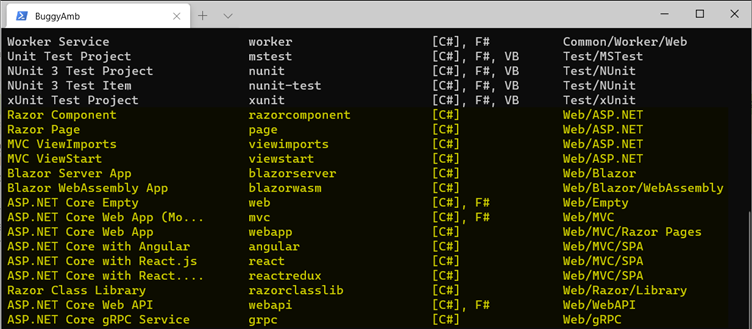
Credit: learn.microsoft.com
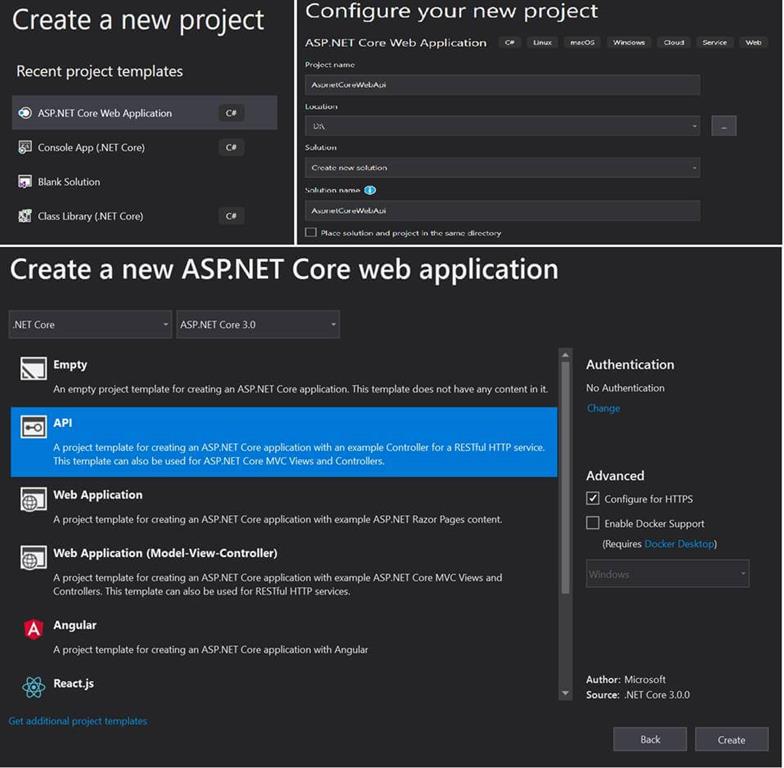
Credit: www.c-sharpcorner.com
Frequently Asked Questions
How To Host .net Core Web Api In Linux?
Install. NET Core SDK on Linux, publish your web API, and use Nginx for reverse proxy. Run the app with the ‘dotnet’ command. Configure firewall rules to allow necessary ports for access. Ensure dependencies are installed and test the application thoroughly for stability and performance.
Can We Host An Asp.net Website On A Linux Server?
Yes, you can host an ASP. NET website on a Linux server using. NET Core. This framework supports cross-platform hosting. Ensure your server has the necessary runtime installed. Hosting on Linux can be cost-effective and efficient. Consider using Docker for easier deployment and management.
Can I Deploy .net On Linux?
Yes, you can deploy. NET applications on Linux. Use. NET Core or. NET 5+ for cross-platform compatibility. . NET provides extensive documentation for Linux deployment. Tools like Docker and Kubernetes enhance deployment efficiency. Many cloud platforms support Linux-based. NET applications.
Enjoy seamless performance and scalability on Linux systems.
How To Install .net Core Sdk In Linux?
Install. NET Core SDK on Linux by updating package lists. Use commands: `sudo apt update`, `sudo apt install dotnet-sdk`. Verify installation with `dotnet –version`. Follow official Microsoft instructions for specific Linux distributions. Ensure your system meets all prerequisites for a smooth installation process.
Conclusion
Hosting Asp Net Core Web API on Linux is straightforward. Follow the steps carefully. Ensure you install necessary software. Check configurations for accuracy. Linux offers stability and security. Many developers prefer it. Compatibility with Asp Net Core is excellent. Testing is crucial for smooth operation.
Troubleshoot any errors promptly. Remember to update regularly. Keep your system secure. A well-maintained server provides reliable service. Users appreciate consistent performance. Hosting on Linux can be efficient and cost-effective. Give it a try! You might find it suits your needs perfectly.


