
Have you ever felt limited by the design options in your WordPress theme? You’re not alone.
Many WordPress users wish they could tweak their site’s appearance to better reflect their brand or personal style. This is where custom CSS comes into play. Imagine having the power to change fonts, colors, and layouts with just a few lines of code.
Custom CSS in WordPress lets you do just that. It’s like having a magic wand for your website’s design, allowing you to enhance and customize your site beyond the default settings. Curious about how you can use this tool to transform your website? Stick around, because we’re about to dive into the world of custom CSS, and you’ll discover just how easy it is to give your WordPress site a unique touch.
Custom Css Basics
CSS stands for Cascading Style Sheets. It helps design web pages. With CSS, you can change colors, fonts, and layouts. It makes websites look nice and organized. CSS works with HTML. HTML builds the structure. CSS styles the page.
WordPress is a popular tool for building websites. Custom CSS lets you change the look of your site. You can make it unique. Adjust colors to match your brand. Change fonts to improve readability. Even alter the layout to fit your needs. Custom CSS is powerful. It gives you control over your site’s appearance.
Why Use Custom Css
Custom CSS lets you change your website’s look. You can make it unique. Your site stands out with custom styles. You gain control over fonts, colors, and layout. It adds a personal touch. Visitors notice your site’s special design. This keeps them engaged.
Good user experience is key. Custom CSS helps achieve this. It makes navigation easy. Users find information faster. It ensures consistency across pages. This boosts satisfaction. Happy users return to your site. They spend more time exploring.
Adding Custom Css In WordPress
The Theme Customizer is a great tool. It helps you add Custom CSS easily. Access it through your WordPress dashboard. Go to Appearance and click Customize. Look for the Additional CSS section. Here, you can type your CSS code. Changes appear instantly. It’s simple and user-friendly. Best for small tweaks.
A Child Theme keeps your customizations safe. It protects them from updates. Create a new folder in your themes directory. Add a style.css file. You can write your CSS here. Always remember to use this method for big changes. It helps keep your main theme clean.
Plugins offer another way to add CSS. Search for Custom CSS plugins in the plugin directory. Install and activate your chosen plugin. Some popular options include Simple Custom CSS and SiteOrigin CSS. They provide an easy interface. Perfect for beginners. Your CSS changes will be safe during theme updates.
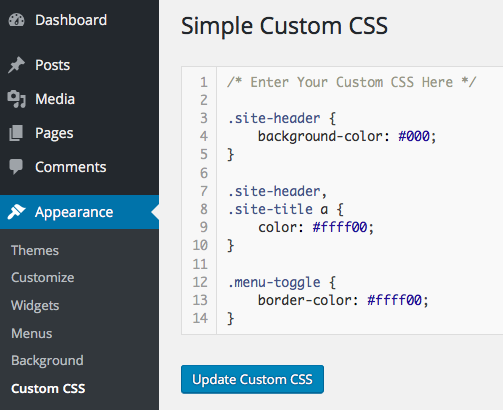
Credit: themetry.com
Best Practices
Custom CSS in WordPress lets users change website design without altering core files. It provides flexibility to adjust colors, fonts, and layouts. This tool enhances site personalization while maintaining functionality and performance.
Keeping Styles Organized
Organized styles help in easy maintenance. Use comments to explain code. Group related styles together. This makes it easier to find code. Indentation is important for clarity. Keep your CSS clean and tidy. Name classes meaningfully. This helps in understanding the code’s purpose. Avoid long CSS files. Break them into smaller sections if needed.
Testing Across Devices
Test your CSS on different devices. Ensure it looks good on phones, tablets, and computers. Check different browsers too. Sometimes styles look different. Responsive design is key. Use media queries for this. Adjust styles based on screen size. This improves user experience. Make sure fonts and images scale well.
Common Mistakes To Avoid
Using !important too often can cause trouble. It makes changes hard to control. It overrides other styles, leading to confusion. Styles become tangled and hard to fix. Use !important sparingly. Only when it’s really needed.
Theme updates are crucial for security and new features. Ignoring them can lead to problems. Themes might become outdated. They may not work with new plugins. Compatibility issues might arise. Always update themes regularly. It keeps your website safe and functional.
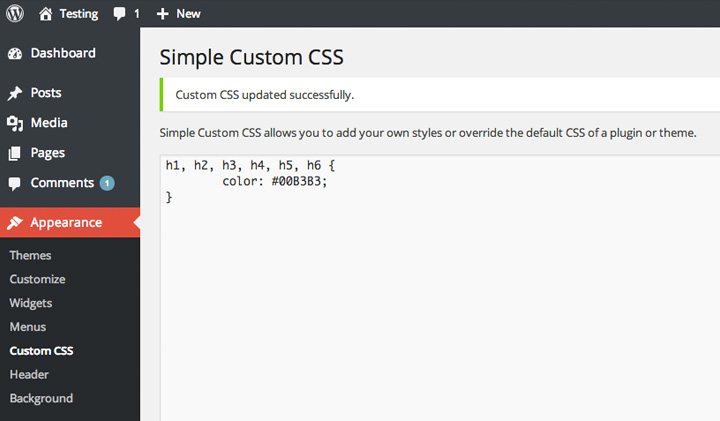
Credit: www.elmastudio.de
Advanced Custom Css Techniques
Responsive design makes websites look good on any device. Custom CSS helps in achieving this. CSS media queries are very useful. They change styles based on screen size. A site can look different on a mobile. It can look different on a desktop. This keeps users happy. It also improves user experience. Flexbox and Grid are CSS tools. They help arrange elements neatly. They are great for responsive layouts. Sites look neat and organized.
CSS animations make web pages lively. They add movement to elements. Transitions make changes smooth. They are used for hover effects. They make buttons and images more interesting. Animations can rotate, scale, or fade elements. This makes pages fun. It’s important to keep animations simple. Too much movement can confuse users. Simple animations keep pages engaging. They attract attention without being overwhelming.
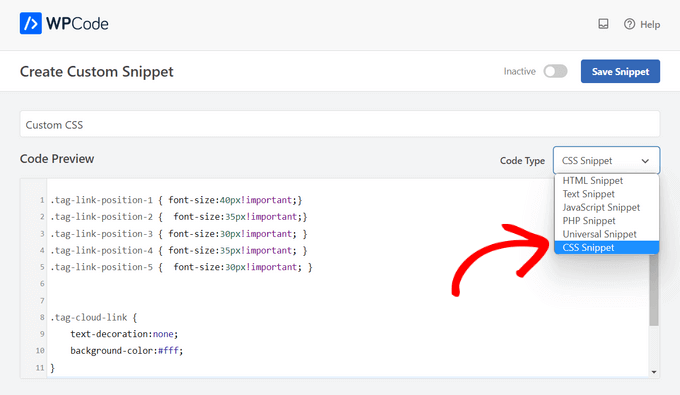
Credit: www.wpbeginner.com
Frequently Asked Questions
What Is Custom Css In WordPress?
Custom CSS in WordPress allows you to modify the appearance of your website. It enables you to add or change styles without altering the theme’s core files. This customization is essential for tailoring your site’s design to match your brand, ensuring a unique and consistent look.
How Do I Add Custom Css In WordPress?
You can add custom CSS through the WordPress Customizer. Navigate to Appearance > Customize > Additional CSS. Here, you can enter your CSS code and see the changes in real-time. This method is user-friendly and doesn’t require editing theme files directly.
Why Use Custom Css In WordPress?
Using custom CSS offers flexibility in design without modifying theme files. It allows you to enhance your site’s appearance and functionality. Custom CSS is crucial for branding and ensuring your website stands out. It’s a straightforward way to implement design changes effectively.
Can Custom Css Affect WordPress Performance?
Excessive or poorly written CSS can slow down your site. It’s essential to write clean and efficient CSS code. Regularly review and optimize your CSS to ensure it doesn’t impact loading times. Well-structured CSS enhances user experience and maintains fast site performance.
Conclusion
Custom CSS in WordPress offers flexibility and control. It allows you to change your site’s appearance with ease. No need for complex coding skills. You can tweak colors, fonts, and layout directly. This enhances your site’s design without altering the core theme.
It’s a straightforward way to personalize your blog. A small change can make a big difference. Experiment with different styles to find what suits you best. Keep your site fresh and engaging for visitors. Custom CSS empowers your creativity, making your WordPress site truly unique.
Explore and enjoy the possibilities today.


