Are you ready to give your WordPress site a unique touch? Styling the header in your WordPress theme can be a game-changer.
It’s the first thing visitors see, and it sets the tone for your entire site. Imagine creating a header that not only looks great but also invites visitors to explore further. In this guide, you’ll discover simple, effective ways to make your header stand out.
Whether you want to add a splash of color, incorporate stunning typography, or include eye-catching images, you’ll learn how to do it with ease. Dive in to transform your website’s first impression and keep your audience hooked from the get-go!
Choosing The Right Header Design
Minimalist headers are clean and simple. They often use few colors and simple fonts. This style makes your website look neat. It is a popular choice for many websites. A minimalist header helps focus on the main content. It is easy to read and understand.
Bold headers stand out with bright colors and big fonts. They grab attention quickly. This style is great for creative websites. It shows a lot of personality. Bold designs make a strong impression on visitors. They are fun and unique.
Some headers fit specific industries. A tech website might use a modern design. A kids’ site could have playful elements. Industry designs match the theme of the site. They make the site feel professional and relevant. These designs help visitors know what to expect.
Customizing Header Layout
A fixed header stays at the top. It does not move when you scroll. This keeps important links visible. A sticky header moves with your scroll. It sticks to the top when you scroll down. Sticky headers are useful for quick navigation. Both styles have their benefits.
Split layouts divide the header in two parts. One part on each side. This is good for balancing design. Centered layouts place content in the middle. This gives a neat look. Choose based on your design needs. Both can look nice and clean.
Headers must adjust to different screens. Responsive design ensures headers look good on phones. Also on tablets and computers. Use flexible layouts for best results. Test headers on various devices. Keep them simple for easy viewing.
Selecting Fonts And Typography
Pick two fonts. One for headers, one for body text. Contrast is key. Use a bold font for headers. Choose a simple font for body text. Mix serif and sans-serif fonts. Play with sizes. Bigger headers, smaller body text. Test different styles. Try italic or bold. Experiment with colors. Dark fonts on light backgrounds. Light fonts on dark backgrounds.
Readability matters. Choose fonts that are easy to read. Avoid fancy fonts. Keep text size between 14px to 18px. Use line spacing. Space between lines helps reading. Make sure colors contrast. Dark text on light background. Use alt text for images. Alt text helps screen readers. Make sure links are clear. Underline links for clarity.
Use web safe fonts. They work on all devices. Popular choices: Arial, Times New Roman, and Verdana. These fonts are reliable. They look good everywhere. Avoid using too many fonts. Stick to one or two. It keeps your site clean. Test fonts on different devices. Ensure they look good on phones and computers.

Credit: developer.wordpress.org
Incorporating Colors And Branding
Use your brand colors to make your header stand out. It helps people know your site. Pick colors that match your logo. This keeps everything looking the same. Too many colors can be confusing. Stick to just two or three.
Colors can make people feel things. Blue is calm and safe. Red is exciting and bold. Choose colors that match your brand’s message. This helps tell your story. It makes visitors feel more connected.
Make sure your text is easy to read. Dark text on a light background is best. Or light text on a dark background. This is called contrast. It helps people read without straining their eyes. Good contrast keeps visitors happy.
Adding Logos And Graphics
Logos should be clear and visible. Place them at the top left or center. These spots are easy to see. Users find logos fast in these places. Choose one that suits your design. Keep it simple and neat.
SVG files are great for logos. They scale without losing quality. PNGs are good too. They show colors well but can lose clarity when resized. Choose SVG for sharp images. Opt for PNG when details are important.
Headers need balance. Too much text can be confusing. Too many images might distract users. Use images to highlight words. Pair text with visuals. Both should complement each other. This makes headers clean and easy to read.
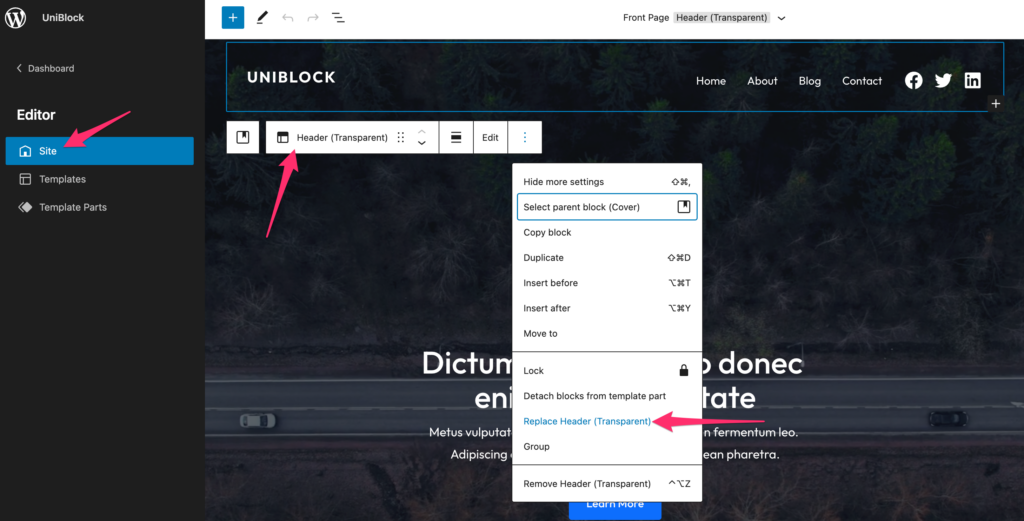
Credit: www.wpzoom.com
Integrating Navigation Menus
Dropdown menus help users find pages easily. They open when you hover over them. Mega menus show more links. They are like small maps of your site. Both types should be easy to use. Keep menu names short. Make sure links are clear and helpful.
Mobile navigation must be easy to use. Keep menus simple. Use icons that everyone knows. Buttons should be big enough to tap. Test on different devices. Ensure everything works well.
Active links show users where they are. These links should look different. Use colors or underline styles. This helps users know their place. It makes browsing easy. Users feel more in control.
Enhancing With Widgets And Plugins
Adding social media icons makes a header lively. Users can find your profiles easily. Place icons in the header’s corner. This keeps the design clean. Use plugins for easy installation. Match icon style with the theme. Choose simple designs for easy recognition.
A search bar helps users find content fast. Place it in the header for quick access. Make sure it blends with the theme’s style. Many plugins add search bars. Pick one that suits your needs. Test its function before going live.
Call-to-action buttons grab attention. They prompt users to act. Use them for special offers or sign-ups. Place them where users see first. Choose bright colors to stand out. Ensure the button text is clear. Test buttons for mobile friendliness.
Utilizing Css For Advanced Styling
Custom CSS can change your header look. You can set the font size. You can change the color. You can adjust the margins. These tweaks make your site unique. Use simple code to achieve this. Tools like the WordPress Customizer help. Inspect and edit your styles easily. These techniques enhance your site’s appearance.
Animations add fun to your header. They make things move smoothly. Transitions allow changes over time. They can fade or slide elements. This makes your site look lively. Use CSS properties like transition or animation. These effects keep users engaged.
Hover effects change elements when you point at them. Text can change color. Images can zoom in. Buttons can change size. These effects make your site interactive. CSS makes it easy. Just add :hover to your styles. Visitors will enjoy exploring your site.
Testing And Optimization
Customizing the header in a WordPress theme enhances user experience. Experiment with different colors, fonts, and layouts to find a style that suits your brand. Regular testing ensures the header remains visually appealing and functional across devices.
Cross-browser Compatibility
Each browser shows websites a bit differently. Some styles might not work everywhere. Test your header on popular browsers like Chrome, Firefox, and Safari. This way, users see the same design no matter what they use. Fix issues early to keep your header looking good.
Loading Speed Considerations
Fast websites make users happy. Large images or heavy code can slow down your site. Use tools to check the loading speed of your header. Reduce image sizes and use clean code. This makes your header load quickly.
User Feedback And Iteration
Listen to users and what they say about your header. They might find things you missed. Ask them for ideas or problems they see. Use this feedback to make your header better. Keep improving until users love it.
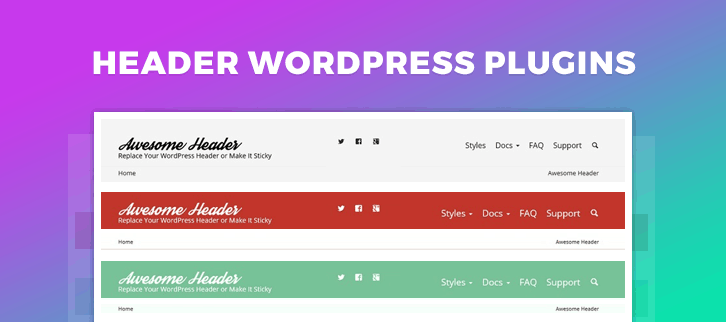
Credit: www.formget.com
Frequently Asked Questions
How Do I Change My Header Logo?
To change your header logo, go to the WordPress dashboard. Navigate to “Appearance” and select “Customize. ” Look for the “Header” section and upload your new logo. Save changes to update your site instantly.
Can I Customize Header Fonts In WordPress?
Yes, you can customize header fonts using the “Customize” option in your WordPress dashboard. Navigate to “Typography” under “Customize,” choose your preferred font, and save changes. Some themes might offer advanced font options for more customization.
How Can I Make My Header Mobile-friendly?
Ensure your header is responsive by using a mobile-friendly WordPress theme. Check the “Customize” section for responsive settings. Use media queries in CSS to adjust header elements specifically for mobile devices.
What Plugins Help With Header Customization?
Plugins like “Elementor” and “Beaver Builder” offer easy header customization options. They provide drag-and-drop features for designing headers. Explore their settings to customize your header layout, fonts, and colors.
Conclusion
Customizing your WordPress header can enhance your site’s look. It’s easy and rewarding. Use the WordPress customizer for quick changes. Experiment with colors and fonts. Keep the design clean and simple. It should match your site’s theme and purpose. A well-styled header improves user experience.
It makes navigation straightforward. Your site appears professional and inviting. Take small steps to see big results. Enjoy the process of making your site unique. Remember, practice makes perfect. Keep exploring and learning. Soon, you’ll style headers like a pro.
Happy styling!